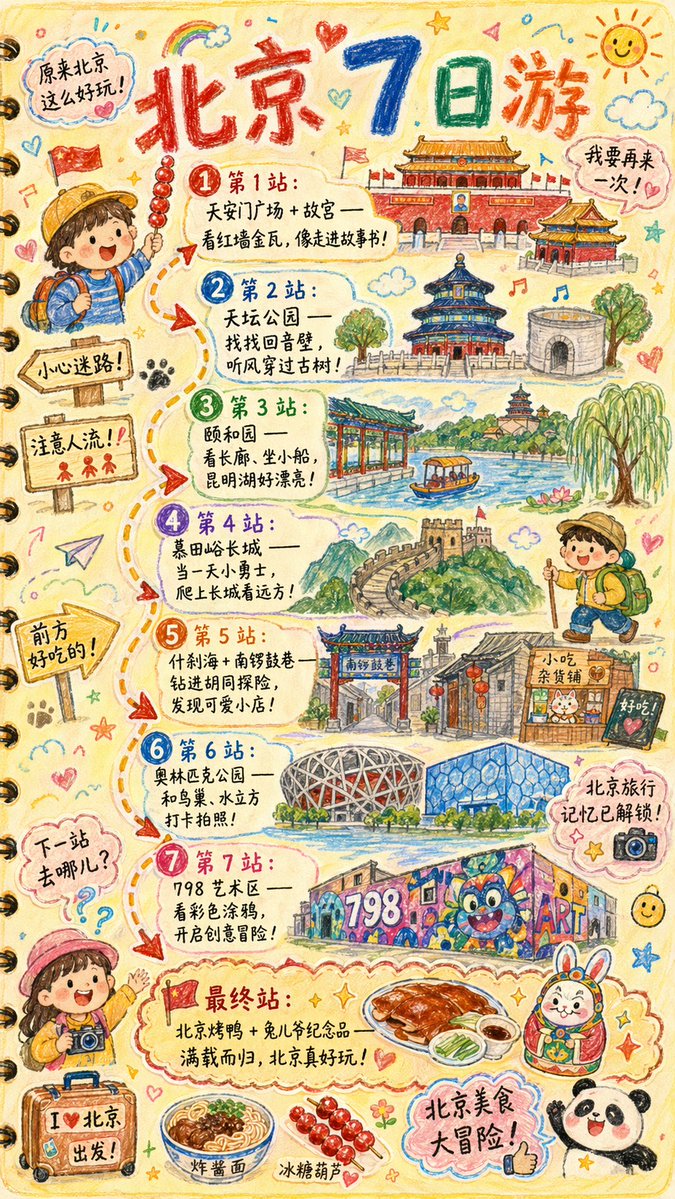
Hand-drawn Travel Journal Illustration
A detailed prompt for creating a child-like, hand-drawn travel journal illustration with customizable city names, landmarks, and routes.
This is a GPT Image 2 prompt case for Graphic & Poster. Use the copy-ready prompt below to generate similar visuals, and review Awesome GPT Image 2 Prompts attribution plus commercial-use rights before reuse.
Free 1K preview
Generate one preview image instantly, no sign-up required.
Prompt
Copy-ready prompt
Please draw a brightly colored, vertical (9:16) hand-drawn style "{argument name="city name" default="Beijing"} Travel Journal Illustration." The style should look as if it were created with crayons by a curious child. Use a soft and warm light-colored background (such as light yellow), paired with bright tones like red, blue, and green, to create a cozy, child-like, and travel-inspired atmosphere.

I. Main Image: Journal-style Travel Route

Draw a "winding travel route" in the center of the illustration, connecting multiple locations with arrows and dashed lines. Recommended attractions will be automatically generated based on a {argument name="number of days" default="1"}-day itinerary:

Example format (automatically replaced with {argument name="city name" default="Beijing"} related content):

- "Stop 1: {Attraction 1 recommendation + short fun description}"
- "Stop 2: {Attraction 2 recommendation + short fun description}"
- "Stop 3: {Attraction 3 recommendation + short fun description}"
- ...
- "Final Stop: {Local signature food/souvenir + warm closing statement}"

> The number of travel stops is automatically generated based on the number of days. If no days are input, a 1-day/highlights route will be generated by default.

II. Fun Surrounding Elements (Automatically replaced based on the city)

Add plenty of child-like elements around the route, such as:

- Cute travel characters: "A child holding local snacks," "An adventurous kid wearing a backpack," etc.
- Child-like Q-version hand-drawings of local landmarks: such as "{landmark 1}," "{landmark 2}," "{landmark 3}."
- Fun signboards: "Watch out for getting lost!", "Mind the crowds!", "Good food ahead!" (Adjusted according to city context).
- Sticker-style slogans: "{argument name="city name" default="Beijing"} Travel Memories Unlocked!", "{argument name="city name" default="Beijing"} Food Adventure!", "Where to next?"
- Cute small icons of local delicacies: such as "{food 1}," "{food 2}," "{food 3}."
- Exclamations (maintaining a child-like tone): "{argument name="city name" default="Beijing"} is so much fun!", "I want to go again!"

III. Overall Style Requirements

- Hand-drawn crayon style / children's travel log style
- Bright colors, full but warm composition
- Emphasis on the joy and exploration of travel
- All text uses cute handwritten fonts
- Make the entire image look like a travel journal page full of child-like wonder.
Prompt variables
Editable argument placeholders found in the prompt, with their default values.
Best for
- - Graphic & Poster visual exploration
- - Image generation and reference-image edits
- - Reusable briefs that keep source attribution visible
Change these parts
- - Subject, product, character, or scene
- - Aspect ratio, camera, lighting, and background
- - Brand, text, color, and output constraints
Recommended model and settings
- - Model: gpt-image-2
- - Input mode: Text to Image
- - Aspect ratio: source
- - Commercial status: review original source
How to use this prompt
- 1. Copy the prompt and preserve its structure for the first test.
- 2. Replace the subject, context, and publishing channel.
- 3. Change one camera, lighting, or style variable per iteration.
- 4. Inspect the output, source, text, and rights before reuse.
Limitations, source, and reuse cautions
- - Generated output is an editable draft, not factual, legal, or rights evidence.
- - Review the linked source, people, brands, logos, text, and third-party media before commercial use.
More cases in this category
Prioritized by category, input mode compatibility, quality, and lower risk.




Reuse and source notes
Use this prompt safely after previewing the case.
- 1.Copy the prompt or open it directly in Dovoo with the generation button.
- 2.Adjust variables, aspect ratio, and reference images for your own use case.
- 3.Before publishing or paid usage, verify source rights, attribution requirements, and brand or likeness risks.
Can I use this prompt commercially?
Commercial-use status is allowed. Review the original source, license, brand constraints, and legal requirements before paid usage.
Where does this case come from?
This case is imported from Awesome GPT Image 2 Prompts; keep attribution visible and check the source URL before reuse.