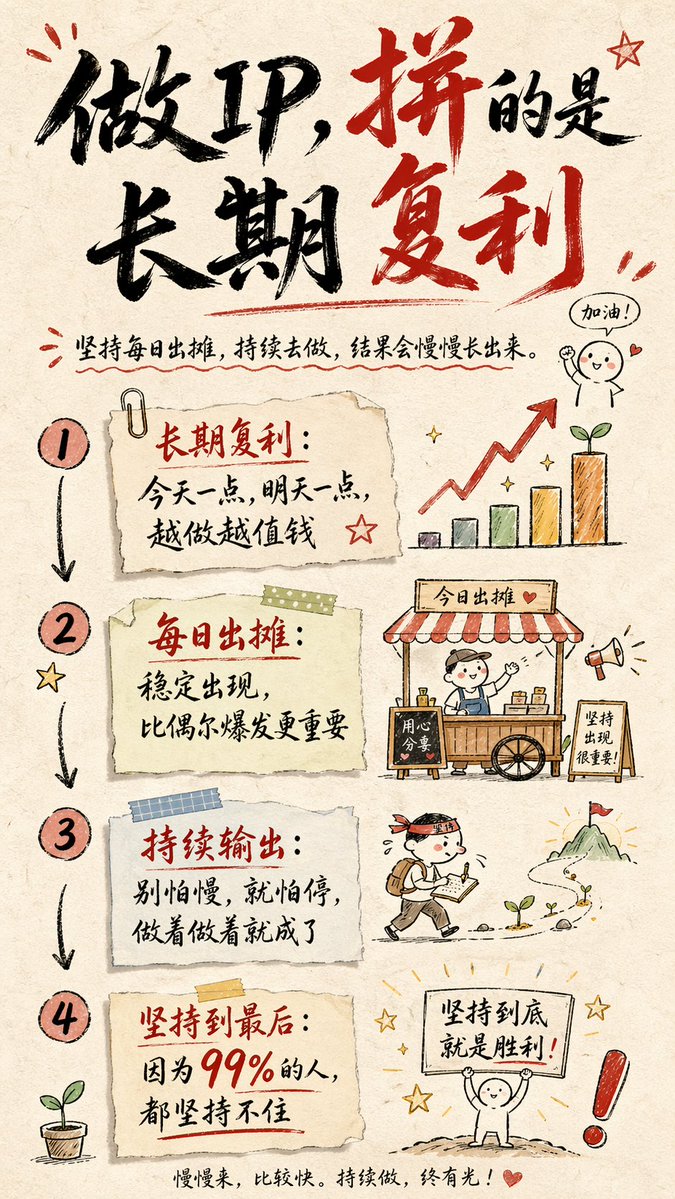
Hand-drawn Infographic Card Prompt
A prompt for creating an artistic infographic card in a 9:16 aspect ratio with a hand-drawn style and paper texture.
This is a GPT Image 2 prompt case for Graphic & Poster. Use the copy-ready prompt below to generate similar visuals, and review Awesome GPT Image 2 Prompts attribution plus commercial-use rights before reuse.
Free 1K preview
Generate one preview image instantly, no sign-up required.
Prompt
Copy-ready prompt
Create a hand-drawn style infographic card with a 9:16 vertical aspect ratio. The card has a clear theme and the background is beige or off-white with a paper texture. The overall design reflects a simple and friendly hand-drawn aesthetic.

The top of the card features a large brush cursive font in alternating red and black with sharp contrast to highlight the title and attract visual focus. The text content is all in Chinese cursive, and the overall layout is divided into 2 to 4 clear sections, each using short, concise Chinese phrases to express core points. The font maintains the smooth rhythm of cursive, being both legible and artistic.

The card is dotted with simple, fun hand-drawn illustrations or icons, such as characters or symbolic signs, to enhance visual appeal and trigger thought and resonance in the reader. The overall layout pays attention to visual balance, reserving enough white space to ensure the image is concise, clear, and easy to read and understand.

The theme is: "{argument name="theme content" default="Building an IP is long-term compound interest. Keep setting up your stall every day, keep doing it, and there will definitely be results, because 99% of people can't stick to it."}"
Prompt variables
Editable argument placeholders found in the prompt, with their default values.
Best for
- - Graphic & Poster visual exploration
- - Image generation and reference-image edits
- - Reusable briefs that keep source attribution visible
Change these parts
- - Subject, product, character, or scene
- - Aspect ratio, camera, lighting, and background
- - Brand, text, color, and output constraints
Recommended model and settings
- - Model: gpt-image-2
- - Input mode: Text to Image
- - Aspect ratio: source
- - Commercial status: review original source
How to use this prompt
- 1. Copy the prompt and preserve its structure for the first test.
- 2. Replace the subject, context, and publishing channel.
- 3. Change one camera, lighting, or style variable per iteration.
- 4. Inspect the output, source, text, and rights before reuse.
Limitations, source, and reuse cautions
- - Generated output is an editable draft, not factual, legal, or rights evidence.
- - Review the linked source, people, brands, logos, text, and third-party media before commercial use.
More cases in this category
Prioritized by category, input mode compatibility, quality, and lower risk.





Reuse and source notes
Use this prompt safely after previewing the case.
- 1.Copy the prompt or open it directly in Dovoo with the generation button.
- 2.Adjust variables, aspect ratio, and reference images for your own use case.
- 3.Before publishing or paid usage, verify source rights, attribution requirements, and brand or likeness risks.
Can I use this prompt commercially?
Commercial-use status is allowed. Review the original source, license, brand constraints, and legal requirements before paid usage.
Where does this case come from?
This case is imported from Awesome GPT Image 2 Prompts; keep attribution visible and check the source URL before reuse.