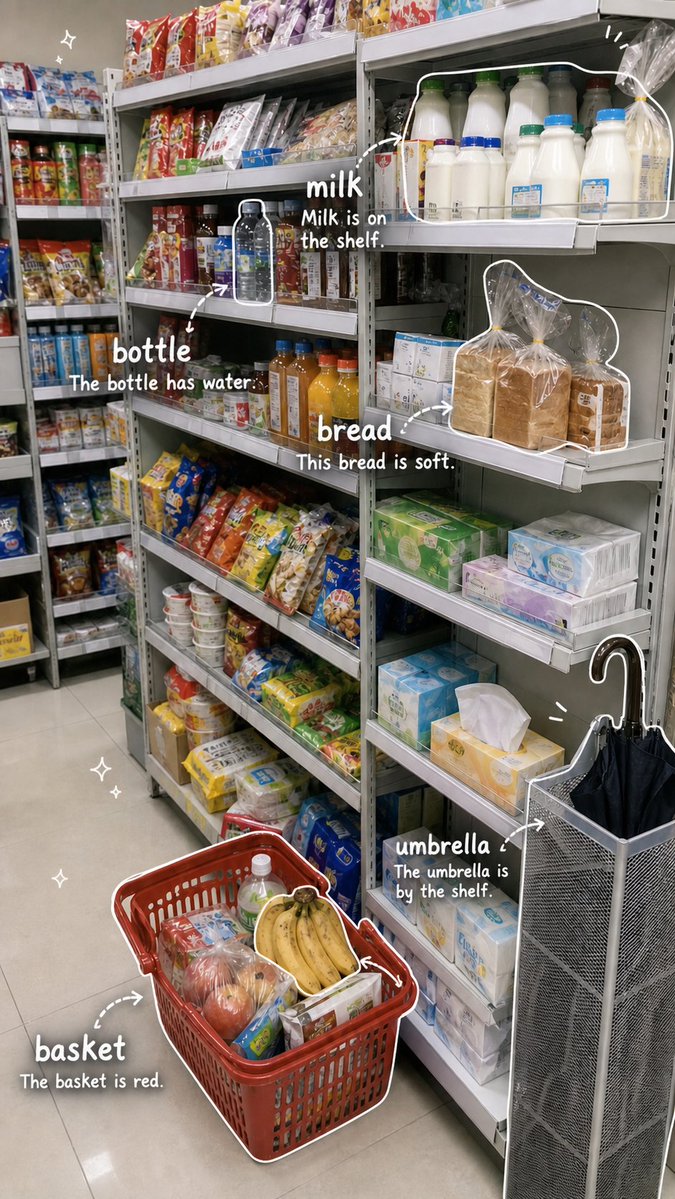
Grocery Vocabulary Notebook Photo
Generates a vertical convenience-store photo overlaid with handwritten English vocabulary labels, arrows, outlines and example sentences for language learning.
This is a GPT Image 2 prompt case for Illustration & Art. Use the copy-ready prompt below to generate similar visuals, and review Awesome GPT Image 2 Prompts attribution plus commercial-use rights before reuse.
Free 1K preview
Generate one preview image instantly, no sign-up required.
Prompt
Copy-ready prompt
{
  "type": "vertical photo-based English vocabulary notebook page",
  "source_scene": "a realistic convenience store or small supermarket aisle photographed from eye level, with tall metal shelves filled with snacks, drinks, milk, bread, tissues and household items; a red shopping basket on the floor in the foreground containing fruit and groceries; an umbrella stand on the right holding a black umbrella",
  "style": "keep the base image photorealistic, then add cute hand-drawn study-notebook annotations in white, like casual marker writing on top of the photo; use rounded handwritten English lettering, white doodle outlines, arrows, sparkles and soft drop shadows for readability",
  "aspect_ratio": "9:16 vertical smartphone image",
  "layout": {
    "annotated_vocabulary_count": 5,
    "vocabulary_items": [
      {
        "word": "{argument name=\"first vocabulary word\" default=\"milk\"}",
        "example_sentence": "{argument name=\"first example sentence\" default=\"Milk is on the shelf.\"}",
        "target": "milk bottles on the upper right shelf",
        "annotation": "white rounded outline around a group of milk bottles, arrow pointing from the word to the bottles, placed near upper center-right"
      },
      {
        "word": "bottle",
        "example_sentence": "The bottle has water.",
        "target": "a single dark water bottle on the middle shelf",
        "annotation": "small white outline around the bottle, curved arrow and label placed mid-left"
      },
      {
        "word": "bread",
        "example_sentence": "This bread is soft.",
        "target": "plastic-wrapped loaves of bread on the right middle shelf",
        "annotation": "large white outline around several bread loaves, arrow and label placed center-right"
      },
      {
        "word": "umbrella",
        "example_sentence": "The umbrella is by the shelf.",
        "target": "black umbrella in a gray metal umbrella stand at lower right",
        "annotation": "white outline following the umbrella and stand, arrow and label placed lower right"
      },
      {
        "word": "basket",
        "example_sentence": "The basket is red.",
        "target": "red shopping basket on the floor in the foreground",
        "annotation": "white outline around the basket, dotted curved arrow and label placed lower left"
      }
    ]
  },
  "visual_details": {
    "doodles": "small white sparkle doodles in empty areas such as upper left and lower left; short emphasis strokes near the top right and umbrella",
    "text_treatment": "large lowercase vocabulary words, smaller sentence underneath each word, all in white handwritten font with subtle shadow",
    "composition": "busy grocery shelves form the background, annotations remain readable and placed near the corresponding objects without covering too much of the products",
    "lighting": "bright indoor fluorescent store lighting, natural candid snapshot feel",
    "language_learning_goal": "turn an everyday photo into a fun visual English vocabulary study diary page"
  }
}
Prompt variables
Editable argument placeholders found in the prompt, with their default values.
Best for
- - Illustration & Art visual exploration
- - Image generation and reference-image edits
- - Reusable briefs that keep source attribution visible
Change these parts
- - Subject, product, character, or scene
- - Aspect ratio, camera, lighting, and background
- - Brand, text, color, and output constraints
Recommended model and settings
- - Model: gpt-image-2
- - Input mode: Text to Image
- - Aspect ratio: source
- - Commercial status: review original source
How to use this prompt
- 1. Copy the prompt and preserve its structure for the first test.
- 2. Replace the subject, context, and publishing channel.
- 3. Change one camera, lighting, or style variable per iteration.
- 4. Inspect the output, source, text, and rights before reuse.
Limitations, source, and reuse cautions
- - Generated output is an editable draft, not factual, legal, or rights evidence.
- - Review the linked source, people, brands, logos, text, and third-party media before commercial use.
More cases in this category
Prioritized by category, input mode compatibility, quality, and lower risk.


Reuse and source notes
Use this prompt safely after previewing the case.
- 1.Copy the prompt or open it directly in Dovoo with the generation button.
- 2.Adjust variables, aspect ratio, and reference images for your own use case.
- 3.Before publishing or paid usage, verify source rights, attribution requirements, and brand or likeness risks.
Can I use this prompt commercially?
Commercial-use status is allowed. Review the original source, license, brand constraints, and legal requirements before paid usage.
Where does this case come from?
This case is imported from Awesome GPT Image 2 Prompts; keep attribution visible and check the source URL before reuse.