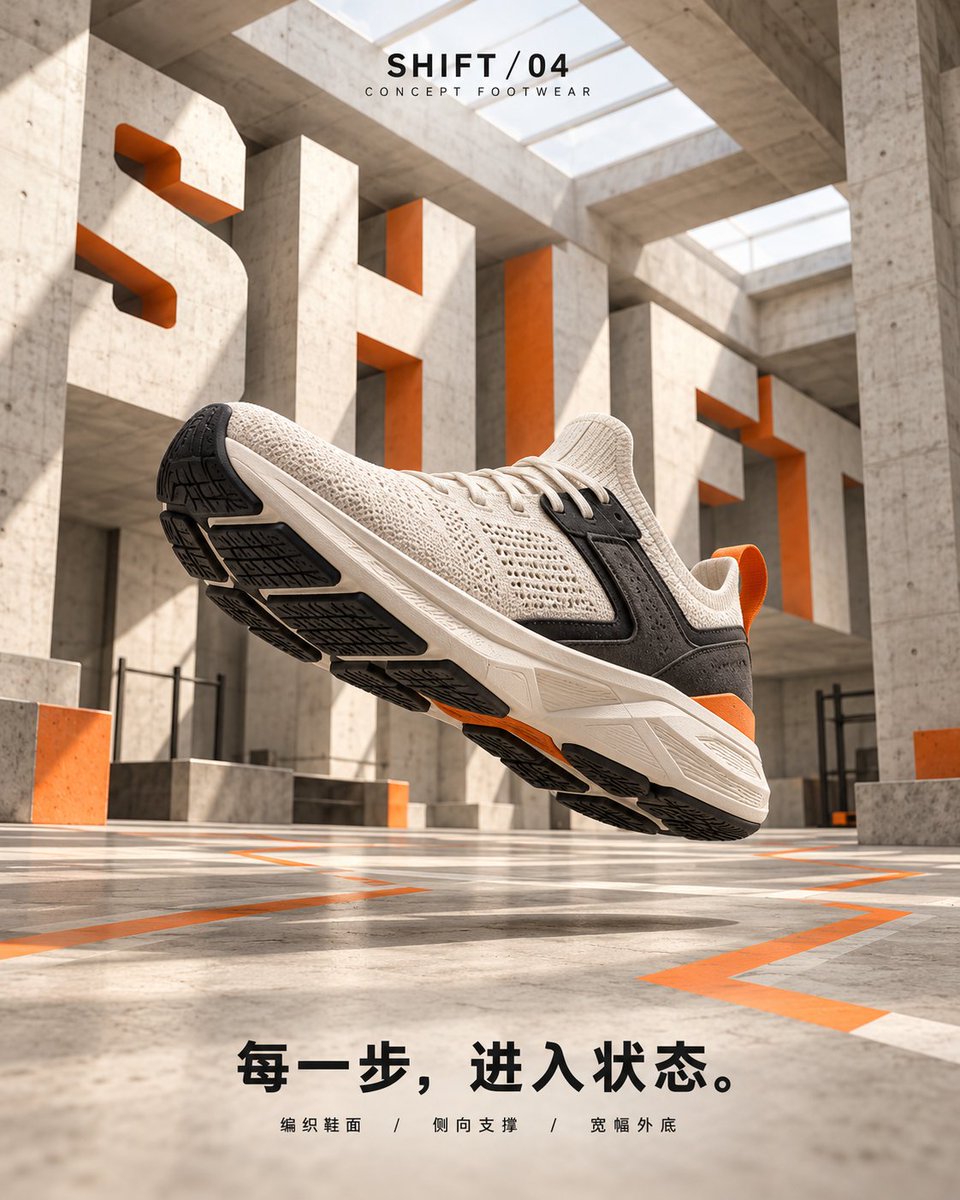
GPT-2 Sneaker Ad Poster Prompt
A prompt for generating modern sneaker advertising posters with specific scene-based performance visuals and typography integration using GPT Image 2.
This is a GPT Image 2 prompt case for Product & Commercial. Use the copy-ready prompt below to generate similar visuals, and review Awesome GPT Image 2 Prompts attribution plus commercial-use rights before reuse.
Free 1K preview
Generate one preview image instantly, no sign-up required.
Free text preview doesn’t preserve reference-image consistency.
Prompt
Copy-ready prompt
Create a modern sneaker promotional poster featuring a [shoe type] with [shoe appearance] as the main foreground visual. Use a fixed visual system of warm white, graphite black, and burning orange. Realistic commercial product photography with clear details of fabric, foam, rubber, and unified lighting. The shoe is complete and occupies about half of the frame; the scene serves the shoe's purpose.

Execute corresponding scenes based on [shoe type]:
Road Running Shoes: Early morning city elevated track, low-angle three-quarter view, toe pointing upper right; ground lines converge into the distance, combined with moderate motion blur to express propulsion.
Trail Shoes: Rock layers, forest slopes, and cold gray sky, wide angle close to the ground side-front; deep-toothed sole crosses gravel, kicking up a little dust, burning orange path climbs along the slope.
City Training Shoes: Warm white concrete training space, skylights and side light, low-angle upward shot, toe pointing upper left; short orange folded lines around the sole to express turning and stable support.

Integrate large [English action words] into the selected environment: Road models become perspective-thick track components; Trail models are embedded in cut rock layers; Training models fold along walls, columns, and floors. The font uses warm white front faces and burning orange cuts, with realistic occlusion, thickness, and shadows, maintaining recognizability.

Place [Product Name] and "CONCEPT FOOTWEAR" at the top; place [Slogan] and [Structure Labels] at the bottom. Small text should be concise and clear, using modern sans-serif fonts, ensuring hierarchy between product, spatial title, and auxiliary information.

Output only one independent poster each time. Avoid real brand logos, people, fictional performance numbers, irrelevant text, shoe deformities, plastic textures, and excessive decoration.
Best for
- - Product & Commercial visual exploration
- - Image generation and reference-image edits
- - Reusable briefs that keep source attribution visible
Change these parts
- - Subject, product, character, or scene
- - Aspect ratio, camera, lighting, and background
- - Brand, text, color, and output constraints
Recommended model and settings
- - Model: gpt-image-2
- - Input mode: Image to Image
- - Aspect ratio: source
- - Commercial status: review original source
How to use this prompt
- 1. Copy the prompt and preserve its structure for the first test.
- 2. Replace the subject, context, and publishing channel.
- 3. Change one camera, lighting, or style variable per iteration.
- 4. Inspect the output, source, text, and rights before reuse.
Limitations, source, and reuse cautions
- - Generated output is an editable draft, not factual, legal, or rights evidence.
- - Review the linked source, people, brands, logos, text, and third-party media before commercial use.
More cases in this category
Prioritized by category, input mode compatibility, quality, and lower risk.
Reuse and source notes
Use this prompt safely after previewing the case.
- 1.Copy the prompt or open it directly in Dovoo with the generation button.
- 2.Adjust variables, aspect ratio, and reference images for your own use case.
- 3.Before publishing or paid usage, verify source rights, attribution requirements, and brand or likeness risks.
Can I use this prompt commercially?
Commercial-use status is allowed. Review the original source, license, brand constraints, and legal requirements before paid usage.
Where does this case come from?
This case is imported from Awesome GPT Image 2 Prompts; keep attribution visible and check the source URL before reuse.