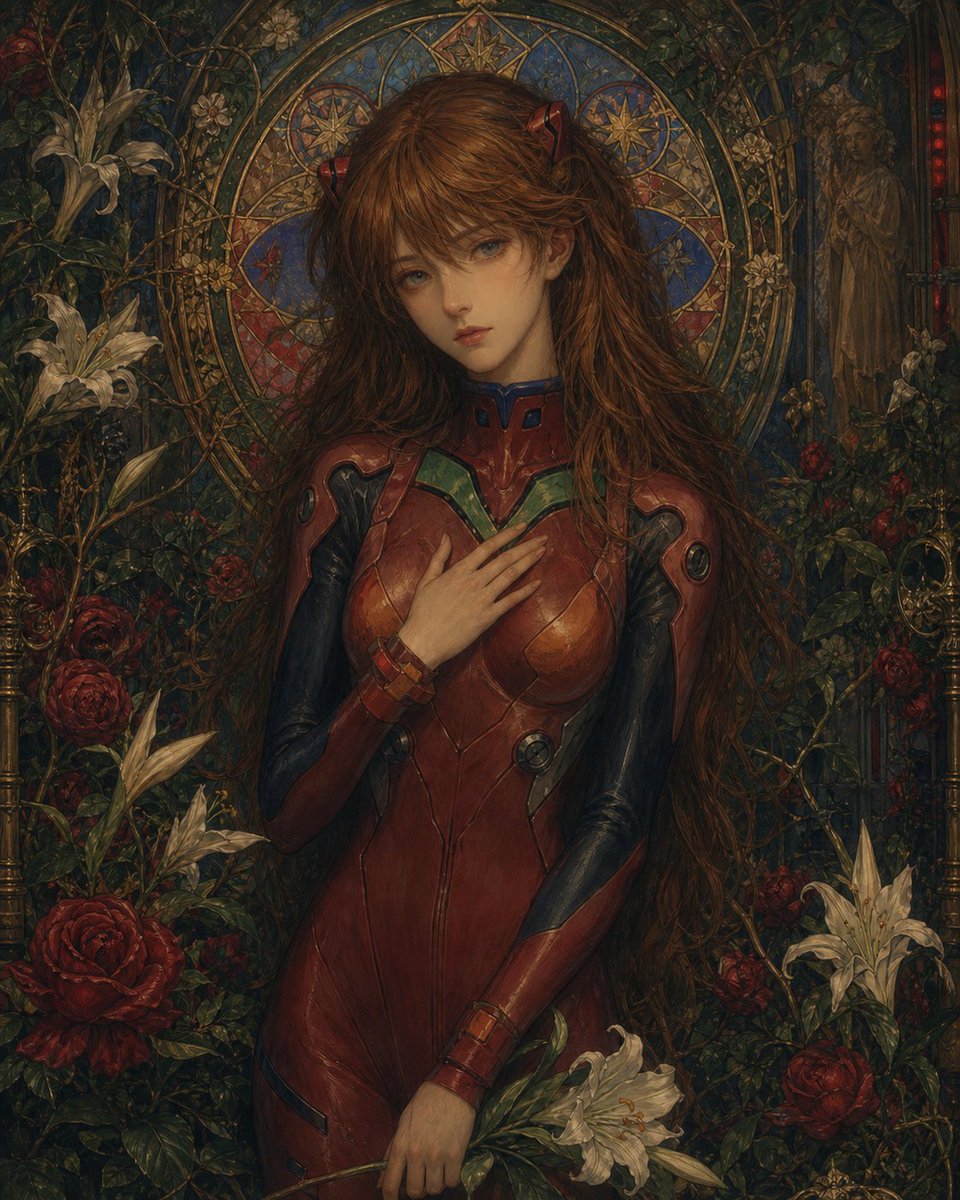
Gothic Stained-Glass Mecha Portrait
This generates a dark, painterly anime-inspired saintlike portrait in a red sci-fi suit, ideal for dramatic character art and ornate poster-style illustrations.
This is a GPT Image 2 prompt case for Portrait & Character. Use the copy-ready prompt below to generate similar visuals, and review Awesome GPT Image 2 Prompts attribution plus commercial-use rights before reuse.
Free 1K preview
Generate one preview image instantly, no sign-up required.
Prompt
Copy-ready prompt
A dark, ornate, Pre-Raphaelite-inspired portrait of {argument name="character name" default="a red-haired anime heroine"} standing front-facing in a dense cathedral garden, wearing a glossy red futuristic plug suit with black and dark blue paneling and small green chest accents. She has very long, slightly tousled auburn hair with two subtle red hair clips near the crown, pale skin, and a solemn, devotional pose: one hand resting over her chest and the other loosely holding a small bouquet of white lilies downward. Behind her head is a large circular stained-glass halo with intricate gold tracery, blue and ruby jewel tones, and star motifs, creating the effect of a saint icon. The background is packed with climbing vines, deep crimson roses, blooming white lilies, antique brass candleholders, and a faint statue-like female figure recessed on the right side. The composition is centered, symmetrical, and waist-to-thigh portrait framing, with rich oil-painting texture, moody chiaroscuro lighting, aged varnish tones, high detail, gothic floral decoration, sacred-art atmosphere, and an elegant fusion of anime mecha design and medieval religious iconography.Prompt variables
Editable argument placeholders found in the prompt, with their default values.
Best for
- - Portrait & Character visual exploration
- - Image generation and reference-image edits
- - Reusable briefs that keep source attribution visible
Change these parts
- - Subject, product, character, or scene
- - Aspect ratio, camera, lighting, and background
- - Brand, text, color, and output constraints
Recommended model and settings
- - Model: gpt-image-2
- - Input mode: Text to Image
- - Aspect ratio: source
- - Commercial status: review original source
How to use this prompt
- 1. Copy the prompt and preserve its structure for the first test.
- 2. Replace the subject, context, and publishing channel.
- 3. Change one camera, lighting, or style variable per iteration.
- 4. Inspect the output, source, text, and rights before reuse.
Limitations, source, and reuse cautions
- - Generated output is an editable draft, not factual, legal, or rights evidence.
- - Review the linked source, people, brands, logos, text, and third-party media before commercial use.
More cases in this category
Prioritized by category, input mode compatibility, quality, and lower risk.





Reuse and source notes
Use this prompt safely after previewing the case.
- 1.Copy the prompt or open it directly in Dovoo with the generation button.
- 2.Adjust variables, aspect ratio, and reference images for your own use case.
- 3.Before publishing or paid usage, verify source rights, attribution requirements, and brand or likeness risks.
Can I use this prompt commercially?
Commercial-use status is allowed. Review the original source, license, brand constraints, and legal requirements before paid usage.
Where does this case come from?
This case is imported from Awesome GPT Image 2 Prompts; keep attribution visible and check the source URL before reuse.