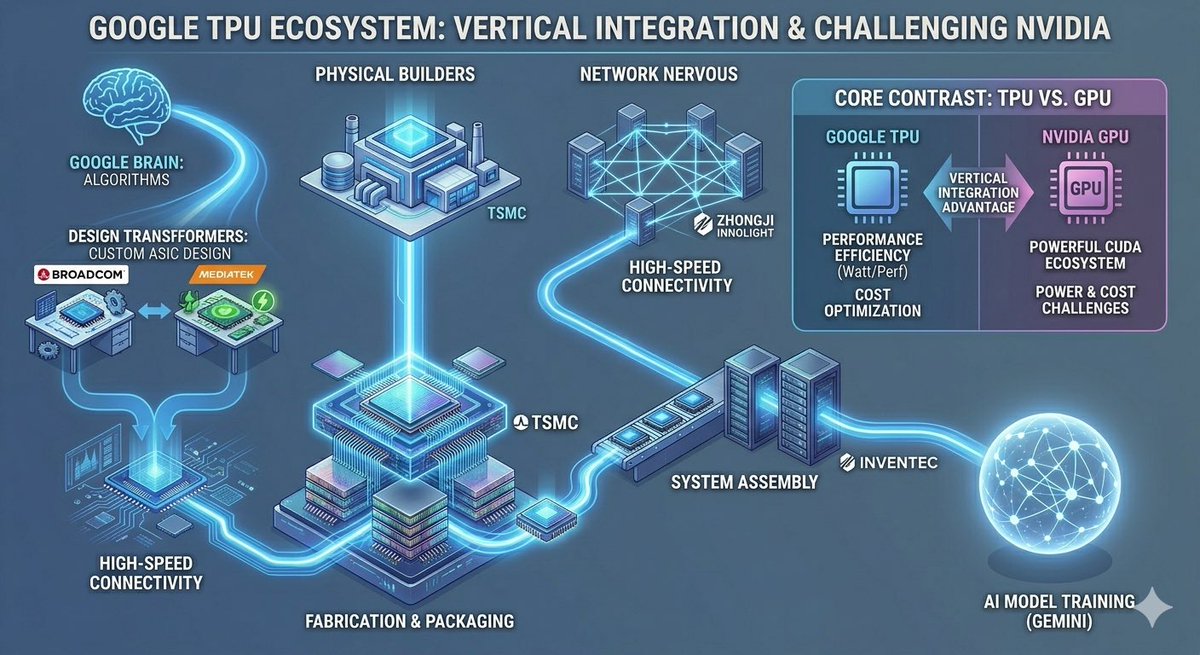
Google TPU Ecosystem Infographic
Generates a wide neon-blue technology infographic mapping the Google TPU supply chain and comparing TPU advantages against Nvidia GPUs for investor or industry analysis.
This is a GPT Image 2 prompt case for Graphic & Poster. Use the copy-ready prompt below to generate similar visuals, and review Awesome GPT Image 2 Prompts attribution plus commercial-use rights before reuse.
Free 1K preview
Generate one preview image instantly, no sign-up required.
Prompt
Copy-ready prompt
{
  "type": "wide futuristic tech industry infographic",
  "title": "{argument name=\"headline text\" default=\"GOOGLE TPU ECOSYSTEM: VERTICAL INTEGRATION & CHALLENGING NVIDIA\"}",
  "style": "dark blue isometric vector infographic, glowing cyan circuit pathways, neon highlights, 3D chip and data-center icons, clean corporate technology presentation, high contrast white uppercase labels with subtle drop shadows, 16:9 landscape",
  "layout": {
    "background": "blue-gray gradient with faint circuitry, all nodes connected by luminous cyan data-flow lines",
    "main_flow": "a left-to-right ecosystem map showing Google's TPU supply chain from algorithms and ASIC design through fabrication, networking, system assembly, and AI model training",
    "discrete_labeled_sections_count": 8,
    "sections": [
      {
        "title": "GOOGLE BRAIN: ALGORITHMS",
        "position": "upper left",
        "visual": "glowing outline brain icon feeding a cyan stream into the ecosystem"
      },
      {
        "title": "DESIGN TRANSFORMERS: CUSTOM ASIC DESIGN",
        "position": "left center",
        "count": 2,
        "labels": [
          "BROADCOM",
          "MEDIATEK"
        ],
        "visual": "two small chip-design workstation tables connected by arrows, Broadcom on the left and MediaTek on the right"
      },
      {
        "title": "HIGH-SPEED CONNECTIVITY",
        "position": "lower left",
        "visual": "circuit-board routing and glowing data links feeding into the central TPU package"
      },
      {
        "title": "PHYSICAL BUILDERS",
        "position": "top center",
        "count": 1,
        "labels": [
          "TSMC"
        ],
        "visual": "isometric semiconductor factory with a bright blue roof core, connected vertically to the central chip"
      },
      {
        "title": "FABRICATION & PACKAGING",
        "position": "bottom center",
        "count": 1,
        "labels": [
          "TSMC"
        ],
        "visual": "large central stacked TPU chip package on a circuit substrate, glowing cyan processor die, multilayer packaging blocks"
      },
      {
        "title": "NETWORK NERVOUS",
        "position": "upper center-right",
        "count": 1,
        "labels": [
          "ZHONGJI INNOLIGHT"
        ],
        "visual": "cluster of server towers connected by a luminous mesh network, data stream flowing downward"
      },
      {
        "title": "SYSTEM ASSEMBLY",
        "position": "right center",
        "count": 1,
        "labels": [
          "INVENTEC"
        ],
        "visual": "rack servers and a long assembly module connected to the main TPU flow"
      },
      {
        "title": "AI MODEL TRAINING (GEMINI)",
        "position": "lower right",
        "visual": "large glowing wireframe sphere with connected nodes representing AI training output"
      }
    ]
  },
  "comparison_panel": {
    "title": "CORE CONTRAST: TPU VS. GPU",
    "position": "upper right",
    "panel_style": "rounded rectangle card split vertically, cyan Google TPU side on left and purple Nvidia GPU side on right",
    "columns_count": 2,
    "columns": [
      {
        "heading": "GOOGLE TPU",
        "icon": "cyan processor icon",
        "points_count": 3,
        "points": [
          "PERFORMANCE EFFICIENCY (Watt/Perf)",
          "COST OPTIMIZATION",
          "VERTICAL INTEGRATION ADVANTAGE"
        ]
      },
      {
        "heading": "NVIDIA GPU",
        "icon": "purple chip icon labeled GPU",
        "points_count": 3,
        "points": [
          "POWERFUL CUDA ECOSYSTEM",
          "POWER & COST CHALLENGES",
          "VERTICAL INTEGRATION ADVANTAGE shown as a central arrow contrast marker"
        ]
      }
    ]
  },
  "visual_elements": {
    "company_labels_count": 5,
    "company_labels": [
      "BROADCOM",
      "MEDIATEK",
      "TSMC",
      "ZHONGJI INNOLIGHT",
      "INVENTEC"
    ],
    "major_icons_count": 9,
    "major_icons": [
      "brain",
      "two ASIC design workstations",
      "semiconductor factory",
      "central packaged TPU chip",
      "network server mesh",
      "assembly rack servers",
      "comparison card",
      "GPU chip",
      "AI training globe"
    ]
  },
  "customization": "Keep all text legible and in English, preserve the exact uppercase labels, use a polished financial research infographic look suitable for explaining the TPU industry chain. Emphasize {argument name=\"highlight theme\" default=\"vertical integration and challenging NVIDIA\"} with bright cyan data paths and a premium technology aesthetic."
}
Prompt variables
Editable argument placeholders found in the prompt, with their default values.
Best for
- - Graphic & Poster visual exploration
- - Image generation and reference-image edits
- - Reusable briefs that keep source attribution visible
Change these parts
- - Subject, product, character, or scene
- - Aspect ratio, camera, lighting, and background
- - Brand, text, color, and output constraints
Recommended model and settings
- - Model: gpt-image-2
- - Input mode: Text to Image
- - Aspect ratio: source
- - Commercial status: review original source
How to use this prompt
- 1. Copy the prompt and preserve its structure for the first test.
- 2. Replace the subject, context, and publishing channel.
- 3. Change one camera, lighting, or style variable per iteration.
- 4. Inspect the output, source, text, and rights before reuse.
Limitations, source, and reuse cautions
- - Generated output is an editable draft, not factual, legal, or rights evidence.
- - Review the linked source, people, brands, logos, text, and third-party media before commercial use.
More cases in this category
Prioritized by category, input mode compatibility, quality, and lower risk.






Reuse and source notes
Use this prompt safely after previewing the case.
- 1.Copy the prompt or open it directly in Dovoo with the generation button.
- 2.Adjust variables, aspect ratio, and reference images for your own use case.
- 3.Before publishing or paid usage, verify source rights, attribution requirements, and brand or likeness risks.
Can I use this prompt commercially?
Commercial-use status is allowed. Review the original source, license, brand constraints, and legal requirements before paid usage.
Where does this case come from?
This case is imported from Awesome GPT Image 2 Prompts; keep attribution visible and check the source URL before reuse.