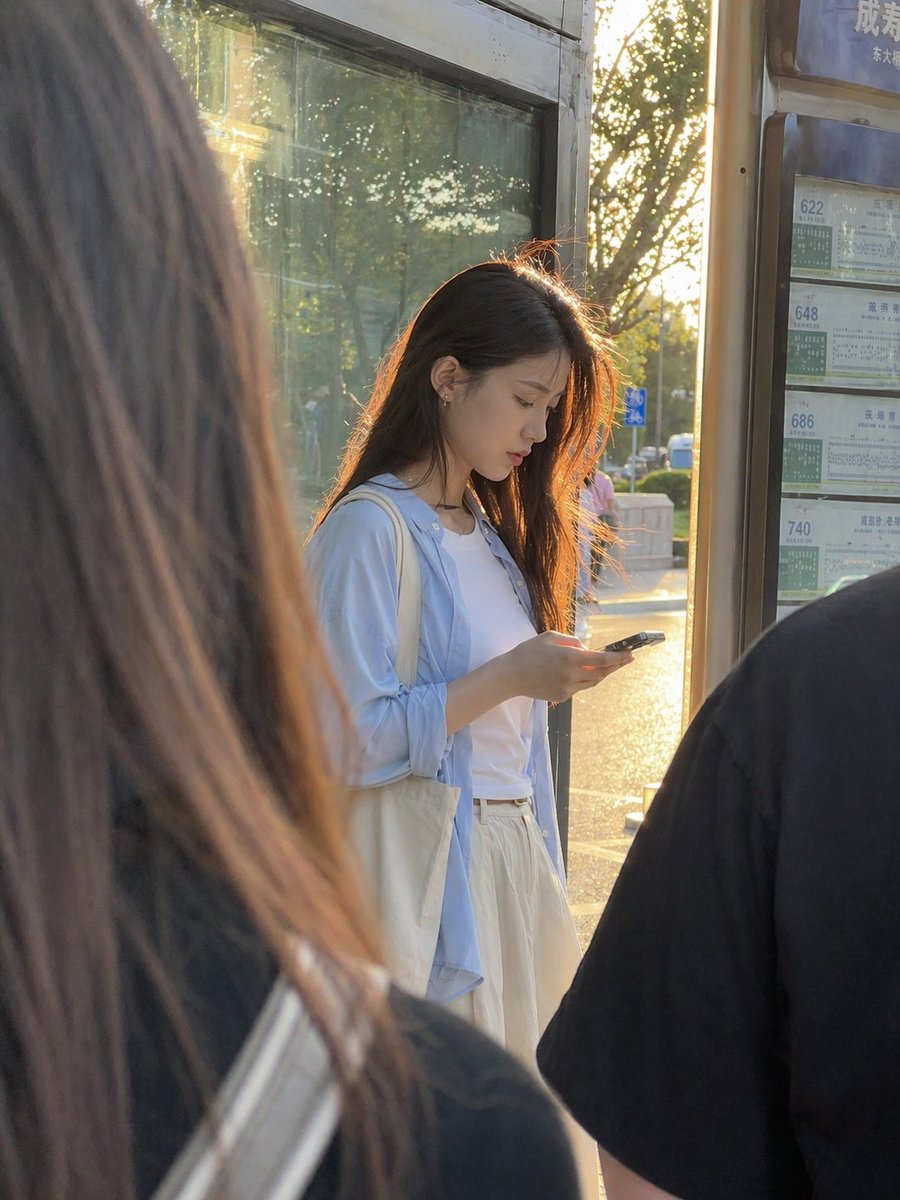
Golden Hour Bus Stop Candid
This prompt generates a realistic candid urban portrait of a young woman at a bus stop, ideal for lifestyle photography and everyday street-scene visuals.
This is a GPT Image 2 prompt case for Portrait & Character. Use the copy-ready prompt below to generate similar visuals, and review Awesome GPT Image 2 Prompts attribution plus commercial-use rights before reuse.
Free 1K preview
Generate one preview image instantly, no sign-up required.
Prompt
Copy-ready prompt
A candid, ultra-realistic street photo of a young East Asian woman standing at a city bus stop during golden hour, viewed from slightly behind other waiting passengers so the composition feels naturally obstructed and documentary-like. She stands near the center-right of the frame, looking down at a smartphone in her hands, with long straight dark brown to black hair glowing with warm backlight from the low sun behind her. She wears a white T-shirt, an oversized pale blue button-up shirt left open, and loose cream or off-white high-waisted pants or a long skirt, with a canvas tote bag over one shoulder. Her posture is relaxed and absorbed in her phone. The scene includes exactly 2 blurred foreground figures framing her: 1 large out-of-focus figure with long hair on the left edge and 1 dark-shirted shoulder and back on the right edge. Behind her is a glass bus shelter panel reflecting trees and sunlight, and on the far right is a vertical bus route board showing exactly 4 route numbers: 622, 648, 686, and 740, with Chinese transit timetable styling. The lighting is warm, soft, and strongly backlit, creating rim light around her hair and a sun-drenched late-afternoon atmosphere. Use a smartphone photo aesthetic, shallow depth of field, natural color, realistic skin and fabric texture, urban everyday life in China, portrait orientation, subtle lens flare, and an unposed slice-of-life mood.
Best for
- - Portrait & Character visual exploration
- - Image generation and reference-image edits
- - Reusable briefs that keep source attribution visible
Change these parts
- - Subject, product, character, or scene
- - Aspect ratio, camera, lighting, and background
- - Brand, text, color, and output constraints
Recommended model and settings
- - Model: gpt-image-2
- - Input mode: Text to Image
- - Aspect ratio: source
- - Commercial status: review original source
How to use this prompt
- 1. Copy the prompt and preserve its structure for the first test.
- 2. Replace the subject, context, and publishing channel.
- 3. Change one camera, lighting, or style variable per iteration.
- 4. Inspect the output, source, text, and rights before reuse.
Limitations, source, and reuse cautions
- - Generated output is an editable draft, not factual, legal, or rights evidence.
- - Review the linked source, people, brands, logos, text, and third-party media before commercial use.
More cases in this category
Prioritized by category, input mode compatibility, quality, and lower risk.



Reuse and source notes
Use this prompt safely after previewing the case.
- 1.Copy the prompt or open it directly in Dovoo with the generation button.
- 2.Adjust variables, aspect ratio, and reference images for your own use case.
- 3.Before publishing or paid usage, verify source rights, attribution requirements, and brand or likeness risks.
Can I use this prompt commercially?
Commercial-use status is allowed. Review the original source, license, brand constraints, and legal requirements before paid usage.
Where does this case come from?
This case is imported from Awesome GPT Image 2 Prompts; keep attribution visible and check the source URL before reuse.