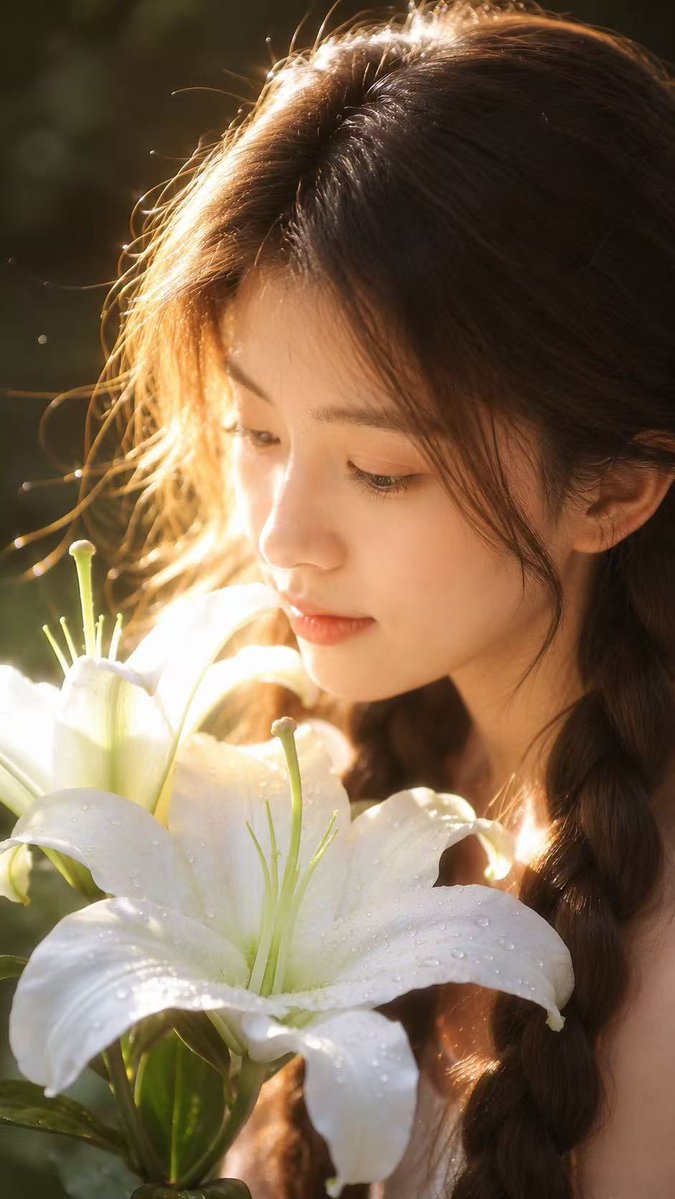
Golden Backlight Lily Portrait
A detailed prompt for creating a romantic and cinematic close-up portrait using a reference photo, featuring golden backlighting and a focus on natural textures.
This is a GPT Image 2 prompt case for 人像角色. Use the copy-ready prompt below to generate similar visuals, and review Awesome GPT Image 2 Prompts attribution plus commercial-use rights before reuse.
Prompt
Copy-ready prompt
请仅将我上传的人像照片作为身份参考。仅保留人物真实的五官、脸型、发型、发色、肤色以及整体气质。生成一张自然光下的超写实特写人像。主体呈侧脸姿态,微微低头看向一朵 {argument name="flower type" default="盛开的白百合"}。花朵位于前景,上面覆盖着清晰的露珠。温暖的金色逆光从侧后方射入,在发丝上形成柔和的轮廓光,带有轻微的镜头光晕和浅景深效果。背景为 {argument name="background color" default="Dark green"} 的自然虚化效果。表情平静、柔和且自然,主体未看向镜头。保持真实的皮肤纹理、清晰的睫毛和细腻的发丝。整体氛围浪漫、纯净、梦幻且具有电影感,如同夏日清晨的照片。竖屏 9:16,高质量写实摄影,无文字,无水印。

请勿改变人物身份。请勿复制参考主体的面部特征。拒绝动漫风格、卡通外观、塑料感皮肤、过度磨皮、虚假面孔、油腻高光、浓妆艳抹、五官扭曲、手部或手指畸形、多余花朵、文字、Logo、水印、低分辨率以及导致重要细节缺失的过度曝光。
Prompt variables
Editable argument placeholders found in the prompt, with their default values.
More cases in this category
Prioritized by category, input mode compatibility, quality, and lower risk.






Reuse and source notes
Use this prompt safely after previewing the case.
- 1.Copy the prompt or open it directly in Dovoo with the generation button.
- 2.Adjust variables, aspect ratio, and reference images for your own use case.
- 3.Before publishing or paid usage, verify source rights, attribution requirements, and brand or likeness risks.
Can I use this prompt commercially?
Commercial-use status is allowed. Review the original source, license, brand constraints, and legal requirements before paid usage.
Where does this case come from?
This case is imported from Awesome GPT Image 2 Prompts; keep attribution visible and check the source URL before reuse.