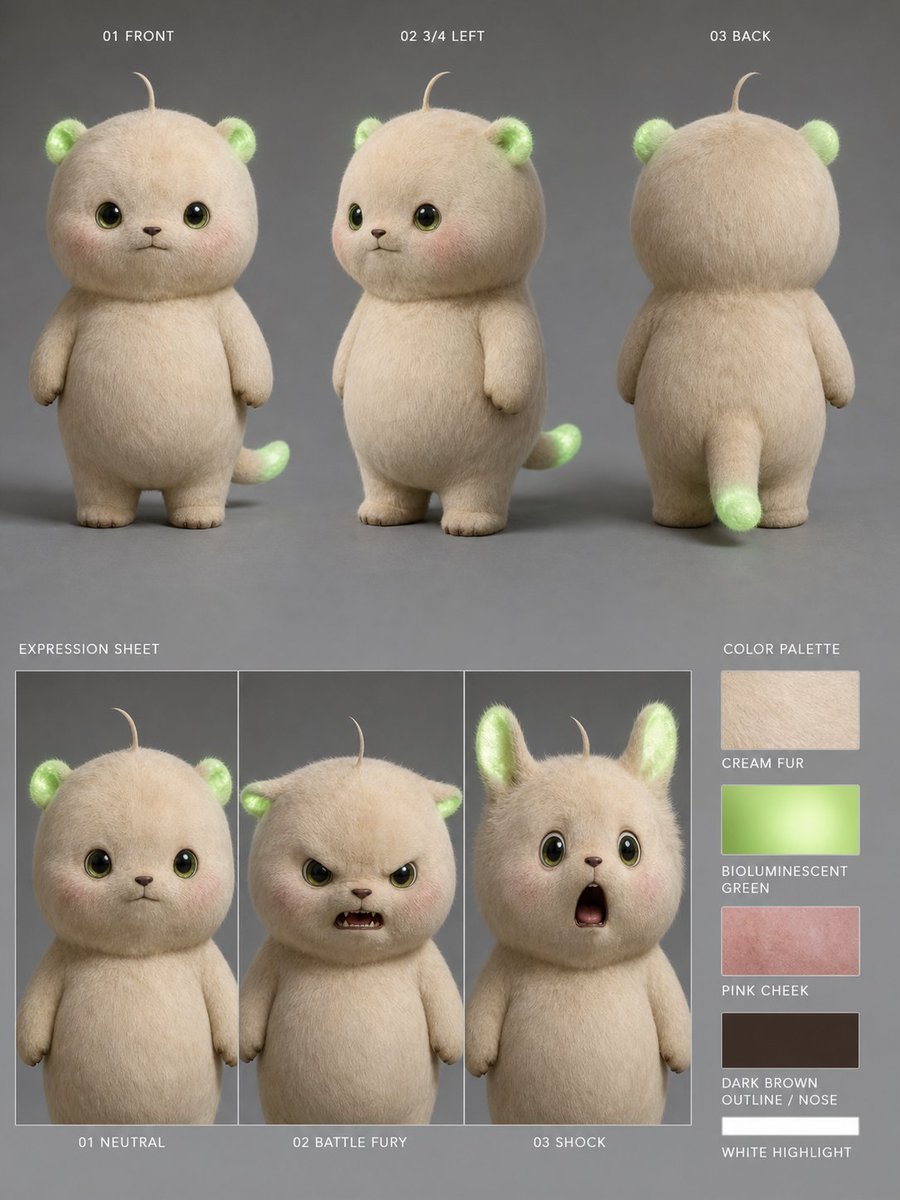
Bioluminescent Plush Creature Sheet
Generates a realistic character turnaround and expression sheet for a cute glowing plush creature used in consistent animation or video workflows.
This is a GPT Image 2 prompt case for 人像角色. Use the copy-ready prompt below to generate similar visuals, and review Awesome GPT Image 2 Prompts attribution plus commercial-use rights before reuse.
Prompt
Copy-ready prompt
目标:为名为 {argument name="character name" default="生物发光奶油森林幼崽"} 的可爱毛绒生物创建逼真的 3D 角色参考图,旨在实现一致的视频生成效果。

画布:垂直 4:5 角色设计图,采用哑光中灰色摄影棚背景,柔和的漫射光,细微的地面阴影,高分辨率照片级毛发渲染。

主体细节:该角色是一个圆滚滚的小型泰迪熊与猫的混合体,拥有圆圆的大脑袋、短圆的身体、细小的手臂、粗短的腿、奶油色浓密的毛绒皮毛、深橄榄棕色的光泽眼睛并带有明亮的高光、小巧的深棕色鼻子和嘴巴、淡淡的粉色脸颊、头顶有一根细细卷曲的毛发、小巧圆润的耳朵内部发出生物发光绿光,以及带有发光绿尖的短尾巴。整体氛围可爱、柔软且具有玩具感,具有逼真的纤维质感和发光绿色区域的柔和半透明感。使用 {argument name="fur color" default="Warm cream color"}、{argument name="glow color" default="生物发光绿色"} 和 {argument name="cheek color" default="柔和粉色腮红"}。

布局:将设计图分为两行。顶行包含 3 个全身三视图,均匀分布并带有小型白色大写字母标签:1) “01 FRONT”展示角色正面,2) “02 3/4 LEFT”展示左侧 3/4 视角,可见背后的尾巴,3) “03 BACK”展示背面视角,包括圆头、背部毛发、小手臂、腿部和发光的尾尖。左下角包含一个表情图,带有 3 个垂直排列的边框面板,上方标注“EXPRESSION SHEET”,下方带有说明文字:1) “01 NEUTRAL”表现平静的正面注视和微闭的小嘴,2) “02 BATTLE FURY”表现面部被居中的不透明米色方块遮挡,3) “03 SHOCK”表现耳朵竖起、瞪大眼睛、嘴巴张开的惊讶表情。右下角包含一个名为“COLOR PALETTE”的调色板列,带有 5 个矩形色块及标签:1) “CREAM FUR”米色毛发质感,2) “BIOLUMINESCENT GREEN”发光绿色渐变,3) “PINK CHEEK”玫瑰粉色质感,4) “DARK BROWN OUTLINE / NOSE”深棕色色块,5) “WHITE HIGHLIGHT”白色色块。

文字风格:小型、简洁的无衬线大写白色标签,采用极简的角色设计图排版,对齐精准且不显突兀。

约束:保持 3 个三视图、3 个表情面板和 5 个色块。不要添加额外的角色、道具、标志、水印或装饰性背景元素。在所有视图中保持一致的比例、毛发质感、发光的耳朵和尾巴以及面部设计。
Prompt variables
Editable argument placeholders found in the prompt, with their default values.
More cases in this category
Prioritized by category, input mode compatibility, quality, and lower risk.

Reuse and source notes
Use this prompt safely after previewing the case.
- 1.Copy the prompt or open it directly in Dovoo with the generation button.
- 2.Adjust variables, aspect ratio, and reference images for your own use case.
- 3.Before publishing or paid usage, verify source rights, attribution requirements, and brand or likeness risks.
Can I use this prompt commercially?
Commercial-use status is allowed. Review the original source, license, brand constraints, and legal requirements before paid usage.
Where does this case come from?
This case is imported from Awesome GPT Image 2 Prompts; keep attribution visible and check the source URL before reuse.