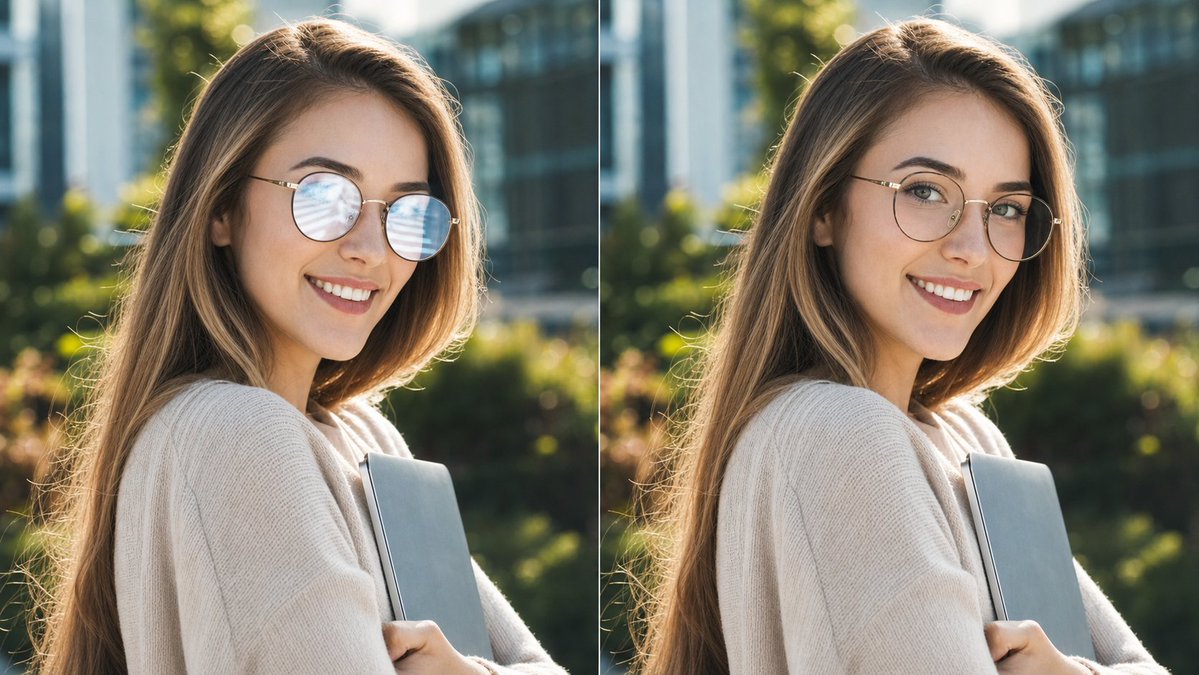
Glasses Glare Removal Comparison
A photorealistic side-by-side portrait comparison showing eyeglass glare before and after removal while preserving the subject and scene.
This is a GPT Image 2 prompt case for 人像角色. Use the copy-ready prompt below to generate similar visuals, and review Awesome GPT Image 2 Prompts attribution plus commercial-use rights before reuse.
This prompt is designed for multiple reference images. We will open Dovoo with the prompt and the available preview image; add the remaining references in Dovoo before generating.
Prompt
Copy-ready prompt
创建一张逼真的并排对比图,展示同一个户外咖啡馆风格的肖像,分为两个垂直面板。画布为 16:9 宽屏。布局:左右两个完全相等的面板,中间由 1 条细垂直白线隔开。每个面板都显示同一位年轻女性的半身像,背景是户外温暖的午后阳光,具有浅景深效果,背景为绿植、现代玻璃建筑和柔和的虚化效果。她留着被阳光照亮的浅棕色/金色长发,穿着舒适的米色针织毛衣,双臂抱着 1 台纤薄的灰色笔记本电脑或笔记本。她的头部略微转向镜头,但整个面部区域被 2 个不透明的矩形色块遮挡(每个面板一个),颜色为暖灰褐色,覆盖范围从前额到下巴。在遮挡的面部两侧可见细圆眼镜框;左侧面板显示眼镜镜片上有明显的淡蓝白色反光,右侧面板则使眼镜更清晰,去除了大部分反光,同时保持相同的脸型、发型、姿势、服装、光照和背景。照片级 DSLR 肖像,自然调色,阳光下的发丝轮廓光,主体清晰,背景虚化,无文字,无标签,无水印。可自定义细节:主体为 {argument name="subject description" default="一位留着浅棕金色长发的年轻女性"},服装为 {argument name="clothing" default="一件米色针织毛衣"},手持物品为 {argument name="held object" default="一台纤薄的灰色笔记本电脑"},遮挡色块颜色为 {argument name="face block color" default="warm grayish brown"},场景为 {argument name="setting" default="带有绿植和现代玻璃建筑的户外咖啡馆庭院"}。Prompt variables
Editable argument placeholders found in the prompt, with their default values.
More cases in this category
Prioritized by category, input mode compatibility, quality, and lower risk.




Reuse and source notes
Use this prompt safely after previewing the case.
- 1.Copy the prompt or open it directly in Dovoo with the generation button.
- 2.Adjust variables, aspect ratio, and reference images for your own use case.
- 3.Before publishing or paid usage, verify source rights, attribution requirements, and brand or likeness risks.
Can I use this prompt commercially?
Commercial-use status is allowed. Review the original source, license, brand constraints, and legal requirements before paid usage.
Where does this case come from?
This case is imported from Awesome GPT Image 2 Prompts; keep attribution visible and check the source URL before reuse.