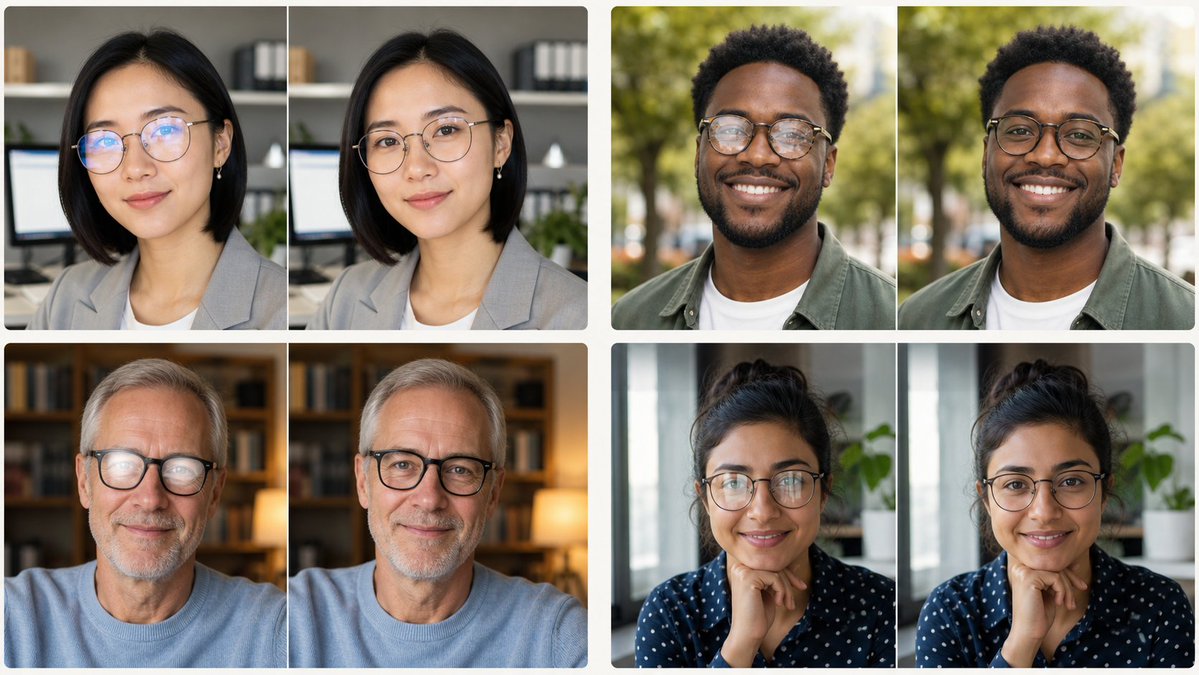
Glasses Glare Removal Portrait Collage
Creates a realistic 2×2 before-and-after portrait collage demonstrating eyeglasses glare removal for profile-photo editing.
This is a GPT Image 2 prompt case for 人像角色. Use the copy-ready prompt below to generate similar visuals, and review Awesome GPT Image 2 Prompts attribution plus commercial-use rights before reuse.
Prompt
Copy-ready prompt
目标:创建一个清晰的对比拼图,展示 4 个眼镜反光去除的人像照片示例。每个示例均以左右对比的形式呈现,并保持人物、姿势、服装、光照和背景的一致性。

画布:宽屏 16:9 图像,尺寸约为 1200×675 像素,白色背景,面板间设有细白色间隙,照片圆角,呈现逼真的头像摄影效果。

布局:将 4 组对比图排列成 2×2 的网格。每组包含 2 张近乎相同的人像照片(左侧和右侧),总计 8 个头像面板。这 4 组分别为:1) 左上:一位身穿灰色西装外套的东亚女性,背景为带有书架和显示器的办公环境;2) 右上:一位在绿色公园户外的年轻黑人男性,身穿橄榄色外套内搭白色 T 恤;3) 左下:一位留着灰发、身穿浅蓝色毛衣的年长白人男性,背景为带有书架和暖色台灯的温馨家庭图书馆;4) 右下:一位扎着深色卷发的女性,身穿海军蓝圆点衬衫,坐在窗边和绿植旁,手托下巴。

主体细节:每组的左侧图像需显示眼部区域轻微的眼镜反光或眩光;右侧图像需去除反光,使眼睛看起来自然清晰,且不得改变面部特征、表情、头部位置、肤色、发型、服装、拍摄角度或背景。使用逼真的浅景深、自然的色彩分级、柔和的专业人像光效,以及胸部或肩部以上的头像构图。

隐私处理:用与主体肤色一致的纯色不透明矩形遮挡块覆盖每张人像的中央面部区域,以隐藏面部特征。共使用 8 个遮挡矩形,每个头像面板一个,居中覆盖从额头到下颌的面部区域。遮挡块应为纯色,不带模糊纹理或文字。

约束条件:无说明文字、无箭头、无 Logo、无水印、无 UI 元素、无额外人物、无装饰性图形。保持对比组对齐且视觉统一,如同用于 {argument name="editing task" default="remove glasses glare"} 的社交媒体演示图。使用 {argument name="image style" default="realistic professional portrait photography"}、{argument name="collage layout" default="four side-by-side before-and-after portrait pairs"}、{argument name="background color" default="white"} 以及 {argument name="privacy treatment" default="solid skin-tone face censor blocks"}。
Prompt variables
Editable argument placeholders found in the prompt, with their default values.
More cases in this category
Prioritized by category, input mode compatibility, quality, and lower risk.




Reuse and source notes
Use this prompt safely after previewing the case.
- 1.Copy the prompt or open it directly in Dovoo with the generation button.
- 2.Adjust variables, aspect ratio, and reference images for your own use case.
- 3.Before publishing or paid usage, verify source rights, attribution requirements, and brand or likeness risks.
Can I use this prompt commercially?
Commercial-use status is allowed. Review the original source, license, brand constraints, and legal requirements before paid usage.
Where does this case come from?
This case is imported from Awesome GPT Image 2 Prompts; keep attribution visible and check the source URL before reuse.