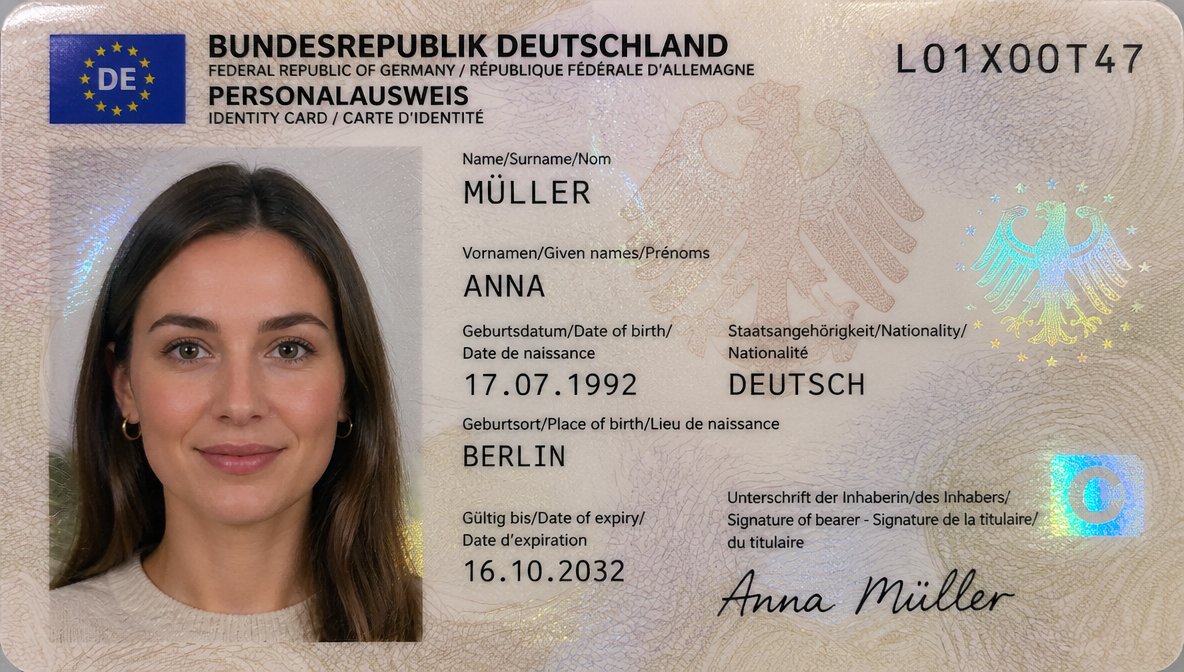
German ID Card Scan Transformation
This prompt turns a photographed German ID card reference into a polished, realistic official document scan with updated personal data and a cleaner passport-photo presentation.
This is a GPT Image 2 prompt case for Product & Commercial. Use the copy-ready prompt below to generate similar visuals, and review Awesome GPT Image 2 Prompts attribution plus commercial-use rights before reuse.
Free 1K preview
Generate one preview image instantly, no sign-up required.
Free text preview doesn’t preserve reference-image consistency.
Prompt
Copy-ready prompt
Using REFERENCE_0, recreate the same German ID card as a clean, realistic flat scan/passport-style document image instead of a photographed card on a dark table. Keep the person, card type, and overall identity-card layout, but remove the tabletop perspective, edge glare, and camera-phone look. Replace the photo area with a properly framed biometric portrait crop showing more of the shoulders and upper chest against a light neutral background, with soft even lighting suitable for an official ID photo. Update the card design to a more modern German ID appearance with a blue EU/DE flag block in the top-left, a cleaner cream security pattern, and holographic security elements including 2 eagle motifs and 1 blue square chip-like mark on the right. Keep the serial number as {argument name="document number" default="L01X00T47"}. Change the personal data to: surname MÜLLER, given name ANNA, date of birth {argument name="date of birth" default="17.07.1992"}, nationality DEUTSCH, place of birth {argument name="place of birth" default="BERLIN"}, expiry date {argument name="expiry date" default="16.10.2032"}, and signature {argument name="signature name" default="Anna Müller"}. Make it look like a high-resolution official ID card scan, sharp typography, realistic print texture, and subtle holographic reflections.Prompt variables
Editable argument placeholders found in the prompt, with their default values.
Best for
- - Product & Commercial visual exploration
- - Image generation and reference-image edits
- - Reusable briefs that keep source attribution visible
Change these parts
- - Subject, product, character, or scene
- - Aspect ratio, camera, lighting, and background
- - Brand, text, color, and output constraints
Recommended model and settings
- - Model: gpt-image-2
- - Input mode: Image to Image
- - Aspect ratio: source
- - Commercial status: review original source
How to use this prompt
- 1. Copy the prompt and preserve its structure for the first test.
- 2. Replace the subject, context, and publishing channel.
- 3. Change one camera, lighting, or style variable per iteration.
- 4. Inspect the output, source, text, and rights before reuse.
Limitations, source, and reuse cautions
- - Generated output is an editable draft, not factual, legal, or rights evidence.
- - Review the linked source, people, brands, logos, text, and third-party media before commercial use.
More cases in this category
Prioritized by category, input mode compatibility, quality, and lower risk.

Reuse and source notes
Use this prompt safely after previewing the case.
- 1.Copy the prompt or open it directly in Dovoo with the generation button.
- 2.Adjust variables, aspect ratio, and reference images for your own use case.
- 3.Before publishing or paid usage, verify source rights, attribution requirements, and brand or likeness risks.
Can I use this prompt commercially?
Commercial-use status is allowed. Review the original source, license, brand constraints, and legal requirements before paid usage.
Where does this case come from?
This case is imported from Awesome GPT Image 2 Prompts; keep attribution visible and check the source URL before reuse.