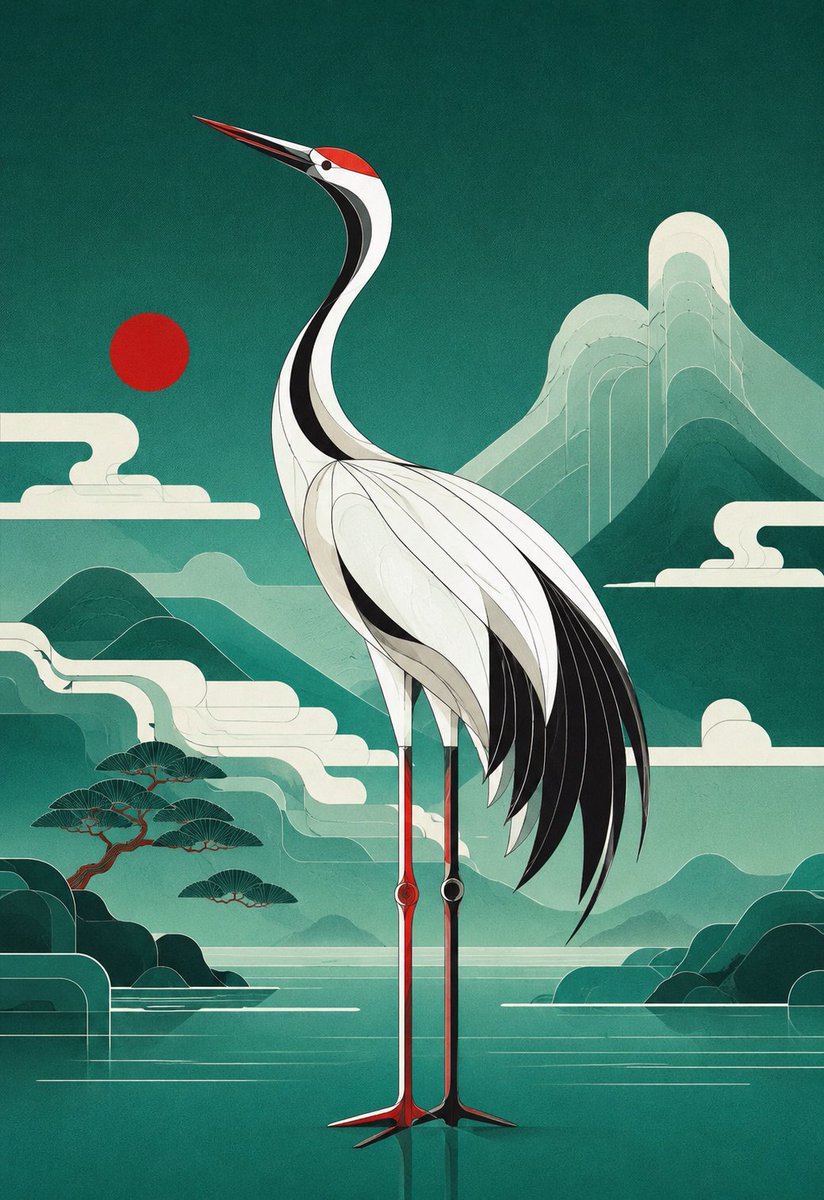
Geometric Red-Crowned Crane Poster
Generates a serene vertical geometric animal poster featuring a red-crowned crane in a blue-green East Asian landscape.
This is a GPT Image 2 prompt case for Graphic & Poster. Use the copy-ready prompt below to generate similar visuals, and review Awesome GPT Image 2 Prompts attribution plus commercial-use rights before reuse.
Free 1K preview
Generate one preview image instantly, no sign-up required.
Prompt
Copy-ready prompt
Create a vertical poster illustration of a {argument name="animal" default="red-crowned crane"} in a refined geometric art style, standing centered in a serene {argument name="landscape theme" default="blue-green East Asian mountain-and-water landscape"}. Use a 2:3 portrait canvas. The crane is full body, tall and elegant, facing left with its long beak angled upward, a red crown patch, white body, black neck stripe, black trailing wing feathers, and very long thin red-and-black legs reflected faintly in still water. Build the bird from clean layered curves, thin contour lines, and Art Deco-like geometric feather panels. The background is teal and jade with misty mountains, a calm lake, stylized rounded clouds, simplified pine trees on the lower left, dark rounded islands on both sides, and one flat red sun disk to the left of the crane’s neck. Include exactly 5 major background motif groups: 1 red sun disk, 1 large layered mountain range in the upper right, 1 smaller mountain-and-mist range across the middle, 1 cluster of stylized pine trees on the lower left, and 2 dark shoreline island masses at the bottom left and bottom right. The visual mood is tranquil, premium, and poster-like, combining Japanese screen-print aesthetics, modern vector geometry, subtle paper grain, muted turquoise gradients, cream highlights, and crisp black accents. No text, no logo, no watermark, no border.Prompt variables
Editable argument placeholders found in the prompt, with their default values.
Best for
- - Graphic & Poster visual exploration
- - Image generation and reference-image edits
- - Reusable briefs that keep source attribution visible
Change these parts
- - Subject, product, character, or scene
- - Aspect ratio, camera, lighting, and background
- - Brand, text, color, and output constraints
Recommended model and settings
- - Model: gpt-image-2
- - Input mode: Text to Image
- - Aspect ratio: source
- - Commercial status: review original source
How to use this prompt
- 1. Copy the prompt and preserve its structure for the first test.
- 2. Replace the subject, context, and publishing channel.
- 3. Change one camera, lighting, or style variable per iteration.
- 4. Inspect the output, source, text, and rights before reuse.
Limitations, source, and reuse cautions
- - Generated output is an editable draft, not factual, legal, or rights evidence.
- - Review the linked source, people, brands, logos, text, and third-party media before commercial use.
More cases in this category
Prioritized by category, input mode compatibility, quality, and lower risk.




Reuse and source notes
Use this prompt safely after previewing the case.
- 1.Copy the prompt or open it directly in Dovoo with the generation button.
- 2.Adjust variables, aspect ratio, and reference images for your own use case.
- 3.Before publishing or paid usage, verify source rights, attribution requirements, and brand or likeness risks.
Can I use this prompt commercially?
Commercial-use status is allowed. Review the original source, license, brand constraints, and legal requirements before paid usage.
Where does this case come from?
This case is imported from Awesome GPT Image 2 Prompts; keep attribution visible and check the source URL before reuse.