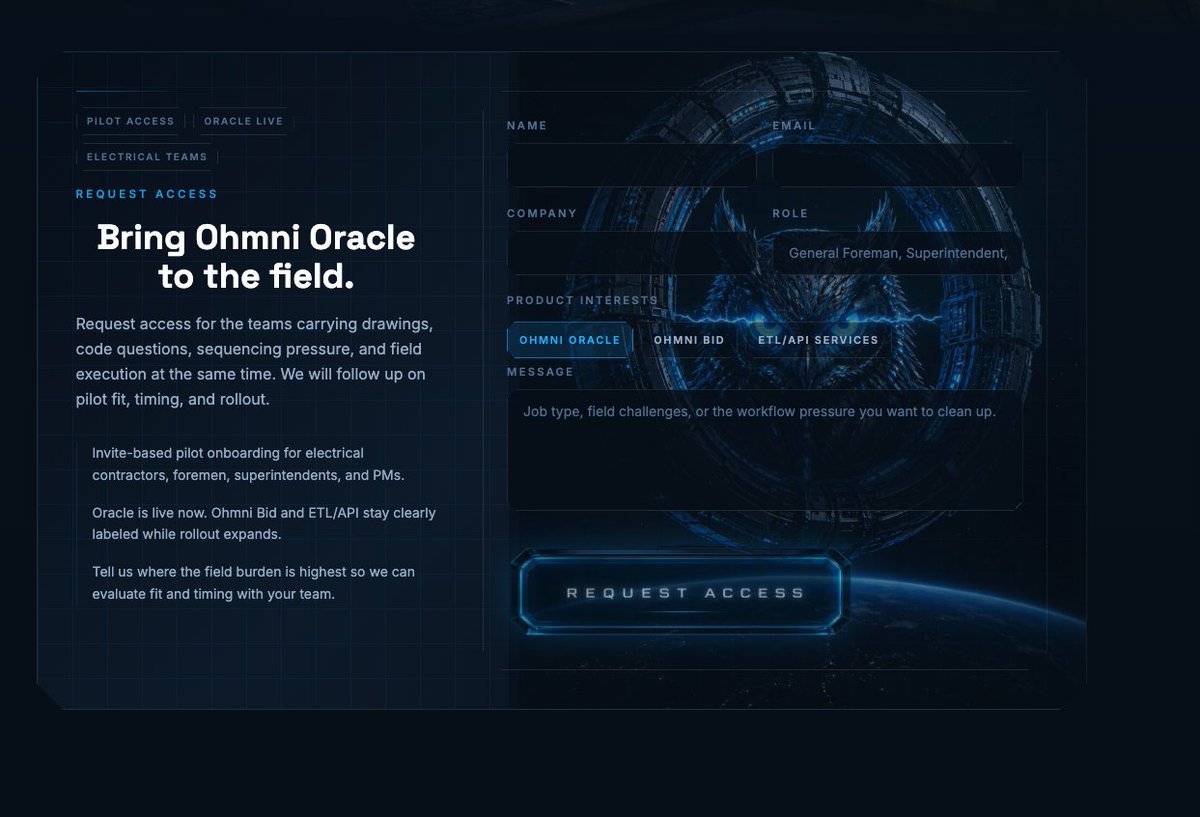
Futuristic Ohmni Access Landing Page
This prompt generates a polished sci-fi website hero mockup for a product access request page, ideal for AI startup branding, landing page concepts, or enterprise SaaS UI presentations.
This is a GPT Image 2 prompt case for Graphic & Poster. Use the copy-ready prompt below to generate similar visuals, and review Awesome GPT Image 2 Prompts attribution plus commercial-use rights before reuse.
Free 1K preview
Generate one preview image instantly, no sign-up required.
Prompt
Copy-ready prompt
{
  "type": "futuristic landing page mockup",
  "style": "high-end sci-fi web homepage, dark navy and black interface, luminous electric-blue accents, cinematic HUD overlay, sleek enterprise tech branding, polished UI design",
  "scene": {
    "background": "deep space-like dark background with subtle blueprint grid lines across the entire canvas, faint interface framing lines, a glowing view of Earth’s curved horizon at the bottom right, and a large circular mechanical portal or ring centered behind the form",
    "center graphic": "inside the ring, a fierce owl face with glowing blue eyes and crackling blue lightning, semi-transparent behind the UI panels"
  },
  "layout": {
    "composition": "two-column website hero section",
    "sections": [
      {
        "title": "left navigation and copy block",
        "position": "left",
        "count": 6,
        "labels": [
          "PILOT ACCESS",
          "ORACLE LIVE",
          "ELECTRICAL TEAMS",
          "REQUEST ACCESS",
          "Bring Ohmni Oracle to the field.",
          "body copy"
        ]
      },
      {
        "title": "form labels",
        "position": "right upper and middle",
        "count": 6,
        "labels": [
          "NAME",
          "EMAIL",
          "COMPANY",
          "ROLE",
          "PRODUCT INTERESTS",
          "MESSAGE"
        ]
      },
      {
        "title": "product interest tabs",
        "position": "right middle",
        "count": 3,
        "labels": [
          "OHMNI ORACLE",
          "OHMNI BID",
          "ETL/API SERVICES"
        ]
      },
      {
        "title": "primary call-to-action",
        "position": "bottom center-right",
        "count": 1,
        "labels": [
          "REQUEST ACCESS"
        ]
      }
    ],
    "left panel": {
      "eyebrow": "REQUEST ACCESS",
      "headline": "Bring {argument name=\"product name\" default=\"Ohmni Oracle\"} to the field.",
      "paragraphs": [
        "Request access for the teams carrying drawings, code questions, sequencing pressure, and field execution at the same time. We will follow up on pilot fit, timing, and rollout.",
        "Invite-based pilot onboarding for electrical contractors, foremen, superintendents, and PMs.",
        "Oracle is live now. Ohmni Bid and ETL/API stay clearly labeled while rollout expands.",
        "Tell us where the field burden is highest so we can evaluate fit and timing with your team."
      ],
      "small nav count": 3
    },
    "right panel": {
      "form": {
        "fields": [
          {
            "label": "NAME",
            "type": "text",
            "value": ""
          },
          {
            "label": "EMAIL",
            "type": "text",
            "value": ""
          },
          {
            "label": "COMPANY",
            "type": "text",
            "value": ""
          },
          {
            "label": "ROLE",
            "type": "text",
            "value": "General Foreman, Superintendent,"
          },
          {
            "label": "PRODUCT INTERESTS",
            "type": "segmented control",
            "options": [
              "OHMNI ORACLE",
              "OHMNI BID",
              "ETL/API SERVICES"
            ],
            "selected": "OHMNI ORACLE"
          },
          {
            "label": "MESSAGE",
            "type": "textarea",
            "value": "Job type, field challenges, or the workflow pressure you want to clean up."
          }
        ],
        "button": "REQUEST ACCESS"
      }
    }
  },
  "visual details": {
    "color palette": [
      "midnight navy",
      "black",
      "electric blue",
      "cyan glow",
      "cool gray-white text"
    ],
    "materials": "glassmorphism panels, translucent dark overlays, neon edge lighting, metallic sci-fi ring structure",
    "typography": "bold modern sans-serif headline, compact uppercase labels with wide letter spacing, clean UI body text",
    "lighting": "low-key dark scene with strong blue neon bloom and subtle reflections",
    "aspect ratio": "16:9"
  }
}
Prompt variables
Editable argument placeholders found in the prompt, with their default values.
Best for
- - Graphic & Poster visual exploration
- - Image generation and reference-image edits
- - Reusable briefs that keep source attribution visible
Change these parts
- - Subject, product, character, or scene
- - Aspect ratio, camera, lighting, and background
- - Brand, text, color, and output constraints
Recommended model and settings
- - Model: gpt-image-2
- - Input mode: Text to Image
- - Aspect ratio: source
- - Commercial status: review original source
How to use this prompt
- 1. Copy the prompt and preserve its structure for the first test.
- 2. Replace the subject, context, and publishing channel.
- 3. Change one camera, lighting, or style variable per iteration.
- 4. Inspect the output, source, text, and rights before reuse.
Limitations, source, and reuse cautions
- - Generated output is an editable draft, not factual, legal, or rights evidence.
- - Review the linked source, people, brands, logos, text, and third-party media before commercial use.
More cases in this category
Prioritized by category, input mode compatibility, quality, and lower risk.






Reuse and source notes
Use this prompt safely after previewing the case.
- 1.Copy the prompt or open it directly in Dovoo with the generation button.
- 2.Adjust variables, aspect ratio, and reference images for your own use case.
- 3.Before publishing or paid usage, verify source rights, attribution requirements, and brand or likeness risks.
Can I use this prompt commercially?
Commercial-use status is allowed. Review the original source, license, brand constraints, and legal requirements before paid usage.
Where does this case come from?
This case is imported from Awesome GPT Image 2 Prompts; keep attribution visible and check the source URL before reuse.