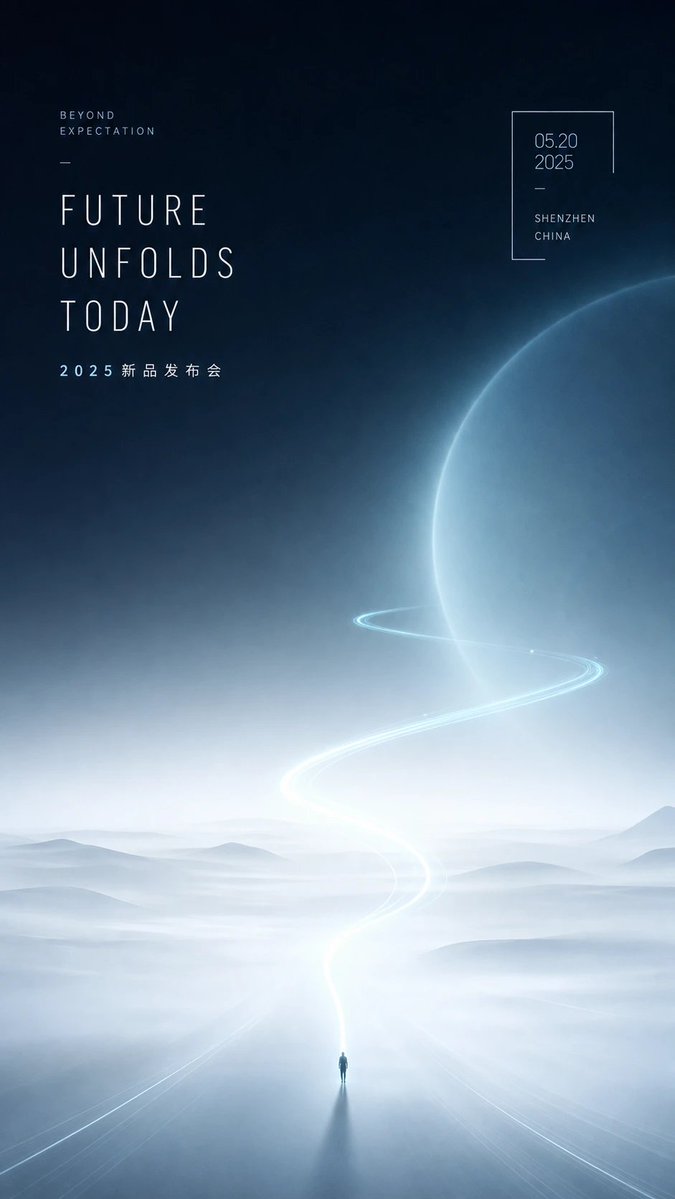
Futuristic Product Launch Poster
A minimal sci-fi event poster featuring a misty landscape, glowing S-curve light trail, giant planet, and elegant launch typography.
This is a GPT Image 2 prompt case for Graphic & Poster. Use the copy-ready prompt below to generate similar visuals, and review Awesome GPT Image 2 Prompts attribution plus commercial-use rights before reuse.
Free 1K preview
Generate one preview image instantly, no sign-up required.
Prompt
Copy-ready prompt
Create a vertical futuristic product-launch poster with a quiet sci-fi aesthetic, generous negative space, curved light, and mist. Canvas: tall 9:16 portrait poster, approximately smartphone wallpaper proportions. Background: deep midnight navy at the top fading into pale icy blue-white fog at the bottom, with soft grain, cinematic haze, and a serene premium technology mood. Main visual: a vast misty landscape of low rolling hills and reflective ground, with one tiny solitary human figure standing at the bottom center, casting a long dark shadow toward the viewer. From the figure, a luminous white-blue road or light trail rises upward in a graceful S-curve, becoming brighter near the horizon, then sweeping around a huge translucent blue planet on the right side. The planet occupies the upper-right half of the image, cropped by the right edge, with a glowing rim and subtle atmospheric texture. Add one thin orbit-like light ring circling the planet, aligned with the S-shaped trail. Typography: use ultra-thin condensed sans-serif uppercase lettering with wide letter spacing, elegant editorial spacing, pale white-blue color. Text elements: exactly 4 text blocks. Block 1 at upper left, small: “BEYOND” on one line and “EXPECTATION” below it, with wide tracking. Block 2 below it, very large stacked headline: {argument name="headline text" default="FUTURE\nUNFOLDS\nTODAY"}. Block 3 under the headline, small spaced event text: {argument name="event subtitle" default="2025 New Product Launch"}. Block 4 at upper right inside a thin incomplete rectangular frame: date {argument name="date" default="05.20\n2025"}, a short divider line, then location {argument name="location" default="SHENZHEN\nCHINA"}. Add two minimal decorative divider lines: one short horizontal line between the small upper-left text and headline, and one short line inside the date frame. Composition: keep the left typography aligned to a clean vertical grid, the right date frame small and airy, and the central landscape mostly empty. Color palette: navy, blue-black, mist white, pale cyan glow. Style: high-end Chinese tech conference poster, futuristic minimalism, ethereal atmosphere, premium launch event design, soft volumetric lighting, no clutter, no logos, no extra text, sharp readable typography.Prompt variables
Editable argument placeholders found in the prompt, with their default values.
Best for
- - Graphic & Poster visual exploration
- - Image generation and reference-image edits
- - Reusable briefs that keep source attribution visible
Change these parts
- - Subject, product, character, or scene
- - Aspect ratio, camera, lighting, and background
- - Brand, text, color, and output constraints
Recommended model and settings
- - Model: gpt-image-2
- - Input mode: Text to Image
- - Aspect ratio: source
- - Commercial status: review original source
How to use this prompt
- 1. Copy the prompt and preserve its structure for the first test.
- 2. Replace the subject, context, and publishing channel.
- 3. Change one camera, lighting, or style variable per iteration.
- 4. Inspect the output, source, text, and rights before reuse.
Limitations, source, and reuse cautions
- - Generated output is an editable draft, not factual, legal, or rights evidence.
- - Review the linked source, people, brands, logos, text, and third-party media before commercial use.
More cases in this category
Prioritized by category, input mode compatibility, quality, and lower risk.

Reuse and source notes
Use this prompt safely after previewing the case.
- 1.Copy the prompt or open it directly in Dovoo with the generation button.
- 2.Adjust variables, aspect ratio, and reference images for your own use case.
- 3.Before publishing or paid usage, verify source rights, attribution requirements, and brand or likeness risks.
Can I use this prompt commercially?
Commercial-use status is allowed. Review the original source, license, brand constraints, and legal requirements before paid usage.
Where does this case come from?
This case is imported from Awesome GPT Image 2 Prompts; keep attribution visible and check the source URL before reuse.