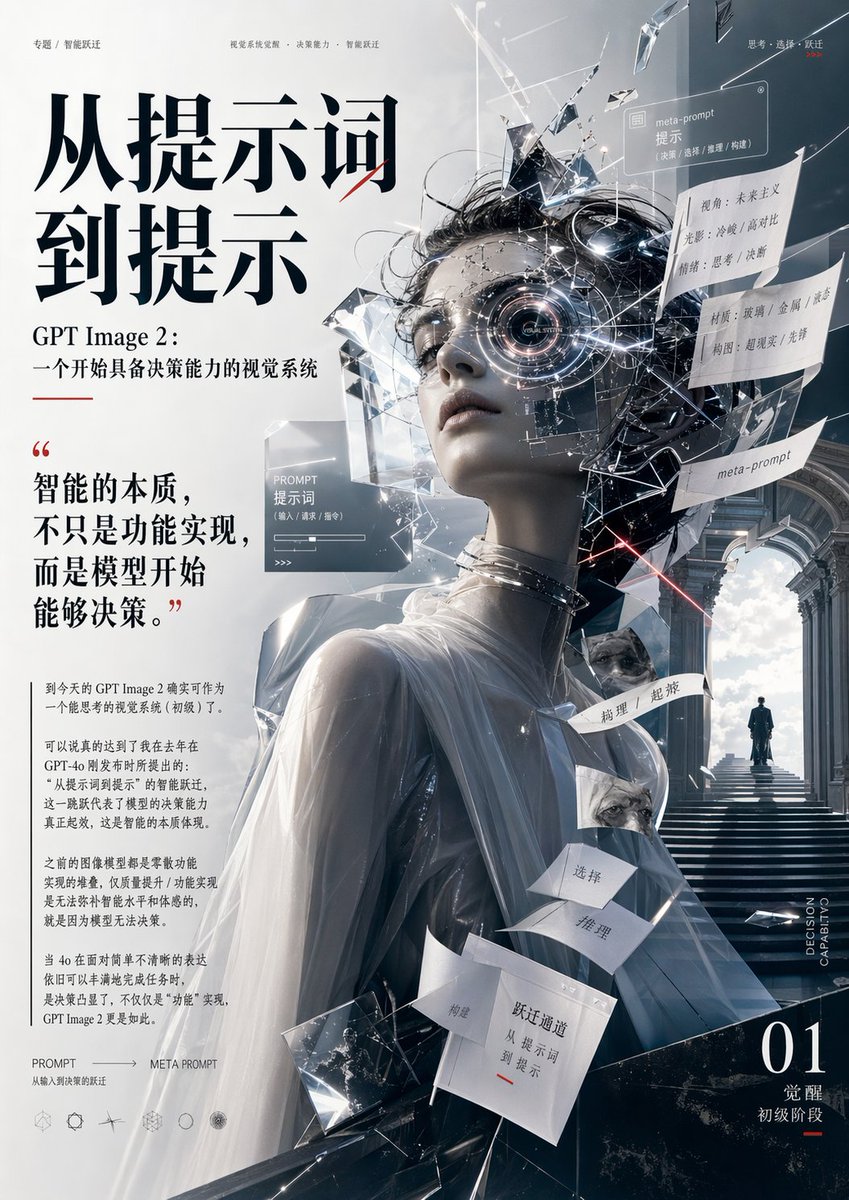
Futuristic AI Editorial Poster
A conceptual Chinese editorial poster showing a fractured classical sculpture and dense typography, ideal for magazine covers or keynote visuals about AI decision-making and meta-prompt design.
This is a GPT Image 2 prompt case for Graphic & Poster. Use the copy-ready prompt below to generate similar visuals, and review Awesome GPT Image 2 Prompts attribution plus commercial-use rights before reuse.
Free 1K preview
Generate one preview image instantly, no sign-up required.
Prompt
Copy-ready prompt
{
  "type": "editorial poster",
  "theme": "AI visual intelligence, from prompt to meta-prompt, decision-making visual system",
  "style": "high-end futuristic Chinese magazine cover mixed with conceptual sci-fi art, minimalist luxury typography, sharp cinematic lighting, crystalline surrealism, white and steel-blue palette with black and subtle red accents",
  "format": "vertical full-page poster",
  "background": {
    "base": "clean white to cool gray gradient",
    "right side": "grand neoclassical stone corridor with arches, stairs, bright cloudy sky at the end, small solitary human figure standing at the top landing"
  },
  "subject": {
    "primary": "surreal classical marble-like bust of a draped female figure shown from the back and three-quarter side",
    "head": "the face area is obscured by a centered rectangular gray block, while the rest of the head explodes into black cables, reflective glass shards, metallic fragments, glowing filaments, and transparent UI-like panels",
    "body details": "smooth pale sculpture surface, translucent white drapery over shoulders and upper back, metallic rings around the neck, angular crystal structures emerging around the torso"
  },
  "layout": {
    "sections": [
      {
        "title": "main headline",
        "position": "upper left",
        "count": 2,
        "labels": [
          "From prompt",
          "To prompt"
        ]
      },
      {
        "title": "subheadline",
        "position": "left upper-middle",
        "count": 2,
        "labels": [
          "GPT Image 2:",
          "A beginning visual system with decision-making capabilities"
        ]
      },
      {
        "title": "quote block",
        "position": "left middle",
        "count": 1,
        "labels": [
          "The essence of intelligence is not just functional implementation, but the model beginning to be able to make decisions."
        ]
      },
      {
        "title": "body text paragraphs",
        "position": "lower left",
        "count": 4,
        "labels": [
          "paragraph 1",
          "paragraph 2",
          "paragraph 3",
          "paragraph 4"
        ]
      },
      {
        "title": "top micro headers",
        "position": "top edge",
        "count": 3,
        "labels": [
          "Special Feature / Intelligent Leap",
          "Visual Systematization of Prompts · Decision-Making Ability · Intelligent Leap",
          "Thinking · Choosing · Leap"
        ]
      },
      {
        "title": "floating cards and tags",
        "position": "center to right",
        "count": 11,
        "labels": [
          "PROMPT Prompt",
          "meta-prompt Prompt",
          "Perspective: Futurism Lighting: Cold / High Contrast Mood: Thoughtful / Decisive",
          "Material: Glass / Metal / Fabric Composition: Surreal / Still Life",
          "meta-prompt",
          "Conception",
          "Choose",
          "Deduction",
          "Choice",
          "Supercession",
          "Quantum Leap Channel: From Prompt to Prompt"
        ]
      },
      {
        "title": "bottom left footer",
        "position": "lower left corner",
        "count": 2,
        "labels": [
          "PROMPT → META PROMPT",
          "Quantum Leap from Input to Decision"
        ]
      },
      {
        "title": "bottom right issue mark",
        "position": "bottom right",
        "count": 3,
        "labels": [
          "01",
          "Awakening",
          "Initial Stage"
        ]
      },
      {
        "title": "vertical side text",
        "position": "right lower edge",
        "count": 1,
        "labels": [
          "DECISION CAPABILITY"
        ]
      }
    ],
    "centerpiece": "large sculptural figure occupying the center and lower center, with shattered thought-cloud and floating labels around the head",
    "text flow": "left column typography-heavy editorial design, right side image-heavy conceptual scene"
  },
  "typography": {
    "headline": "very large black Chinese serif display type",
    "subhead and body": "smaller black serif Chinese text with generous spacing",
    "accent": "thin red underline and tiny red marks used sparingly",
    "secondary labels": "light gray and white text on translucent panels"
  },
  "lighting": {
    "mood": "cold, cerebral, premium, contemplative",
    "effects": "hard rim light, glossy reflections on glass shards, faint particle glows, subtle laser-like red streak near the head"
  },
  "color palette": {
    "dominant": [
      "white",
      "cool gray",
      "steel blue",
      "black"
    ],
    "accent": [
      "soft red"
    ]
  },
  "composition notes": "strong asymmetrical composition, heavy text block on the left balanced by the fractured sculpture and architectural depth on the right, ample negative space, layered collage effect, refined magazine-cover polish, ultra-detailed"
}
Best for
- - Graphic & Poster visual exploration
- - Image generation and reference-image edits
- - Reusable briefs that keep source attribution visible
Change these parts
- - Subject, product, character, or scene
- - Aspect ratio, camera, lighting, and background
- - Brand, text, color, and output constraints
Recommended model and settings
- - Model: gpt-image-2
- - Input mode: Text to Image
- - Aspect ratio: source
- - Commercial status: review original source
How to use this prompt
- 1. Copy the prompt and preserve its structure for the first test.
- 2. Replace the subject, context, and publishing channel.
- 3. Change one camera, lighting, or style variable per iteration.
- 4. Inspect the output, source, text, and rights before reuse.
Limitations, source, and reuse cautions
- - Generated output is an editable draft, not factual, legal, or rights evidence.
- - Review the linked source, people, brands, logos, text, and third-party media before commercial use.
More cases in this category
Prioritized by category, input mode compatibility, quality, and lower risk.





Reuse and source notes
Use this prompt safely after previewing the case.
- 1.Copy the prompt or open it directly in Dovoo with the generation button.
- 2.Adjust variables, aspect ratio, and reference images for your own use case.
- 3.Before publishing or paid usage, verify source rights, attribution requirements, and brand or likeness risks.
Can I use this prompt commercially?
Commercial-use status is allowed. Review the original source, license, brand constraints, and legal requirements before paid usage.
Where does this case come from?
This case is imported from Awesome GPT Image 2 Prompts; keep attribution visible and check the source URL before reuse.