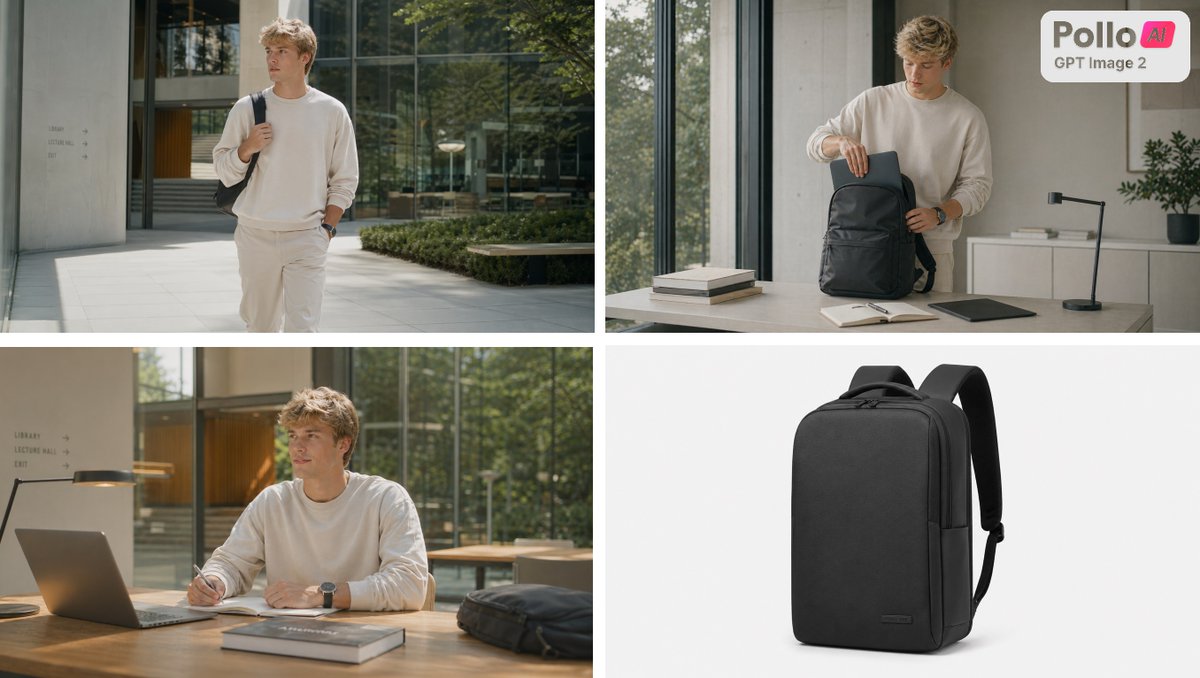
Four-Panel Backpack Lifestyle Ad
A polished four-panel ecommerce ad collage showing a minimalist backpack in lifestyle and studio contexts, ideal for product marketing and social media campaigns.
This is a GPT Image 2 prompt case for Product & Commercial. Use the copy-ready prompt below to generate similar visuals, and review Awesome GPT Image 2 Prompts attribution plus commercial-use rights before reuse.
Free 1K preview
Generate one preview image instantly, no sign-up required.
Prompt
Copy-ready prompt
{
  "customization": {
    "model outfit top": "{argument name=\"top clothing\" default=\"cream oversized sweatshirt\"}",
    "product": "{argument name=\"product type\" default=\"minimalist black backpack\"}",
    "product color": "{argument name=\"product color\" default=\"black\"}"
  },
  "layout": {
    "grid": "2x2 collage with thin white dividers",
    "panel count": 4,
    "panels": [
      {
        "composition": "full-body walking shot of the male model carrying the black backpack over one shoulder, one hand in pocket, bright natural sunlight, soft editorial shadows, greenery and reflective glass in background",
        "position": "top-left",
        "scene": "modern architectural courtyard outside a glass office or campus building"
      },
      {
        "branding": "small rounded white badge in the top-right corner containing the text {argument name=\"brand text\" default=\"Pollo AI\"} and below it {argument name=\"sub brand text\" default=\"GPT Image 2\"}",
        "composition": "medium shot of the male model standing behind a desk and placing a slim laptop into the open black backpack",
        "objects": [
          "black backpack",
          "closed laptop being inserted",
          "2 stacked books",
          "open notebook",
          "black desk lamp",
          "flat tablet or laptop on desk"
        ],
        "objects count": 6,
        "position": "top-right",
        "scene": "minimal modern office interior beside tall windows"
      },
      {
        "composition": "medium seated shot of the male model writing in a notebook at a wooden desk next to an open laptop, backpack resting on the table to the right",
        "objects": [
          "open laptop",
          "desk lamp",
          "notebook",
          "stack of 2 books",
          "black backpack"
        ],
        "objects count": 5,
        "position": "bottom-left",
        "scene": "warm sunlit workspace with glass walls and trees outside"
      },
      {
        "composition": "isolated three-quarter view of the backpack standing upright, straps visible, soft shadow beneath, premium ecommerce lighting",
        "position": "bottom-right",
        "scene": "clean studio product shot on a light gray background"
      }
    ]
  },
  "style": {
    "aspect ratio": "16:9",
    "camera": "photorealistic, shallow depth of field in lifestyle shots, sharp product detail",
    "color palette": "neutral beige, cream, black, gray, muted green",
    "lighting": "soft natural daylight in lifestyle panels, even studio lighting in product panel",
    "look": "premium ecommerce campaign, minimalist startup ad, polished lifestyle branding"
  },
  "subject": {
    "human model": "young adult man with light skin and messy blond hair, Show every face clearly with natural, detailed facial features, wearing a cream oversized sweatshirt, light beige pants, and a dark wristwatch",
    "primary product": "minimalist black backpack",
    "product details": "structured rectangular tech backpack, matte fabric, clean front panel, top zipper, padded shoulder straps, subtle small logo tag near the lower front corner"
  },
  "type": "four-panel lifestyle product ad collage"
}
Prompt variables
Editable argument placeholders found in the prompt, with their default values.
Best for
- - Product & Commercial visual exploration
- - Image generation and reference-image edits
- - Reusable briefs that keep source attribution visible
Change these parts
- - Subject, product, character, or scene
- - Aspect ratio, camera, lighting, and background
- - Brand, text, color, and output constraints
Recommended model and settings
- - Model: gpt-image-2
- - Input mode: Text to Image
- - Aspect ratio: source
- - Commercial status: review original source
How to use this prompt
- 1. Copy the prompt and preserve its structure for the first test.
- 2. Replace the subject, context, and publishing channel.
- 3. Change one camera, lighting, or style variable per iteration.
- 4. Inspect the output, source, text, and rights before reuse.
Limitations, source, and reuse cautions
- - Generated output is an editable draft, not factual, legal, or rights evidence.
- - Review the linked source, people, brands, logos, text, and third-party media before commercial use.
More cases in this category
Prioritized by category, input mode compatibility, quality, and lower risk.
Reuse and source notes
Use this prompt safely after previewing the case.
- 1.Copy the prompt or open it directly in Dovoo with the generation button.
- 2.Adjust variables, aspect ratio, and reference images for your own use case.
- 3.Before publishing or paid usage, verify source rights, attribution requirements, and brand or likeness risks.
Can I use this prompt commercially?
Commercial-use status is allowed. Review the original source, license, brand constraints, and legal requirements before paid usage.
Where does this case come from?
This case is imported from Awesome GPT Image 2 Prompts; keep attribution visible and check the source URL before reuse.