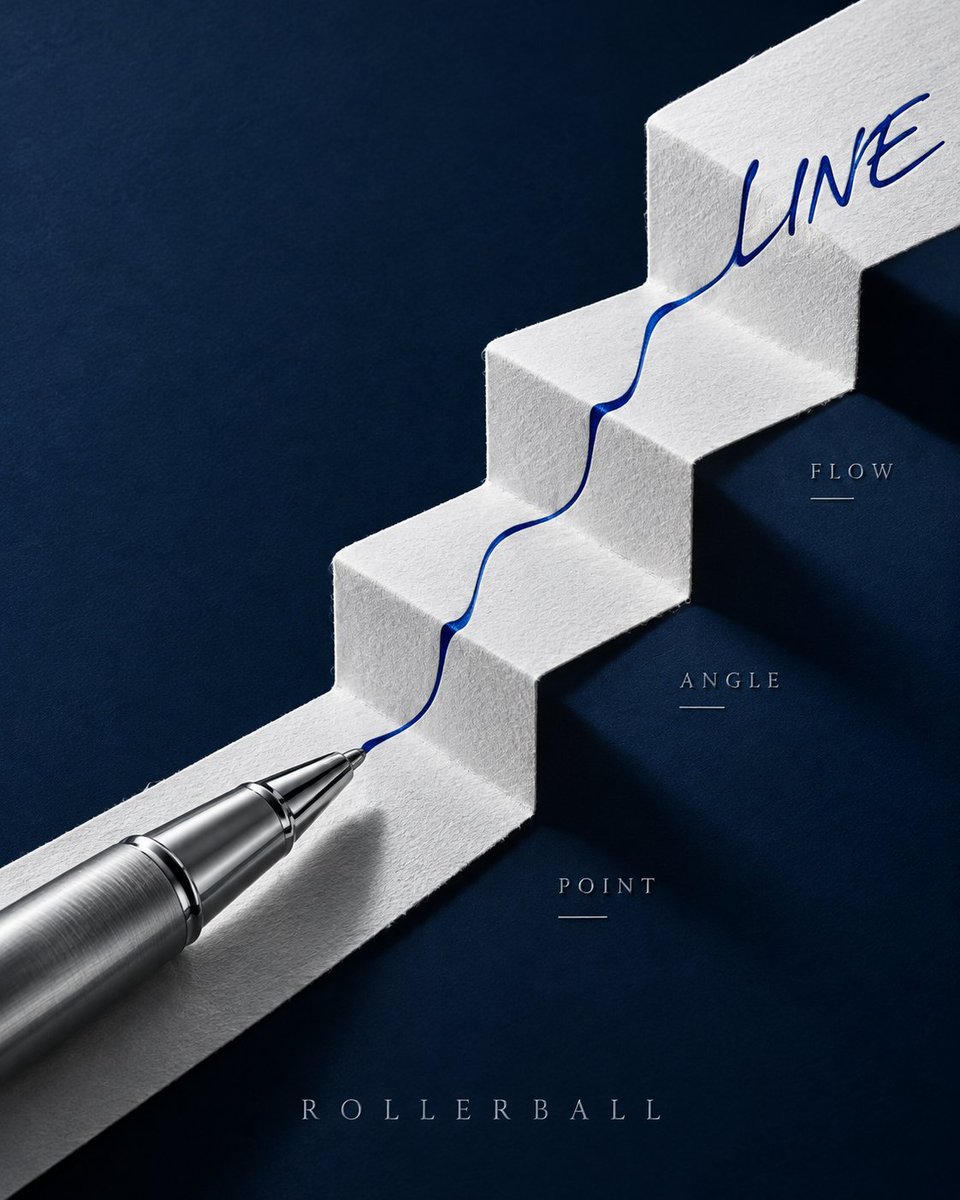
GPT Image 2 Pen Poster Prompt: Ink Fold Path
A prompt for creating a high-end fountain pen poster featuring a Z-fold paper path with ink flowing along it, using specific lighting and composition details.
This is a GPT Image 2 prompt case for Product & Commercial. Use the copy-ready prompt below to generate similar visuals, and review Awesome GPT Image 2 Prompts attribution plus commercial-use rights before reuse.
Free 1K preview
Generate one preview image instantly, no sign-up required.
Prompt
Copy-ready prompt
Create a 4:5 vertical premium fountain pen promotional poster, with the core composition being "Ink Fold Path." A dark ink-green metallic fountain pen is placed diagonally from the top right to the bottom left of the frame, with the cap open and parallel in the top right corner, and the gold nib positioned in the center. Below the pen is a continuous sheet of warm white cotton paper, entering from the top left and undergoing three wide folds to form a high-to-low Z-shaped paper path, with realistic fold thickness, fibers, and soft shadows.

A deep blue-black ink flow starts from the nib and moves strictly along the center of the paper path. The ink begins as a thin line in the first segment, spreads into broad strokes in the second fold, splits into several parallel dry brush marks in the third fold, and finally converges into the clear word "TRACE" in the bottom left. The text must be formed naturally by the same ink flow, without adding computer fonts. The ink accumulates realistically and slightly penetrates at the creases but does not flow off the paper.

Only three tiny embossed coordinates are added on both sides of the paper path: NIB, FLOW, PAPER; no arrows or explanatory boxes. The background is a matte dark cyan tabletop, with a color palette limited to dark cyan, warm white, blue-black ink, and a touch of gold.

Use close-up still life photography, with soft light from the top right emphasizing the metal body, nib engraving, and paper fibers, while retaining deeper shadows in the bottom left. Full opaque rectangular background covering the canvas, no transparent corners, no Alpha masks, no edge feathering. No hands, no calligraphy scrolls, no ink splatters, no Eastern decorative patterns, no existing brand logos, no watermarks.
Best for
- - Product & Commercial visual exploration
- - Image generation and reference-image edits
- - Reusable briefs that keep source attribution visible
Change these parts
- - Subject, product, character, or scene
- - Aspect ratio, camera, lighting, and background
- - Brand, text, color, and output constraints
Recommended model and settings
- - Model: gpt-image-2
- - Input mode: Text to Image
- - Aspect ratio: source
- - Commercial status: review original source
How to use this prompt
- 1. Copy the prompt and preserve its structure for the first test.
- 2. Replace the subject, context, and publishing channel.
- 3. Change one camera, lighting, or style variable per iteration.
- 4. Inspect the output, source, text, and rights before reuse.
Limitations, source, and reuse cautions
- - Generated output is an editable draft, not factual, legal, or rights evidence.
- - Review the linked source, people, brands, logos, text, and third-party media before commercial use.
More cases in this category
Prioritized by category, input mode compatibility, quality, and lower risk.


Reuse and source notes
Use this prompt safely after previewing the case.
- 1.Copy the prompt or open it directly in Dovoo with the generation button.
- 2.Adjust variables, aspect ratio, and reference images for your own use case.
- 3.Before publishing or paid usage, verify source rights, attribution requirements, and brand or likeness risks.
Can I use this prompt commercially?
Commercial-use status is allowed. Review the original source, license, brand constraints, and legal requirements before paid usage.
Where does this case come from?
This case is imported from Awesome GPT Image 2 Prompts; keep attribution visible and check the source URL before reuse.