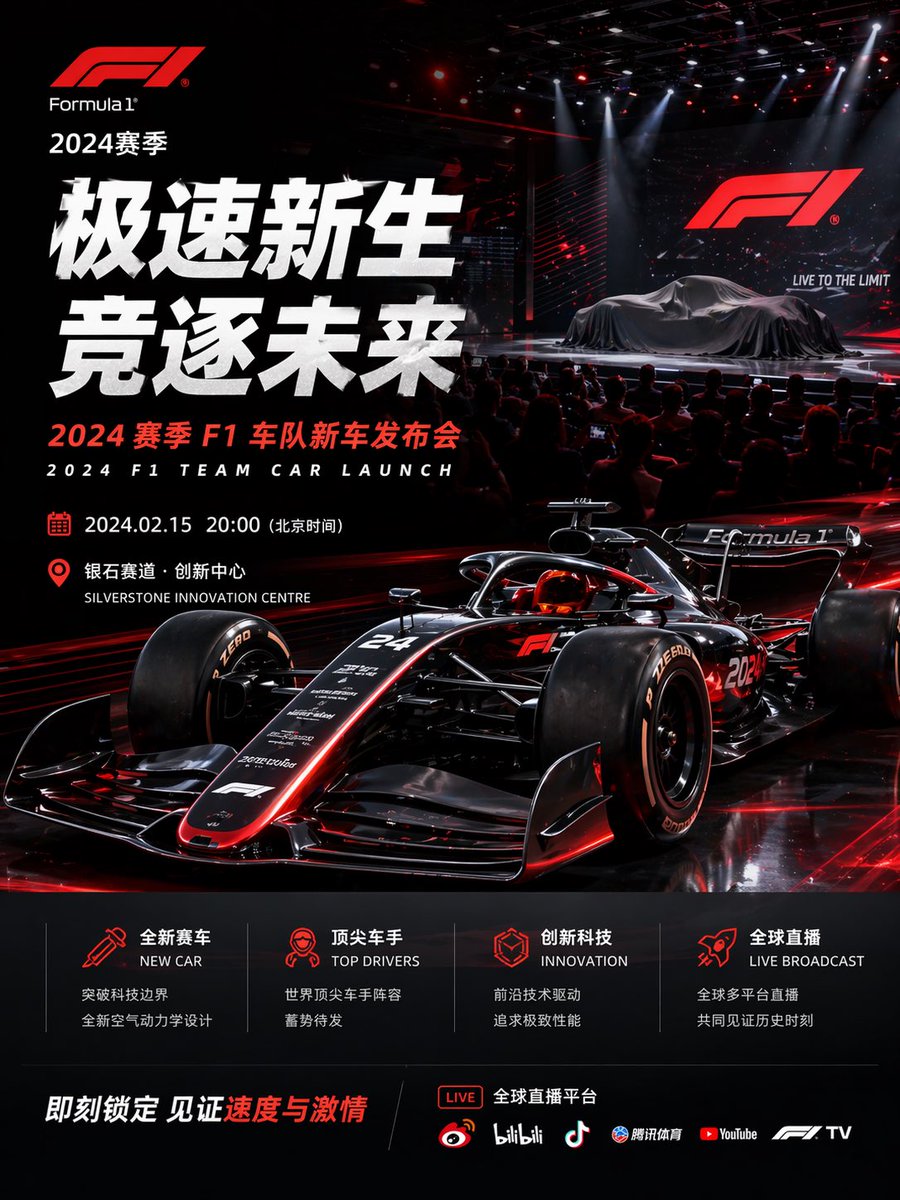
Formula 1 Team Car Launch Poster
A cinematic bilingual motorsport event poster for a 2024 Formula 1 team car launch, suitable for premium promotional graphics, social media campaigns, and launch announcements.
This is a GPT Image 2 prompt case for Graphic & Poster. Use the copy-ready prompt below to generate similar visuals, and review Awesome GPT Image 2 Prompts attribution plus commercial-use rights before reuse.
Free 1K preview
Generate one preview image instantly, no sign-up required.
Prompt
Copy-ready prompt
{
  "type": "Formula 1 event poster",
  "style": "ultra-polished cinematic sports marketing key visual, high-end launch event advertising, photorealistic 3D render look, glossy black and crimson red color scheme, dramatic contrast, premium motorsport branding",
  "brand": {
    "logo": "Formula 1",
    "season": "2024 Season"
  },
  "headline": {
    "primary": "Speedy Rebirth",
    "secondary": "Chasing the Future",
    "subheadline_cn": "2024 Season F1 Team New Car Launch Event",
    "subheadline_en": "2024 F1 TEAM CAR LAUNCH"
  },
  "scene": {
    "environment": "dark indoor presentation arena with a live audience in silhouette, concert-style stage lighting, red laser accents, overhead spotlights, reflective black floor, giant LED screen on the right showing the F1 logo and the slogan LIVE TO THE LIMIT",
    "stage": {
      "count": 2,
      "elements": [
        "covered Formula 1 car on the stage under a dark silk drape",
        "large presentation screen behind it"
      ]
    },
    "foreground": {
      "main_subject": "a futuristic black Formula 1 race car with glowing red trim, low front three-quarter angle, aggressive aerodynamic bodywork, exposed suspension, halo cockpit, slick tires, reflective carbon-fiber surfaces, subtle white sponsor decals, car number 24 visible on the nose and 2024 on the side"
    }
  },
  "layout": {
    "composition": "portrait poster, dense left-aligned typography block, hero race car dominating the lower center and right, launch-stage vignette in the upper right, informational footer panels across the bottom",
    "sections": [
      {
        "title": "event details",
        "position": "left-middle",
        "count": 2,
        "labels": [
          "2024.02.15 20:00 (Beijing Time)",
          "Silverstone Innovation Centre"
        ]
      },
      {
        "title": "feature icons",
        "position": "bottom-center",
        "count": 4,
        "labels": [
          "NEW CAR",
          "TOP DRIVERS",
          "INNOVATION",
          "LIVE BROADCAST"
        ]
      },
      {
        "title": "streaming platforms",
        "position": "bottom-right",
        "count": 6,
        "labels": [
          "LIVE",
          "Weibo",
          "bilibili",
          "Douyin",
          "Tencent Sports",
          "YouTube",
          "F1 TV"
        ]
      }
    ],
    "footer": {
      "cta": "Lock it in now and witness the speed and passion",
      "accent_text": "Speed and Passion"
    }
  },
  "text_treatment": "oversized bold white Chinese headline on the left, compact red and white supporting text, bilingual Chinese-English labels, modern sans-serif typography, glowing red iconography, premium commercial poster spacing",
  "lighting": "high-contrast red rim lighting on the car, glossy reflections, theatrical white spotlights from above, subtle haze and particles in the stage area",
  "palette": {
    "count": 4,
    "colors": [
      "deep black",
      "crimson red",
      "bright white",
      "dark charcoal gray"
    ]
  }
}
Best for
- - Graphic & Poster visual exploration
- - Image generation and reference-image edits
- - Reusable briefs that keep source attribution visible
Change these parts
- - Subject, product, character, or scene
- - Aspect ratio, camera, lighting, and background
- - Brand, text, color, and output constraints
Recommended model and settings
- - Model: gpt-image-2
- - Input mode: Text to Image
- - Aspect ratio: source
- - Commercial status: review original source
How to use this prompt
- 1. Copy the prompt and preserve its structure for the first test.
- 2. Replace the subject, context, and publishing channel.
- 3. Change one camera, lighting, or style variable per iteration.
- 4. Inspect the output, source, text, and rights before reuse.
Limitations, source, and reuse cautions
- - Generated output is an editable draft, not factual, legal, or rights evidence.
- - Review the linked source, people, brands, logos, text, and third-party media before commercial use.
More cases in this category
Prioritized by category, input mode compatibility, quality, and lower risk.





Reuse and source notes
Use this prompt safely after previewing the case.
- 1.Copy the prompt or open it directly in Dovoo with the generation button.
- 2.Adjust variables, aspect ratio, and reference images for your own use case.
- 3.Before publishing or paid usage, verify source rights, attribution requirements, and brand or likeness risks.
Can I use this prompt commercially?
Commercial-use status is allowed. Review the original source, license, brand constraints, and legal requirements before paid usage.
Where does this case come from?
This case is imported from Awesome GPT Image 2 Prompts; keep attribution visible and check the source URL before reuse.