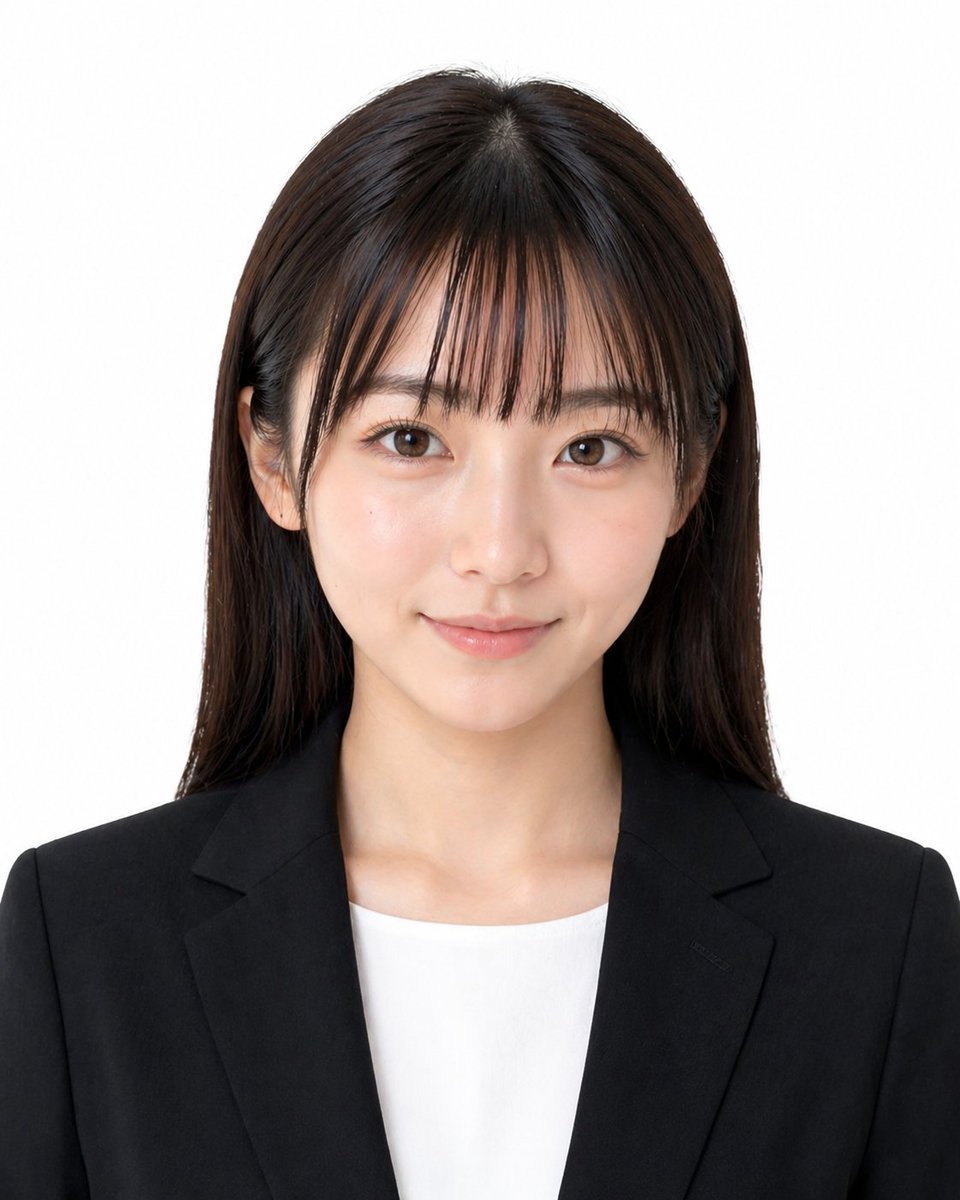
Formal Japanese ID Photo Portrait
A realistic studio-style identification portrait of a professionally dressed young woman, suitable for passport, resume, or official document photo generation.
This is a GPT Image 2 prompt case for Portrait & Character. Use the copy-ready prompt below to generate similar visuals, and review Awesome GPT Image 2 Prompts attribution plus commercial-use rights before reuse.
Free 1K preview
Generate one preview image instantly, no sign-up required.
Prompt
Copy-ready prompt
A formal Japanese-style passport or ID photo of a young adult woman, chest-up and centered, facing straight toward the camera with a neutral professional expression, on a clean light gray studio background. She has straight dark brown to near-black hair, smooth and glossy, parted slightly off-center near the top, with the hair falling evenly past the shoulders on both sides. Her ears are partially visible, with no noticeable accessories. She wears a tailored black business blazer over a plain white crew-neck blouse, creating a conservative job-application or official-document look. The lighting is soft, even, and frontal with minimal shadows, high sharpness, natural skin tones, and a realistic photographic finish. Composition is symmetrical and tightly cropped like an ID photo, showing the top of the head, shoulders, neckline, and upper chest. No smile, no dramatic styling, no props, no text, no border, no background details.
Best for
- - Portrait & Character visual exploration
- - Image generation and reference-image edits
- - Reusable briefs that keep source attribution visible
Change these parts
- - Subject, product, character, or scene
- - Aspect ratio, camera, lighting, and background
- - Brand, text, color, and output constraints
Recommended model and settings
- - Model: gpt-image-2
- - Input mode: Text to Image
- - Aspect ratio: source
- - Commercial status: review original source
How to use this prompt
- 1. Copy the prompt and preserve its structure for the first test.
- 2. Replace the subject, context, and publishing channel.
- 3. Change one camera, lighting, or style variable per iteration.
- 4. Inspect the output, source, text, and rights before reuse.
Limitations, source, and reuse cautions
- - Generated output is an editable draft, not factual, legal, or rights evidence.
- - Review the linked source, people, brands, logos, text, and third-party media before commercial use.
More cases in this category
Prioritized by category, input mode compatibility, quality, and lower risk.




Reuse and source notes
Use this prompt safely after previewing the case.
- 1.Copy the prompt or open it directly in Dovoo with the generation button.
- 2.Adjust variables, aspect ratio, and reference images for your own use case.
- 3.Before publishing or paid usage, verify source rights, attribution requirements, and brand or likeness risks.
Can I use this prompt commercially?
Commercial-use status is allowed. Review the original source, license, brand constraints, and legal requirements before paid usage.
Where does this case come from?
This case is imported from Awesome GPT Image 2 Prompts; keep attribution visible and check the source URL before reuse.