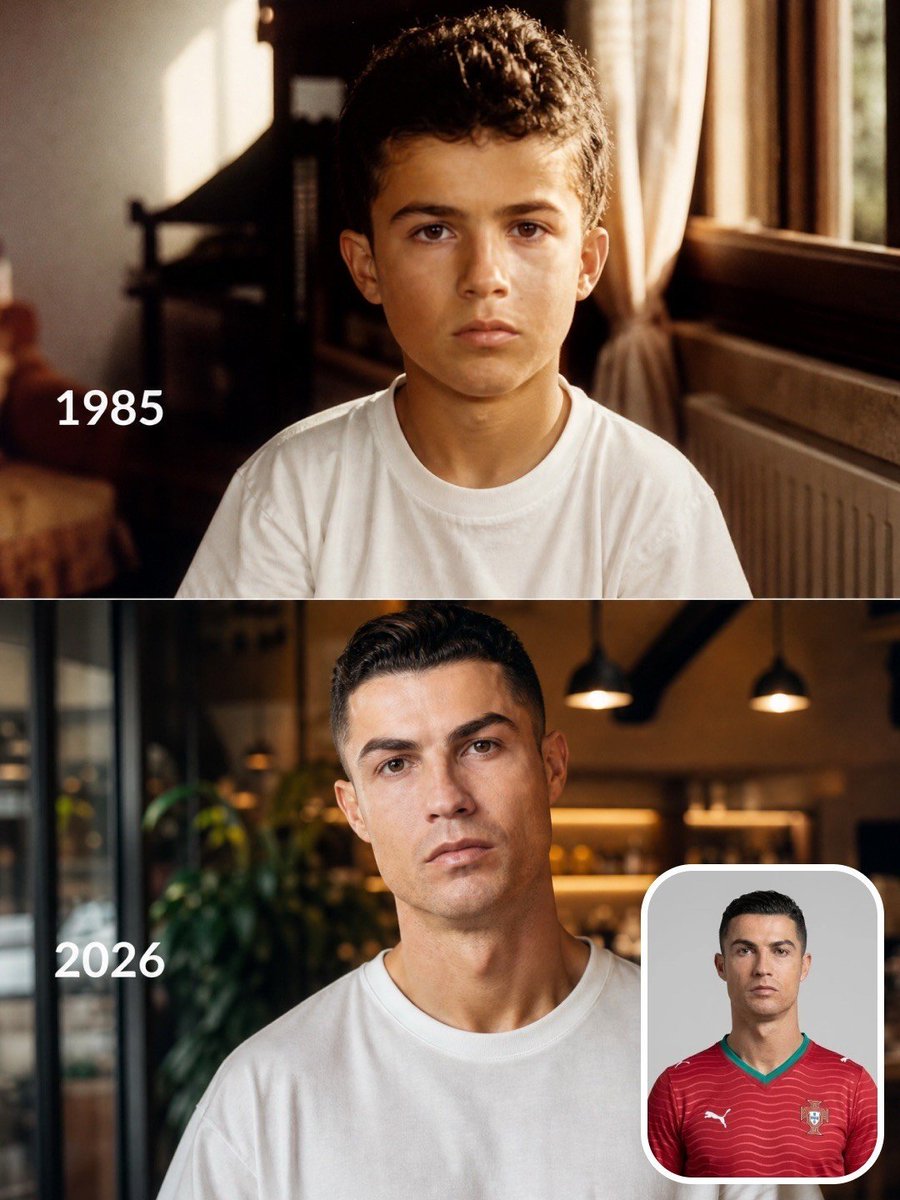
Footballer Then vs Now Transformation
A split-screen prompt that generates a nostalgic childhood portrait and a modern adult version of the same person, showing the passage of time.
This is a GPT Image 2 prompt case for Portrait & Character. Use the copy-ready prompt below to generate similar visuals, and review Awesome GPT Image 2 Prompts attribution plus commercial-use rights before reuse.
Free 1K preview
Generate one preview image instantly, no sign-up required.
Free text preview doesn’t preserve reference-image consistency.
Prompt
Copy-ready prompt
Create a realistic vertical split-screen "Then vs Now" transformation featuring the same famous {argument name="athlete" default="football player"}. The composition is divided into two stacked sections. Top panel: a warm nostalgic childhood portrait set in the player's family home during their birth year (display the year in clean white text on the left, e.g. "{argument name="birth year" default="1985"}"). The child sits naturally facing the camera wearing a simple white T-shirt, soft golden sunlight streaming through a nearby window, authentic 90s/80s home interior, subtle film grain, warm Kodak color grading, emotional and cinematic. Bottom panel: the same person recreated as their present-day adult self in 2026, maintaining recognizable facial structure and identity, wearing a plain white oversized T-shirt inside a modern café with warm ambient lighting and shallow depth of field. Place a small rounded-corner reference portrait of the player in their national team jersey at the bottom-right corner. Match the pose, eye direction, framing, and expression between the child and adult versions to emphasize the passage of time. Hyper-realistic skin, natural facial evolution, consistent identity, cinematic photography, editorial quality, soft depth of field, 85mm lens, ultra-detailed, photorealistic, 8K, masterpiece.Prompt variables
Editable argument placeholders found in the prompt, with their default values.
Best for
- - Portrait & Character visual exploration
- - Image generation and reference-image edits
- - Reusable briefs that keep source attribution visible
Change these parts
- - Subject, product, character, or scene
- - Aspect ratio, camera, lighting, and background
- - Brand, text, color, and output constraints
Recommended model and settings
- - Model: gpt-image-2
- - Input mode: Image to Image
- - Aspect ratio: source
- - Commercial status: review original source
How to use this prompt
- 1. Copy the prompt and preserve its structure for the first test.
- 2. Replace the subject, context, and publishing channel.
- 3. Change one camera, lighting, or style variable per iteration.
- 4. Inspect the output, source, text, and rights before reuse.
Limitations, source, and reuse cautions
- - Generated output is an editable draft, not factual, legal, or rights evidence.
- - Review the linked source, people, brands, logos, text, and third-party media before commercial use.
More cases in this category
Prioritized by category, input mode compatibility, quality, and lower risk.


Reuse and source notes
Use this prompt safely after previewing the case.
- 1.Copy the prompt or open it directly in Dovoo with the generation button.
- 2.Adjust variables, aspect ratio, and reference images for your own use case.
- 3.Before publishing or paid usage, verify source rights, attribution requirements, and brand or likeness risks.
Can I use this prompt commercially?
Commercial-use status is allowed. Review the original source, license, brand constraints, and legal requirements before paid usage.
Where does this case come from?
This case is imported from Awesome GPT Image 2 Prompts; keep attribution visible and check the source URL before reuse.