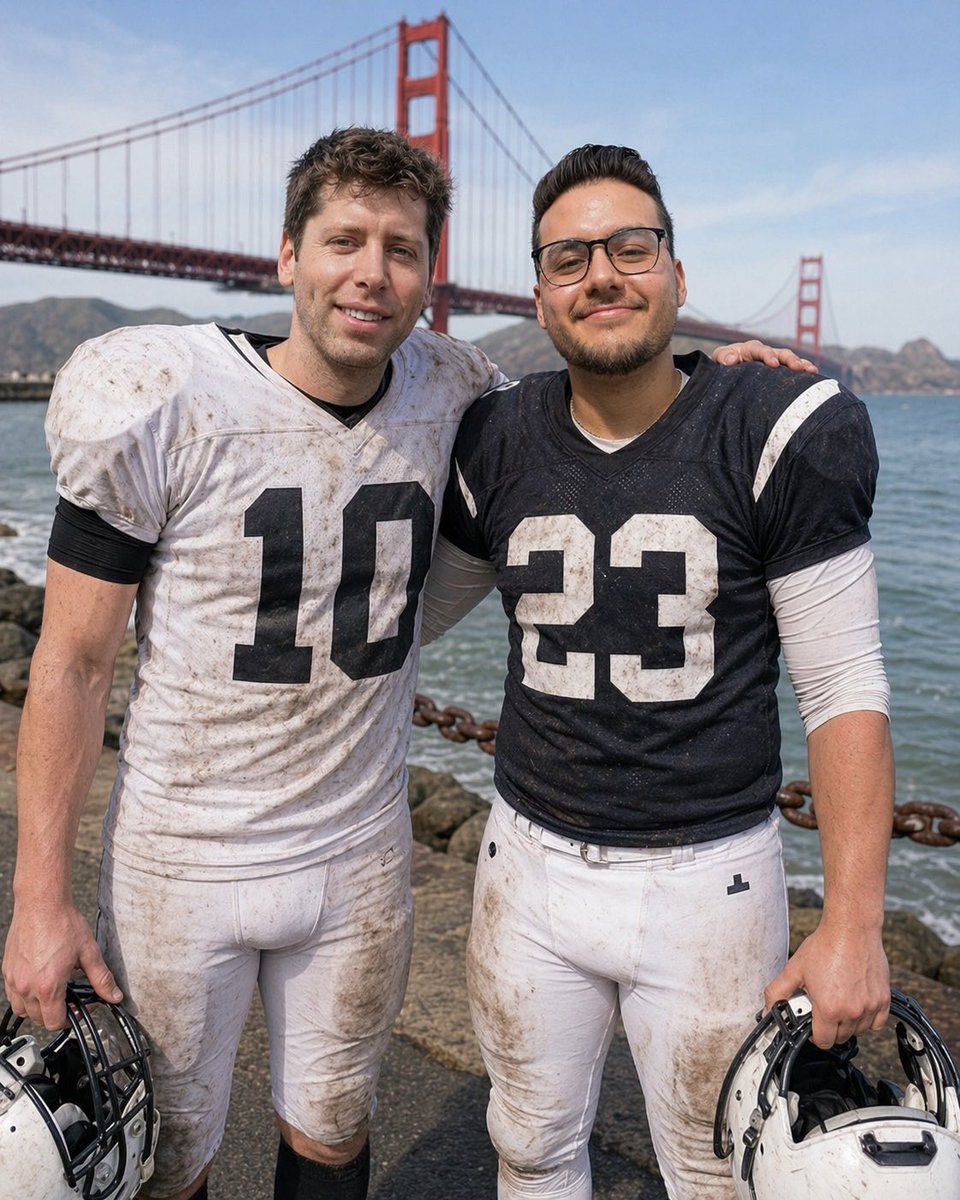
Football Teammates at Golden Gate Bridge
This prompt generates a realistic post-game portrait of two muddy football players posing by the water with the Golden Gate Bridge behind them, useful for sports editorial or lifestyle imagery.
This is a GPT Image 2 prompt case for Portrait & Character. Use the copy-ready prompt below to generate similar visuals, and review Awesome GPT Image 2 Prompts attribution plus commercial-use rights before reuse.
Free 1K preview
Generate one preview image instantly, no sign-up required.
Prompt
Copy-ready prompt
A realistic outdoor sports portrait of two American football players standing side by side on a waterfront path with the Golden Gate Bridge filling the background on a bright clear day. The player on the left wears a muddy white jersey with the large black number 10, white football pants, black undersleeves, and holds a white helmet at his side. The player on the right wears a muddy dark navy jersey with the large white number 23, white football pants, a white long-sleeve undershirt, and holds a white helmet at his side. Both athletes are full torso to upper thigh in frame, facing the camera, with their inside arms around each other’s shoulders in a friendly post-game pose. Their uniforms are visibly grass-stained and dirty from play. Behind them is blue water, a rocky shoreline, a heavy rust-colored chain barrier, distant hills, and the red-orange towers and suspension cables of the Golden Gate Bridge. Natural daylight, documentary-style sports photography, shallow depth of field, sharp fabric texture, realistic anatomy, candid team-bonding mood. Obscure both faces with smooth rectangular blur blocks for privacy.
Best for
- - Portrait & Character visual exploration
- - Image generation and reference-image edits
- - Reusable briefs that keep source attribution visible
Change these parts
- - Subject, product, character, or scene
- - Aspect ratio, camera, lighting, and background
- - Brand, text, color, and output constraints
Recommended model and settings
- - Model: gpt-image-2
- - Input mode: Text to Image
- - Aspect ratio: source
- - Commercial status: review original source
How to use this prompt
- 1. Copy the prompt and preserve its structure for the first test.
- 2. Replace the subject, context, and publishing channel.
- 3. Change one camera, lighting, or style variable per iteration.
- 4. Inspect the output, source, text, and rights before reuse.
Limitations, source, and reuse cautions
- - Generated output is an editable draft, not factual, legal, or rights evidence.
- - Review the linked source, people, brands, logos, text, and third-party media before commercial use.
More cases in this category
Prioritized by category, input mode compatibility, quality, and lower risk.




Reuse and source notes
Use this prompt safely after previewing the case.
- 1.Copy the prompt or open it directly in Dovoo with the generation button.
- 2.Adjust variables, aspect ratio, and reference images for your own use case.
- 3.Before publishing or paid usage, verify source rights, attribution requirements, and brand or likeness risks.
Can I use this prompt commercially?
Commercial-use status is allowed. Review the original source, license, brand constraints, and legal requirements before paid usage.
Where does this case come from?
This case is imported from Awesome GPT Image 2 Prompts; keep attribution visible and check the source URL before reuse.