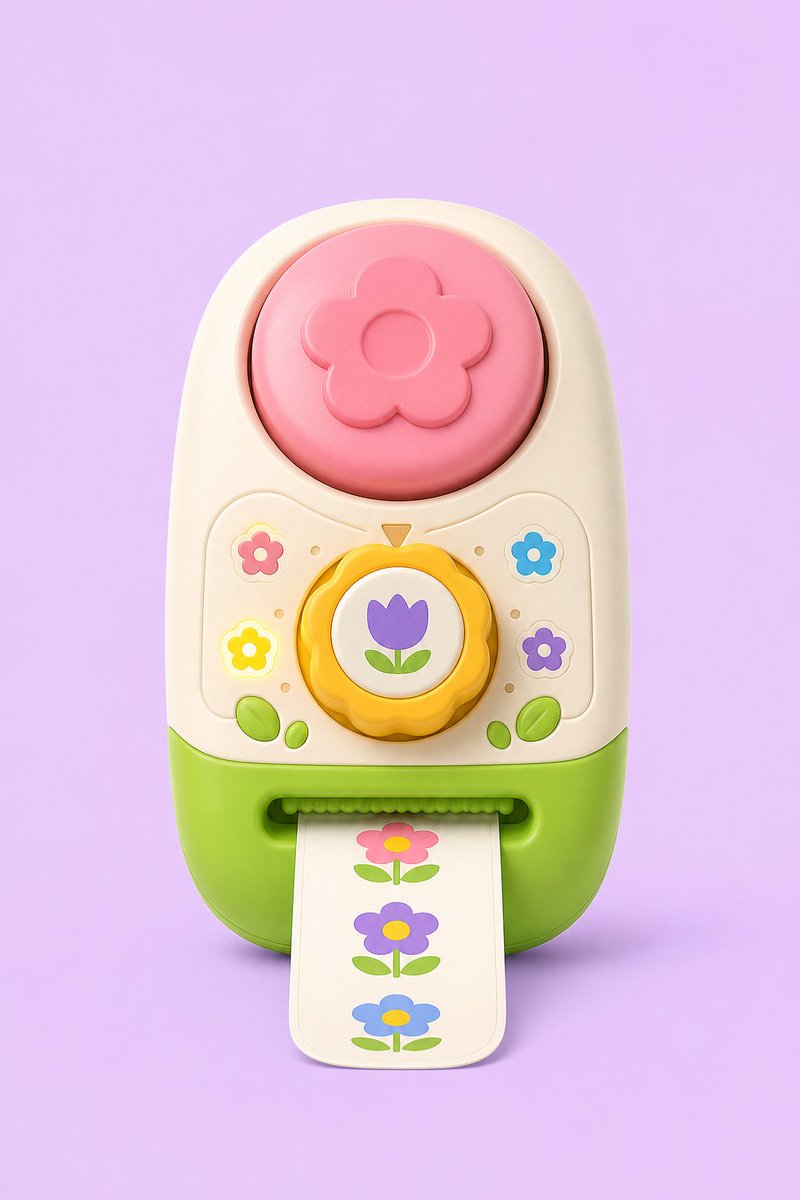
Pastel Flower Sticker-Stamp Toy
A cute 3D game concept render of a pastel flower-themed toy sticker-stamp printer for product or prop design inspiration.
This is a GPT Image 2 prompt case for Anime & Game. Use the copy-ready prompt below to generate similar visuals, and review Awesome GPT Image 2 Prompts attribution plus commercial-use rights before reuse.
Free 1K preview
Generate one preview image instantly, no sign-up required.
Prompt
Copy-ready prompt
Create a polished 3D concept-art product render of a cute toy sticker-stamp printer shaped like a rounded vertical capsule, centered on a soft pastel lavender background. The toy has a cream upper body and bright lime-green lower base, with glossy molded plastic, rounded bevels, soft studio lighting, and subtle contact shadow. At the top is one large circular pink push button embossed with a simple five-petal flower and a raised circular center. In the middle is one yellow scalloped rotary dial with a white circular face showing a purple tulip icon with two green leaves, and a small orange triangular pointer above it. Around the dial are exactly four small flower icons: pink flower at upper left, blue flower at upper right, glowing yellow flower at lower left, and purple flower at lower right, plus small decorative dot indicators and two pairs of green leaf buttons near the bottom corners. At the front bottom is a horizontal sticker slot with a green ridged roller edge, feeding out one cream paper strip with rounded corners. The strip shows exactly three printed flower stickers stacked vertically: pink flower with yellow center at top, purple flower with yellow center in the middle, and blue flower with yellow center at bottom, each with green leaves and stem. Use a playful toy-study aesthetic for {argument name="product type" default="sticker-stamp toy"}, pastel palette with {argument name="background color" default="lavender"}, cream plastic body, {argument name="base color" default="lime green"}, {argument name="top button color" default="pink"}, and {argument name="dial icon" default="purple tulip"}. No text, no logo, no watermark, no hands, no extra accessories, front-facing view, high-detail smooth plastic render suitable for game concept art.Prompt variables
Editable argument placeholders found in the prompt, with their default values.
Best for
- - Anime & Game visual exploration
- - Image generation and reference-image edits
- - Reusable briefs that keep source attribution visible
Change these parts
- - Subject, product, character, or scene
- - Aspect ratio, camera, lighting, and background
- - Brand, text, color, and output constraints
Recommended model and settings
- - Model: gpt-image-2
- - Input mode: Text to Image
- - Aspect ratio: source
- - Commercial status: review original source
How to use this prompt
- 1. Copy the prompt and preserve its structure for the first test.
- 2. Replace the subject, context, and publishing channel.
- 3. Change one camera, lighting, or style variable per iteration.
- 4. Inspect the output, source, text, and rights before reuse.
Limitations, source, and reuse cautions
- - Generated output is an editable draft, not factual, legal, or rights evidence.
- - Review the linked source, people, brands, logos, text, and third-party media before commercial use.
More cases in this category
Prioritized by category, input mode compatibility, quality, and lower risk.

Reuse and source notes
Use this prompt safely after previewing the case.
- 1.Copy the prompt or open it directly in Dovoo with the generation button.
- 2.Adjust variables, aspect ratio, and reference images for your own use case.
- 3.Before publishing or paid usage, verify source rights, attribution requirements, and brand or likeness risks.
Can I use this prompt commercially?
Commercial-use status is allowed. Review the original source, license, brand constraints, and legal requirements before paid usage.
Where does this case come from?
This case is imported from Awesome GPT Image 2 Prompts; keep attribution visible and check the source URL before reuse.