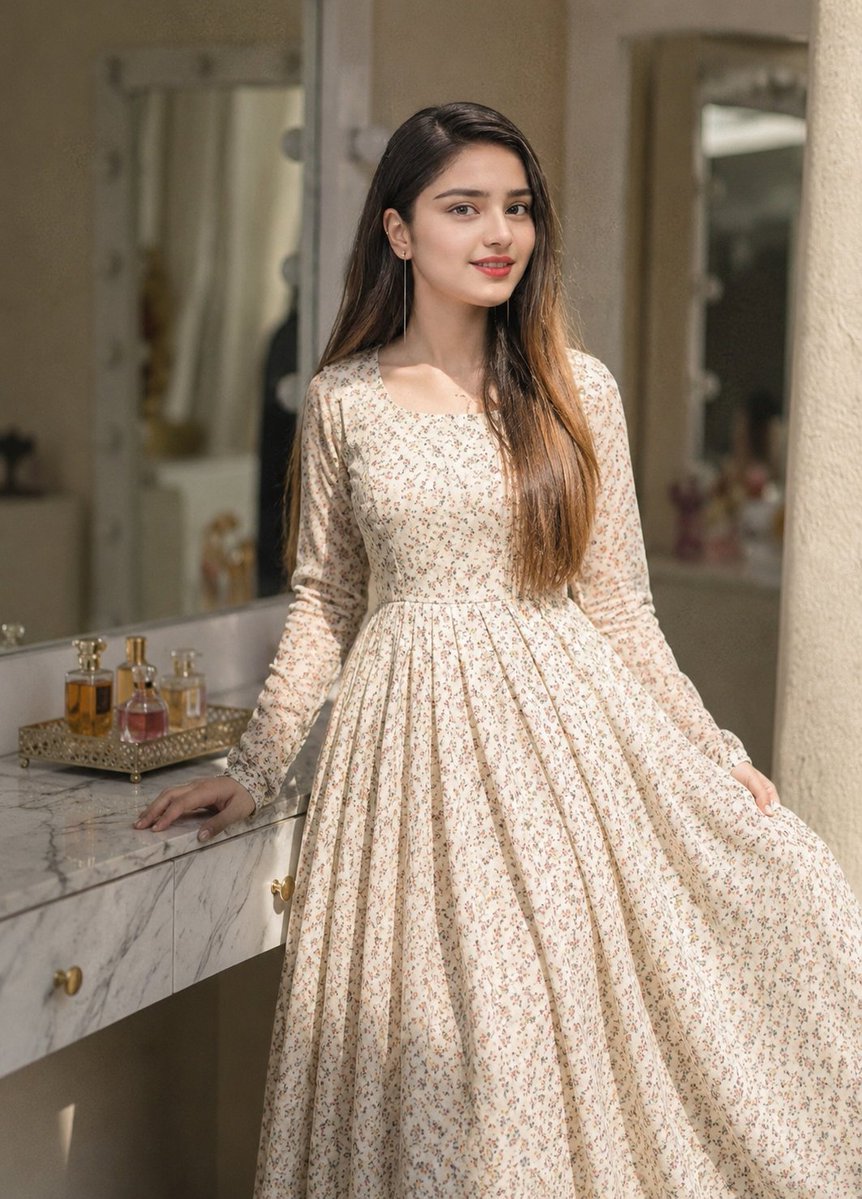
Floral Dress Vanity Portrait
A realistic vertical fashion portrait prompt for generating a woman in a cream floral maxi dress inside a warm vanity dressing room.
This is a GPT Image 2 prompt case for Fashion & Beauty. Use the copy-ready prompt below to generate similar visuals, and review Awesome GPT Image 2 Prompts attribution plus commercial-use rights before reuse.
Free 1K preview
Generate one preview image instantly, no sign-up required.
Prompt
Copy-ready prompt
Create a realistic fashion editorial portrait of a young woman standing in a softly lit dressing room or vanity area. She has long straight {argument name="hair color" default="dark brown hair with warm caramel ends"} worn loose over one shoulder, Show every face clearly with natural, detailed facial features. She wears a modest cream-colored long-sleeve maxi dress with a square neckline, fitted bodice, gathered waist, and a very full flowing skirt, covered in a delicate tiny floral print in muted pink, beige, and green. Pose her standing three-quarter front, left hand resting on a white-gray marble vanity counter, right hand lightly lifting the side of the skirt to show its volume. The setting is an elegant warm beige interior with a large mirror behind her framed by round vanity bulbs, a second mirror in the background, and a textured wall or column on the right. On the marble counter, include exactly three small perfume bottles sitting on one ornate gold tray: one amber bottle, one pink bottle, and one small clear-gold bottle. Use natural sunlight from the right, soft shadows, shallow depth of field, muted beige tones, realistic fabric folds, high-detail marble veining, and a vertical portrait composition. No visible readable text, no watermark, no extra people, no exaggerated makeup, Show every face clearly with natural, detailed facial features.Prompt variables
Editable argument placeholders found in the prompt, with their default values.
Best for
- - Fashion & Beauty visual exploration
- - Image generation and reference-image edits
- - Reusable briefs that keep source attribution visible
Change these parts
- - Subject, product, character, or scene
- - Aspect ratio, camera, lighting, and background
- - Brand, text, color, and output constraints
Recommended model and settings
- - Model: gpt-image-2
- - Input mode: Text to Image
- - Aspect ratio: source
- - Commercial status: review original source
How to use this prompt
- 1. Copy the prompt and preserve its structure for the first test.
- 2. Replace the subject, context, and publishing channel.
- 3. Change one camera, lighting, or style variable per iteration.
- 4. Inspect the output, source, text, and rights before reuse.
Limitations, source, and reuse cautions
- - Generated output is an editable draft, not factual, legal, or rights evidence.
- - Review the linked source, people, brands, logos, text, and third-party media before commercial use.
More cases in this category
Prioritized by category, input mode compatibility, quality, and lower risk.

Reuse and source notes
Use this prompt safely after previewing the case.
- 1.Copy the prompt or open it directly in Dovoo with the generation button.
- 2.Adjust variables, aspect ratio, and reference images for your own use case.
- 3.Before publishing or paid usage, verify source rights, attribution requirements, and brand or likeness risks.
Can I use this prompt commercially?
Commercial-use status is allowed. Review the original source, license, brand constraints, and legal requirements before paid usage.
Where does this case come from?
This case is imported from Awesome GPT Image 2 Prompts; keep attribution visible and check the source URL before reuse.