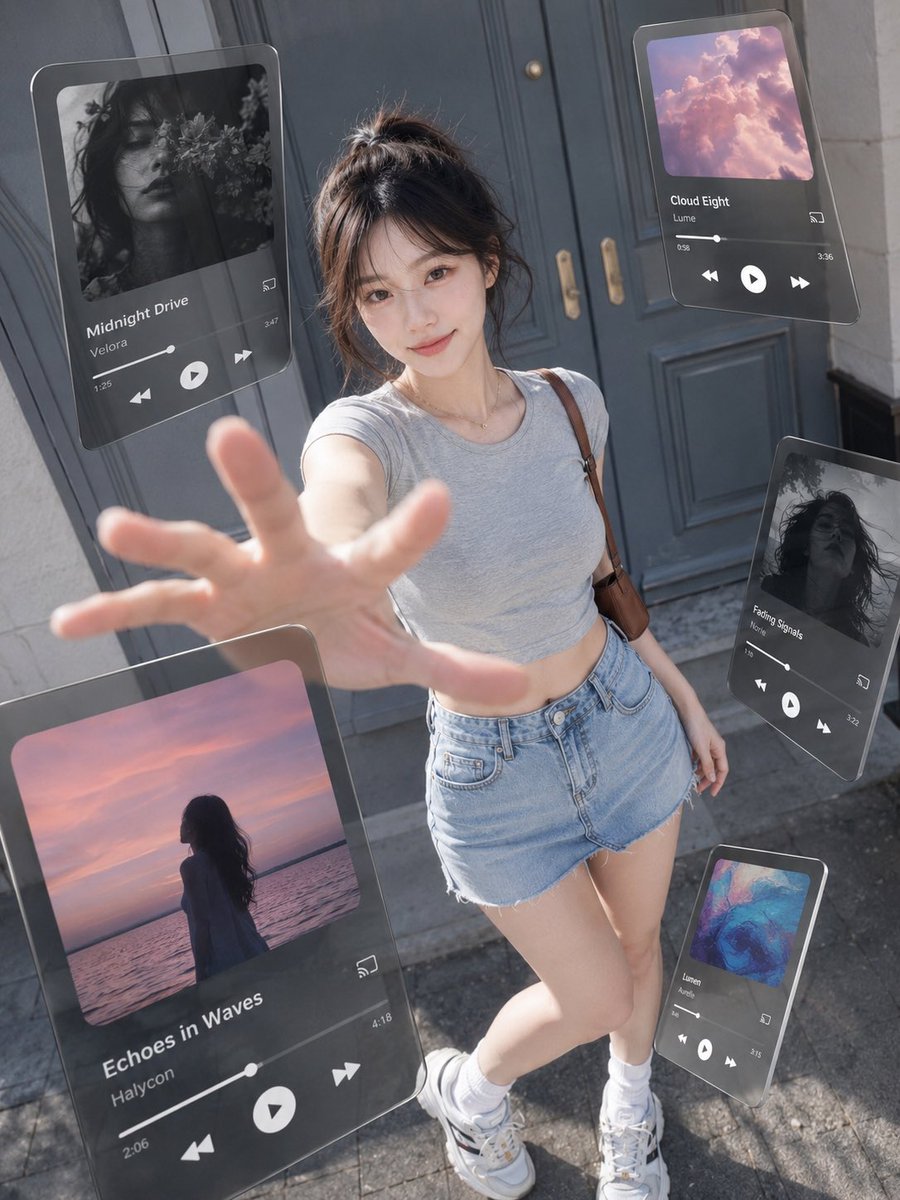
Floating Music UI Street Portrait
A hyperrealistic vertical street photo prompt featuring a young woman surrounded by five floating glassmorphism music player panels for futuristic advertising visuals.
This is a GPT Image 2 prompt case for Product & Commercial. Use the copy-ready prompt below to generate similar visuals, and review Awesome GPT Image 2 Prompts attribution plus commercial-use rights before reuse.
Free 1K preview
Generate one preview image instantly, no sign-up required.
Prompt
Copy-ready prompt
Create a 3:4 vertical ultra-realistic street fashion photograph blended with floating augmented-reality music player UI panels, as if a smartphone music app has been pulled out into the real world. A young woman with {argument name="character appearance" default="an East Asian young woman with fair skin, dark brown hair in a messy high bun with wispy bangs, soft natural makeup, and a gentle smile"} stands centered in front of {argument name="location" default="a low-saturation gray-blue vintage double door on a city street"} in bright daytime natural light. Use a high-angle wide lens perspective looking slightly downward, like the camera is close to her outstretched hand; her hand reaches toward the lens in the foreground with strong perspective distortion and shallow depth of field. She wears {argument name="outfit" default="a fitted light gray cropped T-shirt, high-waisted light blue denim shorts, white socks, chunky white sneakers, a delicate necklace, and a brown shoulder bag strap"}. The background is softly blurred but still recognizable, with stone walls, door handles, pavement, and realistic sunlight shadows. Around her, place exactly 5 semi-transparent floating glassmorphism music player cards with rounded corners, dark translucent panels, subtle reflections, thin highlights, and realistic perspective, as if hovering in physical space. Card 1: large card on the upper left, tilted slightly, black-and-white floral portrait album art, title “Midnight Drive,” artist “Velora,” visible progress bar, time 1:26 and 3:47, previous/play/next icons, cast icon. Card 2: medium card on the upper right, pink cloud album art, title “Cloud Eight,” artist “Lume,” time 0:58 and 3:56, playback controls and cast icon. Card 3: large card at lower left foreground, partially cropped, sunset ocean silhouette album art, title “Echoes in Waves,” artist “Haycoon,” time 2:06 and 4:18, large play button and skip icons. Card 4: medium card on the right side, tilted vertically, black-and-white hair portrait album art, title “Fading Signals,” artist “Nolie,” time 1:40 and 3:22, playback controls. Card 5: small card at lower right near her shoes, colorful abstract blue-pink album art, title “Lumen,” artist “Ardens,” time 0:49 and 3:15, playback controls. Make the UI feel physically present with accurate occlusion, reflections, motionless hovering, and soft shadows/refractions, while keeping it readable. Style: creative advertising photography, hyperrealistic, cinematic daylight, crisp skin texture, natural colors, slight wide-angle distortion, no extra cards, no watermark, no messy text, no duplicated limbs.Prompt variables
Editable argument placeholders found in the prompt, with their default values.
Best for
- - Product & Commercial visual exploration
- - Image generation and reference-image edits
- - Reusable briefs that keep source attribution visible
Change these parts
- - Subject, product, character, or scene
- - Aspect ratio, camera, lighting, and background
- - Brand, text, color, and output constraints
Recommended model and settings
- - Model: gpt-image-2
- - Input mode: Text to Image
- - Aspect ratio: source
- - Commercial status: review original source
How to use this prompt
- 1. Copy the prompt and preserve its structure for the first test.
- 2. Replace the subject, context, and publishing channel.
- 3. Change one camera, lighting, or style variable per iteration.
- 4. Inspect the output, source, text, and rights before reuse.
Limitations, source, and reuse cautions
- - Generated output is an editable draft, not factual, legal, or rights evidence.
- - Review the linked source, people, brands, logos, text, and third-party media before commercial use.
More cases in this category
Prioritized by category, input mode compatibility, quality, and lower risk.
Reuse and source notes
Use this prompt safely after previewing the case.
- 1.Copy the prompt or open it directly in Dovoo with the generation button.
- 2.Adjust variables, aspect ratio, and reference images for your own use case.
- 3.Before publishing or paid usage, verify source rights, attribution requirements, and brand or likeness risks.
Can I use this prompt commercially?
Commercial-use status is allowed. Review the original source, license, brand constraints, and legal requirements before paid usage.
Where does this case come from?
This case is imported from Awesome GPT Image 2 Prompts; keep attribution visible and check the source URL before reuse.