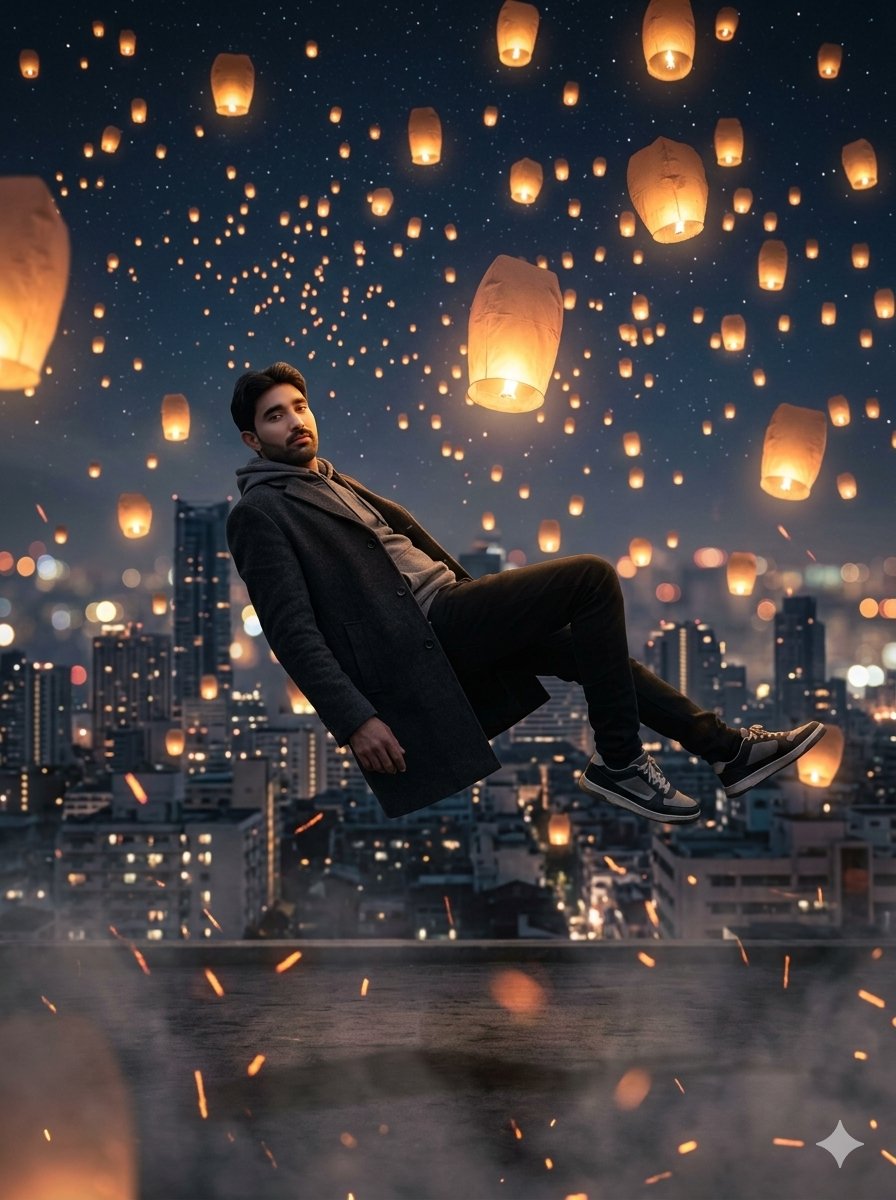
Floating Man Above Lantern City
A surreal cinematic night artwork of a man levitating over a rooftop cityscape while glowing sky lanterns rise into a starry sky.
This is a GPT Image 2 prompt case for 人像角色. Use the copy-ready prompt below to generate similar visuals, and review Awesome GPT Image 2 Prompts attribution plus commercial-use rights before reuse.
Prompt
Copy-ready prompt
创作一幅令人惊叹的超现实电影质感数字艺术作品,画面中 {argument name="character name" default="A young man"} 在夜晚悬浮于巨大的城市屋顶之上,采用 3:4 竖构图。男子位于画面中偏左位置,仿佛重力消失般在半空中水平仰卧:躯干后倾,头部靠近左上方中心,一只手臂下垂,双膝弯曲,双腿向右延伸,身穿深炭灰色长款大衣、灰色连帽衫、黑色长裤及黑白配色运动鞋。采用写实而梦幻的合成风格,具备强烈的景深效果和柔和的动态模糊。背景为密集的现代城市天际线,包含高层建筑、发光的窗户、虚化的街灯以及横跨画面底部三分之一处的低矮屋顶边缘。天空呈深海军蓝色,繁星点点。天空中需准确填充 96 盏发着暖橙色光芒的纸质孔明灯:9 盏大型近景灯分布在边缘和高空,27 盏中型灯散布在中高空,60 盏小型远景灯以松散的对角线流向隐入背景。在画面下半部分添加 22 条细小的橙色余烬轨迹,并在屋顶表面覆盖一层淡淡的烟雾。光线主要来自孔明灯,在男子的外套和鞋子上投射出温暖的琥珀色高光,而城市则保持冷蓝色调。强调规模感、奇幻感和悬浮感,画面中右侧中心附近最大的那盏灯需发出明亮光芒,男子悬浮在模糊的城市夜景之上。画面中不得包含任何文字、水印或额外人物。Prompt variables
Editable argument placeholders found in the prompt, with their default values.
More cases in this category
Prioritized by category, input mode compatibility, quality, and lower risk.
Reuse and source notes
Use this prompt safely after previewing the case.
- 1.Copy the prompt or open it directly in Dovoo with the generation button.
- 2.Adjust variables, aspect ratio, and reference images for your own use case.
- 3.Before publishing or paid usage, verify source rights, attribution requirements, and brand or likeness risks.
Can I use this prompt commercially?
Commercial-use status is allowed. Review the original source, license, brand constraints, and legal requirements before paid usage.
Where does this case come from?
This case is imported from Awesome GPT Image 2 Prompts; keep attribution visible and check the source URL before reuse.