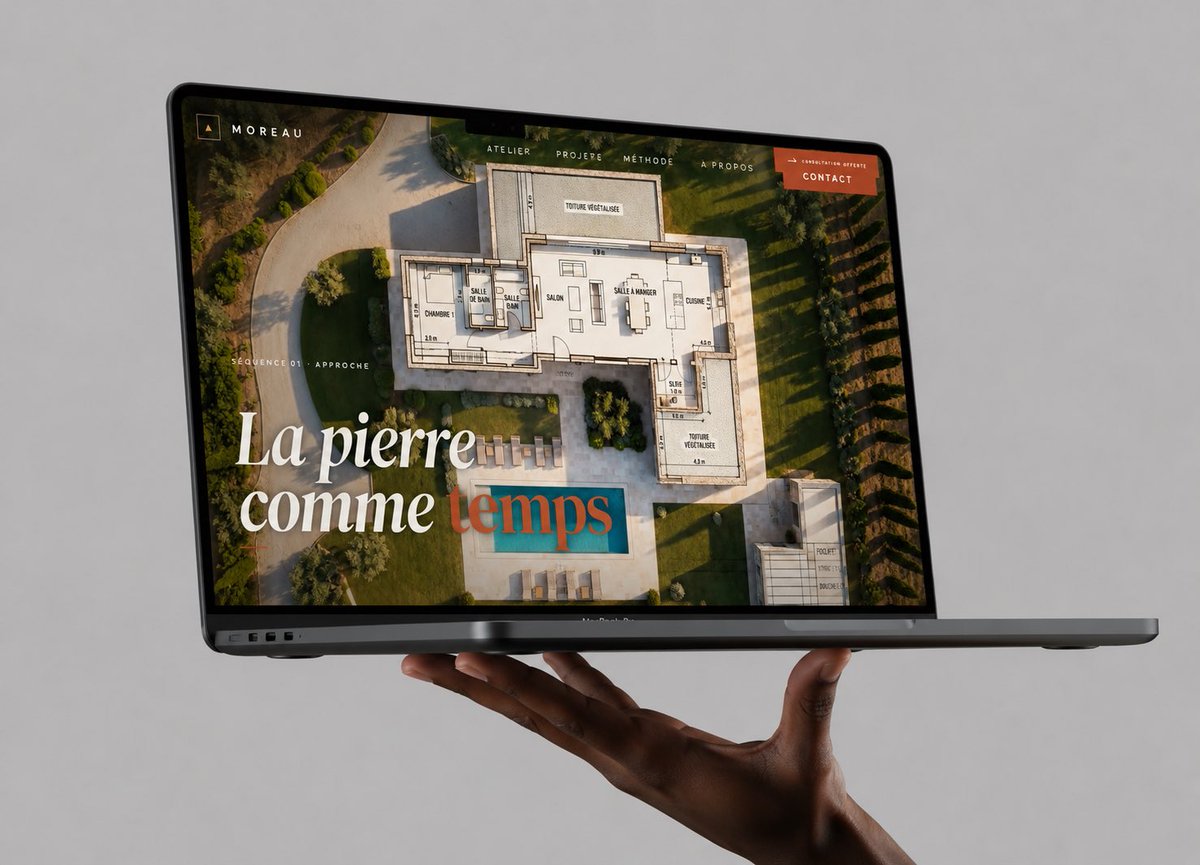
Floating Laptop Website Mockup
A premium photorealistic MacBook mockup presenting an architecture portfolio website, useful for showcasing web design work in a polished social media post.
This is a GPT Image 2 prompt case for 产品商业. Use the copy-ready prompt below to generate similar visuals, and review Awesome GPT Image 2 Prompts attribution plus commercial-use rights before reuse.
Prompt
Copy-ready prompt
创建一个高端且逼真的摄影级工作室样机,展示一台深灰色 MacBook Pro 笔记本电脑,水平悬浮在无缝浅灰色背景前,下方由一只写实的深色皮肤手托举,手掌向上,手指轻轻弯曲托住笔记本电脑。笔记本电脑呈浅角度打开,从左前方四分之三视角观察,可见纤薄的黑色边框、摄像头凹槽、左侧边缘的接口以及纤薄的底座。在屏幕上,展示一个奢华建筑/石艺作品集网站,品牌名称为 {argument name="brand name" default="MOREAU"}:背景为一张现代别墅花园及游泳池的全屏航拍照片,上方叠加半透明的建筑平面图绘图。添加一个极简风格的顶部导航栏,包含 5 个可见项目:“ATELIER”、“PROJERE”、“MÉTHODE”、“À PROPOS”以及一个橙色按钮,标签为 {argument name="button text" default="CONTACT"}。在屏幕左上角放置一个小巧的方形字母组合图标和文字“MOREAU”。在屏幕左侧添加小号大写文字“SÉQUENCE 01 · APPROCHE”。在左下角添加一个优雅的大号衬线标题,内容为 {argument name="headline text" default="La pierre comme temps"},其中前几个词为白色,最后一个词采用柔和的青色/赤陶色叠加样式。网站图像内部使用温暖的黄金时刻光效,采用精致的编辑排版、高端代理机构品牌风格,玻璃屏幕上有逼真的反射效果,笔记本电脑和手下方有微妙的阴影,对焦清晰,无水印,无额外设备,画面整洁。Prompt variables
Editable argument placeholders found in the prompt, with their default values.
More cases in this category
Prioritized by category, input mode compatibility, quality, and lower risk.
Reuse and source notes
Use this prompt safely after previewing the case.
- 1.Copy the prompt or open it directly in Dovoo with the generation button.
- 2.Adjust variables, aspect ratio, and reference images for your own use case.
- 3.Before publishing or paid usage, verify source rights, attribution requirements, and brand or likeness risks.
Can I use this prompt commercially?
Commercial-use status is allowed. Review the original source, license, brand constraints, and legal requirements before paid usage.
Where does this case come from?
This case is imported from Awesome GPT Image 2 Prompts; keep attribution visible and check the source URL before reuse.