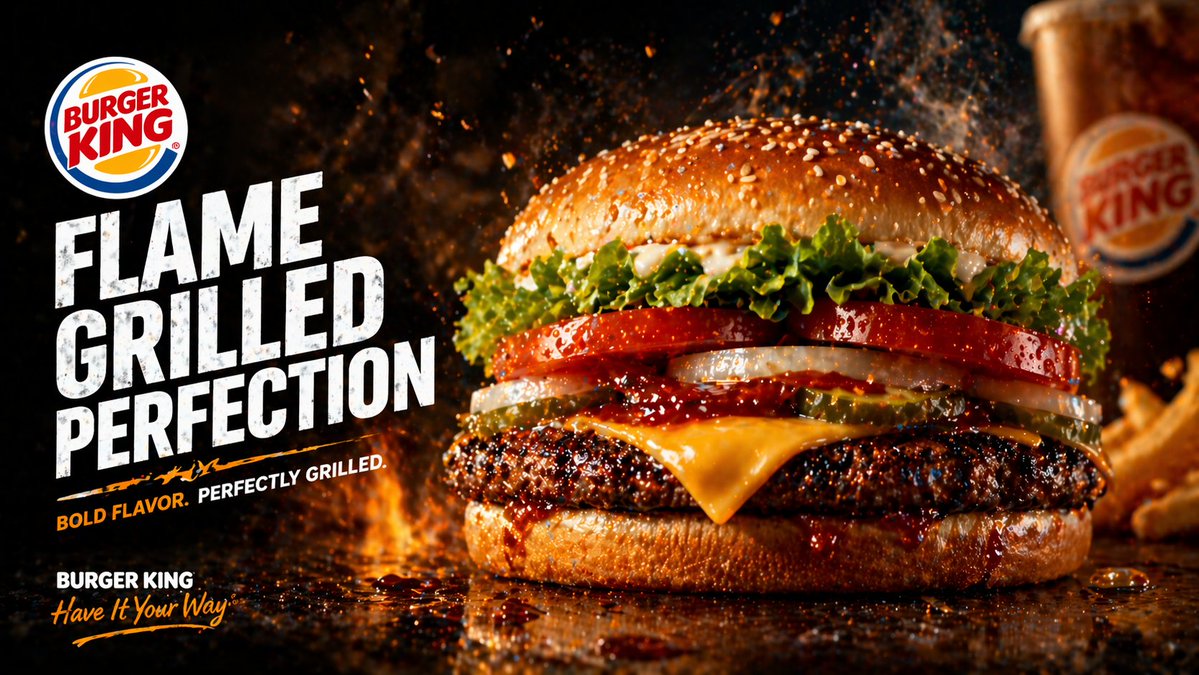
Flame-Grilled Burger Ad Poster
A dramatic fast-food promotional poster featuring a flame-grilled cheeseburger, bold branding, and fiery cinematic styling for restaurant ads, menu boards, and social media marketing.
This is a GPT Image 2 prompt case for Product & Commercial. Use the copy-ready prompt below to generate similar visuals, and review Awesome GPT Image 2 Prompts attribution plus commercial-use rights before reuse.
Free 1K preview
Generate one preview image instantly, no sign-up required.
Prompt
Copy-ready prompt
Create a dramatic fast-food advertising poster in a cinematic studio style for {argument name="brand name" default="BURGER KING"}. Use a wide landscape composition with the hero burger dominating the right half of the frame and bold promotional typography stacked on the left. The background should be nearly black with fiery orange flames, glowing embers, smoke, and flying grease droplets to emphasize heat and flame-grilling. The burger should be an extreme close-up, shot at table level on a glossy dark reflective surface with sauce drips and scattered droplets. Show exactly 8 visible burger components from top to bottom: 1 sesame seed top bun, 1 layer of curly green leaf lettuce, 2 thick red tomato slices, 2 white onion rings, 3 pickle slices, 1 slice of melted yellow American cheese, 1 thick charred flame-grilled beef patty, and 1 glossy bottom bun with barbecue sauce dripping over the edge. Make the patty heavily textured with blackened grill-char detail and juicy highlights. Add sparks and steam rising around the burger. On the left side, place a circular fast-food logo near the upper-left corner, then huge distressed bold white block text in three stacked lines reading {argument name="headline text" default="FLAME GRILLED PERFECTION"}. Beneath it, add a short tagline in smaller uppercase text with an orange accent slash or underline, reading {argument name="tagline text" default="BOLD FLAVOR. PERFECTLY GRILLED."}. In the bottom-left corner, add the brand name again in white plus a handwritten script slogan in orange reading {argument name="slogan text" default="Have It Your Way"}. In the blurred background on the far right, include exactly 2 secondary food elements: 1 branded soda cup and 1 portion of fries, both out of focus. High contrast, rich warm tones, glossy food photography, ultra-detailed textures, realistic commercial lighting, shallow depth of field, premium restaurant poster aesthetic, print-ready ad composition.Prompt variables
Editable argument placeholders found in the prompt, with their default values.
Best for
- - Product & Commercial visual exploration
- - Image generation and reference-image edits
- - Reusable briefs that keep source attribution visible
Change these parts
- - Subject, product, character, or scene
- - Aspect ratio, camera, lighting, and background
- - Brand, text, color, and output constraints
Recommended model and settings
- - Model: gpt-image-2
- - Input mode: Text to Image
- - Aspect ratio: source
- - Commercial status: review original source
How to use this prompt
- 1. Copy the prompt and preserve its structure for the first test.
- 2. Replace the subject, context, and publishing channel.
- 3. Change one camera, lighting, or style variable per iteration.
- 4. Inspect the output, source, text, and rights before reuse.
Limitations, source, and reuse cautions
- - Generated output is an editable draft, not factual, legal, or rights evidence.
- - Review the linked source, people, brands, logos, text, and third-party media before commercial use.
More cases in this category
Prioritized by category, input mode compatibility, quality, and lower risk.



Reuse and source notes
Use this prompt safely after previewing the case.
- 1.Copy the prompt or open it directly in Dovoo with the generation button.
- 2.Adjust variables, aspect ratio, and reference images for your own use case.
- 3.Before publishing or paid usage, verify source rights, attribution requirements, and brand or likeness risks.
Can I use this prompt commercially?
Commercial-use status is allowed. Review the original source, license, brand constraints, and legal requirements before paid usage.
Where does this case come from?
This case is imported from Awesome GPT Image 2 Prompts; keep attribution visible and check the source URL before reuse.