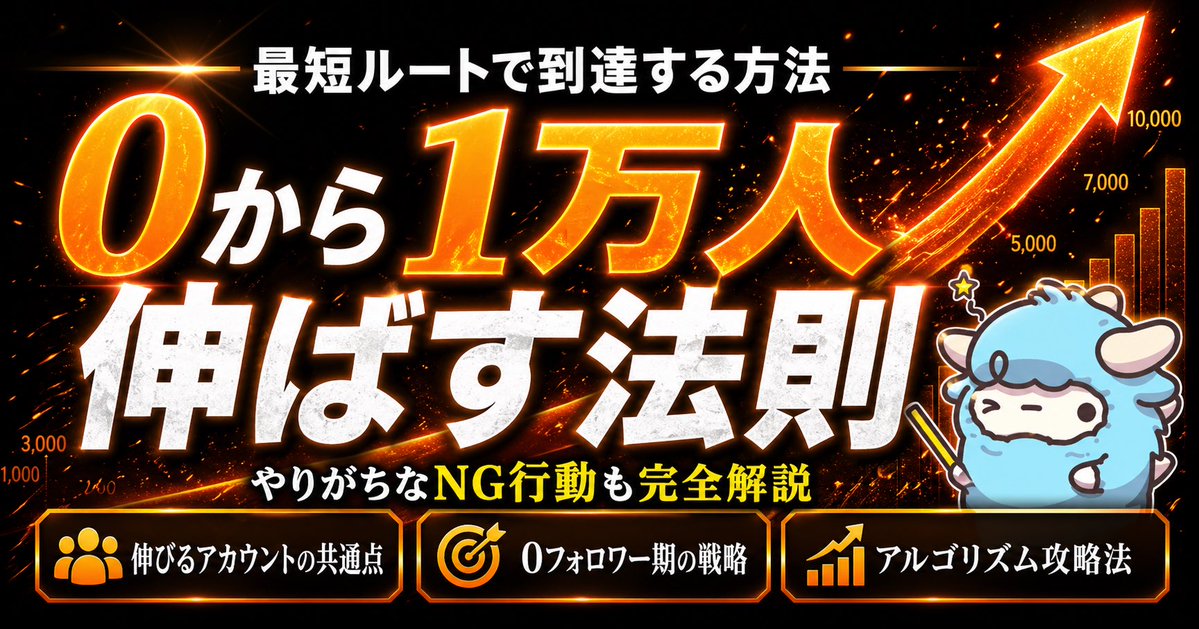
Fiery Japanese Growth Thumbnail
A bold Japanese YouTube-style thumbnail for social media growth content, ideal for tutorials about growing an account from zero to ten thousand followers.
This is a GPT Image 2 prompt case for Graphic & Poster. Use the copy-ready prompt below to generate similar visuals, and review Awesome GPT Image 2 Prompts attribution plus commercial-use rights before reuse.
Free 1K preview
Generate one preview image instantly, no sign-up required.
Prompt
Copy-ready prompt
{
  "type": "Japanese YouTube thumbnail",
  "style": "high-impact flashy growth-marketing thumbnail, dramatic, glossy, fiery, attention-grabbing",
  "canvas": {
    "aspect_ratio": "16:9",
    "background": "black with orange fire sparks, glowing particles, light streaks, and lens flare"
  },
  "headline": {
    "top_text": "{argument name=\"headline text\" default=\"最短ルートで到達する方法\"}",
    "main_text": [
      "0から",
      "Up to 10,000 people",
      "伸ばす法則"
    ],
    "sub_text": "やりがちなNG行動も完全解説",
    "main_text_style": {
      "font": "extra bold Japanese display font",
      "colors": [
        "white",
        "glowing orange-gold"
      ],
      "effects": "thick black shadow, strong outer glow, metallic heat texture on the orange text, slight distress texture on the white text"
    }
  },
  "graphics": {
    "count": 6,
    "items": [
      {
        "type": "giant upward arrow",
        "position": "top-right sweeping diagonally upward",
        "color": "bright orange-gold",
        "effect": "intense glow, spark trail"
      },
      {
        "type": "bar chart",
        "position": "right side behind character",
        "count": 4,
        "labels": [
          "5,000",
          "7,000",
          "10,000",
          ""
        ],
        "color": "orange-gold glow"
      },
      {
        "type": "lens flare starburst",
        "position": "top-left",
        "color": "golden orange"
      },
      {
        "type": "diagonal energy streak",
        "position": "bottom-left to center",
        "color": "orange"
      },
      {
        "type": "small spark particles",
        "position": "across entire background",
        "color": "orange and gold"
      },
      {
        "type": "small star icon",
        "position": "above character head",
        "color": "yellow glow"
      }
    ]
  },
  "character": {
    "count": 1,
    "subject": "cute mascot sheep avatar",
    "position": "bottom right corner",
    "appearance": {
      "body_color": "light blue fluffy wool",
      "face": "cream white",
      "outline": "dark brown line art",
      "expression": "calm closed-eye smile",
      "accessories": "holding a yellow pointer stick in the right hoof"
    }
  },
  "bottom_panels": {
    "count": 3,
    "style": "black rounded rectangular boxes with bright orange glowing borders",
    "items": [
      {
        "icon": "group of people",
        "text": "伸びるアカウントの共通点",
        "position": "bottom left corner"
      },
      {
        "icon": "target with arrow",
        "text": "0フォロワー期の戦略",
        "position": "bottom-center"
      },
      {
        "icon": "rising bar chart with arrow",
        "text": "アルゴリズム攻略法",
        "position": "bottom right corner"
      }
    ]
  },
  "color_palette": {
    "primary": [
      "black",
      "white",
      "orange",
      "gold"
    ],
    "accent": [
      "yellow",
      "light blue"
    ]
  },
  "composition": "oversized central typography dominates the frame, with the largest emphasis on 1万人 and 伸ばす法則, supporting mascot on the right, and three informational callout boxes aligned along the bottom, all designed to look like a viral Japanese social media or YouTube growth tutorial thumbnail",
  "quality": "ultra sharp, high contrast, polished thumbnail design, cinematic glow effects"
}
Prompt variables
Editable argument placeholders found in the prompt, with their default values.
Best for
- - Graphic & Poster visual exploration
- - Image generation and reference-image edits
- - Reusable briefs that keep source attribution visible
Change these parts
- - Subject, product, character, or scene
- - Aspect ratio, camera, lighting, and background
- - Brand, text, color, and output constraints
Recommended model and settings
- - Model: gpt-image-2
- - Input mode: Text to Image
- - Aspect ratio: source
- - Commercial status: review original source
How to use this prompt
- 1. Copy the prompt and preserve its structure for the first test.
- 2. Replace the subject, context, and publishing channel.
- 3. Change one camera, lighting, or style variable per iteration.
- 4. Inspect the output, source, text, and rights before reuse.
Limitations, source, and reuse cautions
- - Generated output is an editable draft, not factual, legal, or rights evidence.
- - Review the linked source, people, brands, logos, text, and third-party media before commercial use.
More cases in this category
Prioritized by category, input mode compatibility, quality, and lower risk.





Reuse and source notes
Use this prompt safely after previewing the case.
- 1.Copy the prompt or open it directly in Dovoo with the generation button.
- 2.Adjust variables, aspect ratio, and reference images for your own use case.
- 3.Before publishing or paid usage, verify source rights, attribution requirements, and brand or likeness risks.
Can I use this prompt commercially?
Commercial-use status is allowed. Review the original source, license, brand constraints, and legal requirements before paid usage.
Where does this case come from?
This case is imported from Awesome GPT Image 2 Prompts; keep attribution visible and check the source URL before reuse.