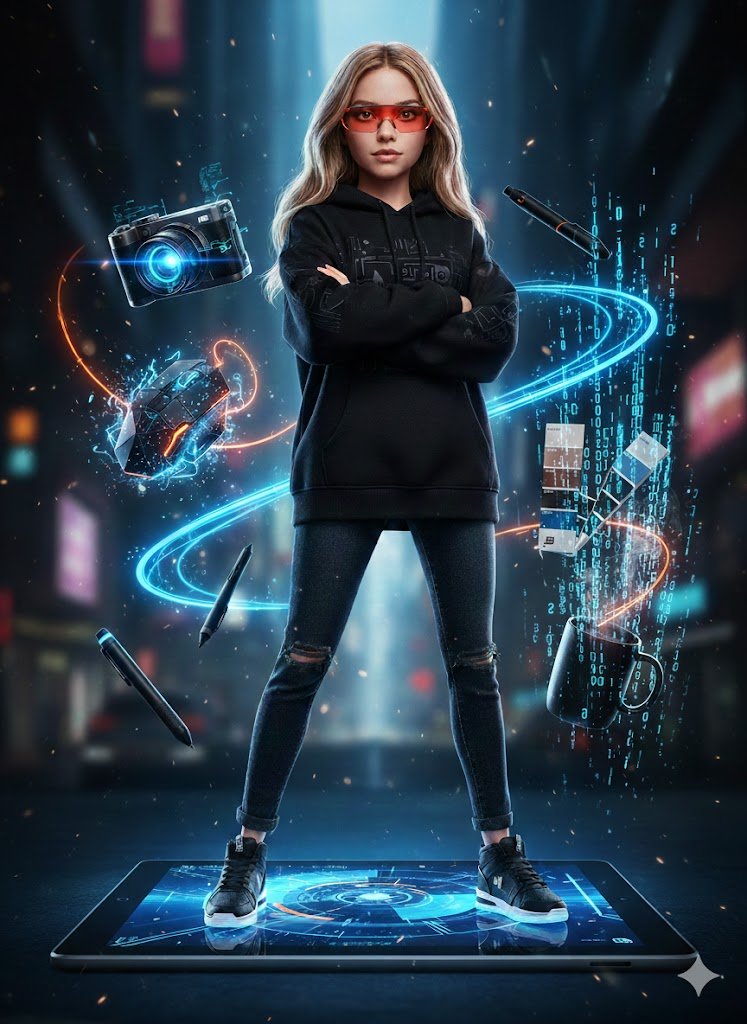
Action Figure Stylization Prompt
A prompt to stylize a portrait based on a reference photo, turning the subject into a sleek action figure standing on a digital tablet with floating tech accessories.
This is a GPT Image 2 prompt case for Portrait & Character. Use the copy-ready prompt below to generate similar visuals, and review Awesome GPT Image 2 Prompts attribution plus commercial-use rights before reuse.
Free 1K preview
Generate one preview image instantly, no sign-up required.
Prompt
Copy-ready prompt
Ultra-realistic full-body portrait of a woman posed exactly as in the reference photo, stylized as a sleek female action figure. She stands with arms folded across her chest on top of a {argument name="platform" default="massive Microsoft Surface Tablet"}, dressed in urban streetwear — {argument name="outfit" default="black hoodie, jeans, sneakers"} — with {argument name="accessory" default="sharp red tech glasses"}.

Floating around her in a dynamic layout are designer tools: a next-gen camera with a blue holographic glow, a geometric mouse with electric sparks, a digital stylus leaving wireframe trails, a Pantone color guide in bold blue and black, and a minimal black coffee cup with binary code steam rising from it.

Bold blue-and-orange color palette with dramatic lighting throughout. Cyberpunk vibe, neon details, particle effects scattered across the scene. Visual style blends 3D animation with tech photography. Crisp focus, cinematic lighting, 8k resolution.
Prompt variables
Editable argument placeholders found in the prompt, with their default values.
Best for
- - Portrait & Character visual exploration
- - Image generation and reference-image edits
- - Reusable briefs that keep source attribution visible
Change these parts
- - Subject, product, character, or scene
- - Aspect ratio, camera, lighting, and background
- - Brand, text, color, and output constraints
Recommended model and settings
- - Model: gpt-image-2
- - Input mode: Text to Image
- - Aspect ratio: source
- - Commercial status: review original source
How to use this prompt
- 1. Copy the prompt and preserve its structure for the first test.
- 2. Replace the subject, context, and publishing channel.
- 3. Change one camera, lighting, or style variable per iteration.
- 4. Inspect the output, source, text, and rights before reuse.
Limitations, source, and reuse cautions
- - Generated output is an editable draft, not factual, legal, or rights evidence.
- - Review the linked source, people, brands, logos, text, and third-party media before commercial use.
More cases in this category
Prioritized by category, input mode compatibility, quality, and lower risk.

Reuse and source notes
Use this prompt safely after previewing the case.
- 1.Copy the prompt or open it directly in Dovoo with the generation button.
- 2.Adjust variables, aspect ratio, and reference images for your own use case.
- 3.Before publishing or paid usage, verify source rights, attribution requirements, and brand or likeness risks.
Can I use this prompt commercially?
Commercial-use status is allowed. Review the original source, license, brand constraints, and legal requirements before paid usage.
Where does this case come from?
This case is imported from Awesome GPT Image 2 Prompts; keep attribution visible and check the source URL before reuse.