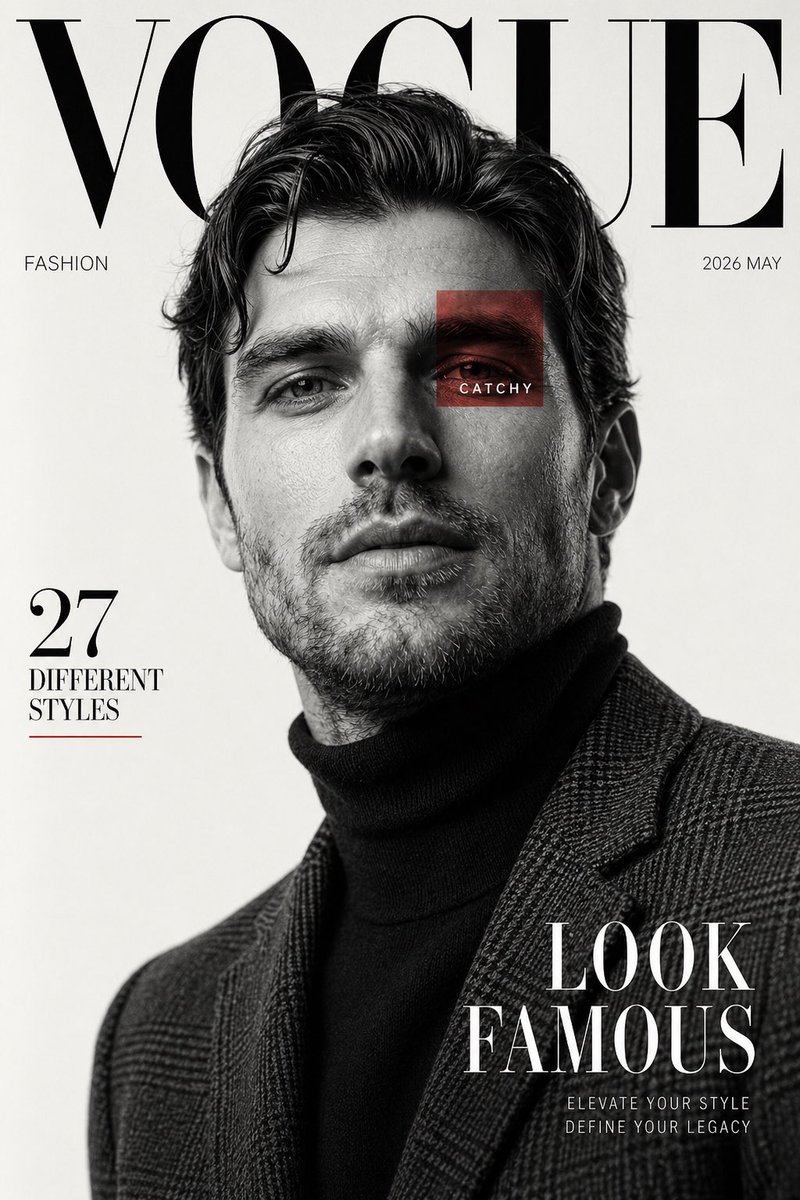
Black and White Fashion Magazine Cover
A detailed prompt for generating a luxury fashion editorial magazine cover featuring high-contrast black and white photography.
This is a GPT Image 2 prompt case for 时尚美妆. Use the copy-ready prompt below to generate similar visuals, and review Awesome GPT Image 2 Prompts attribution plus commercial-use rights before reuse.
Prompt
Copy-ready prompt
设计一张具有高端出版物风格的奢华时尚编辑类杂志封面。请使用男性主体的参考照片。以黑白人像摄影风格拍摄,背景为干净的灰白色摄影棚背景。让主体以低机位视角自信地摆出姿势,下巴微抬,下颌线清晰,双唇微张,凌乱的波浪卷发自然蓬松。服装:深色高领毛衣外搭一件质感十足的格纹西装外套。光线柔和但富有戏剧性,雕琢出面部阴影并产生优雅的色调对比。

在排版方面,在最顶部放置一个超大的衬线字体刊头,文字为“{argument name="magazine name" default="VOGUE"}”,并被主体头部部分遮挡。其余排版保持极简且高端。添加侧边文字“FASHION”、发行日期“{argument name="issue date" default="2026 MAY"}”、左侧标题“27 DIFFERENT STYLES”以及右下角醒目的封面标语“LOOK FAMOUS”。在其中一只眼睛上方叠加一个半透明的小红方块,方块内写有单词“CATCHY”。

整体质感:高端、现代、电影感、构图简洁、对焦清晰、超写实的皮肤纹理、编辑类奢华美学、充足的留白、永恒的封面设计。竖版杂志比例,高分辨率。
Prompt variables
Editable argument placeholders found in the prompt, with their default values.
More cases in this category
Prioritized by category, input mode compatibility, quality, and lower risk.
Reuse and source notes
Use this prompt safely after previewing the case.
- 1.Copy the prompt or open it directly in Dovoo with the generation button.
- 2.Adjust variables, aspect ratio, and reference images for your own use case.
- 3.Before publishing or paid usage, verify source rights, attribution requirements, and brand or likeness risks.
Can I use this prompt commercially?
Commercial-use status is allowed. Review the original source, license, brand constraints, and legal requirements before paid usage.
Where does this case come from?
This case is imported from Awesome GPT Image 2 Prompts; keep attribution visible and check the source URL before reuse.