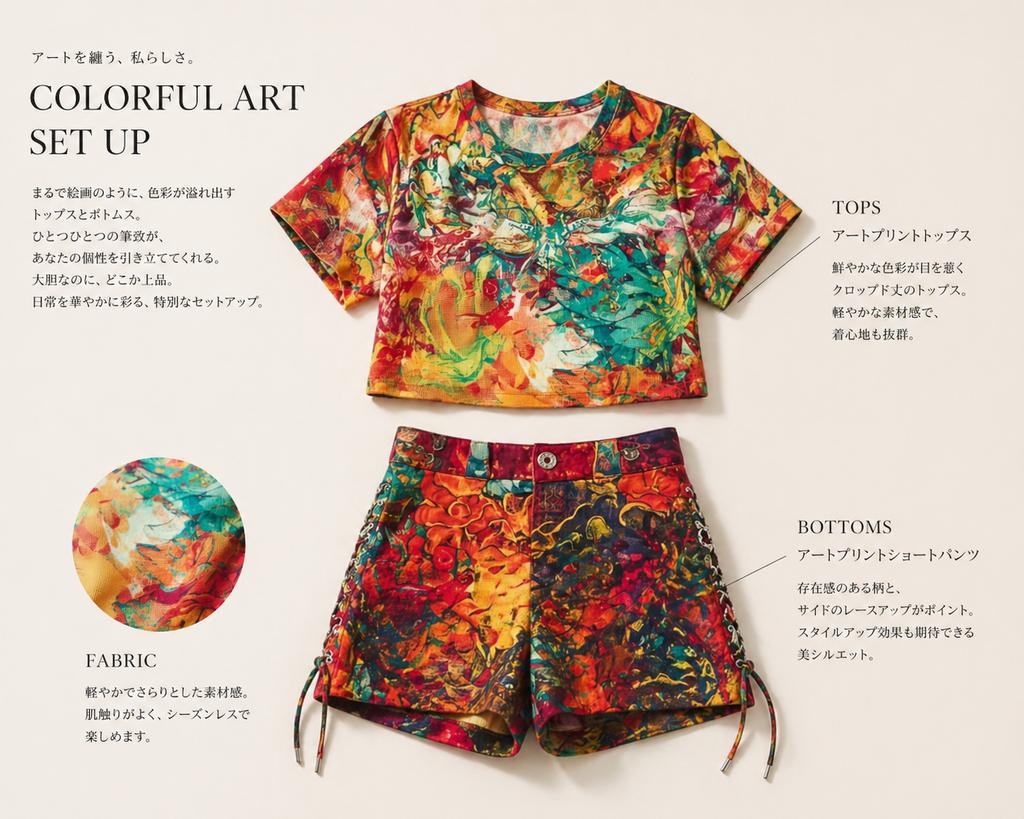
Fashion Editorial Outfit Breakdown
This prompt turns a reference outfit photo into a polished magazine-style apparel layout for product presentation and catalog mockups.
This is a GPT Image 2 prompt case for Fashion & Beauty. Use the copy-ready prompt below to generate similar visuals, and review Awesome GPT Image 2 Prompts attribution plus commercial-use rights before reuse.
Free 1K preview
Generate one preview image instantly, no sign-up required.
Prompt
Copy-ready prompt
Using REFERENCE_0, extract only the outfit and turn it into a clean fashion magazine product showcase on a light warm-beige background. Remove the person entirely and display the clothing as separate laid-flat items: 1 cropped short-sleeve top centered near the top and 1 pair of shorts centered below it. Preserve the vivid multicolor art print from the reference, but present the garments neatly, as if for an editorial catalog page, with soft studio shadows. Add 1 circular fabric-detail inset at the lower left showing a close-up of the print. Add elegant editorial typography and thin callout lines, with 4 text blocks total: a large headline block at upper left reading “COLORFUL ART SET UP” with small Japanese copy above and below, 1 right-side block labeled “TOPS” with Japanese description, 1 lower-right block labeled “BOTTOMS” with Japanese description, and 1 lower-left block labeled “FABRIC” with short Japanese description. Keep the overall look refined, minimal, premium, and like a clothing introduction page in a magazine.
Best for
- - Fashion & Beauty visual exploration
- - Image generation and reference-image edits
- - Reusable briefs that keep source attribution visible
Change these parts
- - Subject, product, character, or scene
- - Aspect ratio, camera, lighting, and background
- - Brand, text, color, and output constraints
Recommended model and settings
- - Model: gpt-image-2
- - Input mode: Text to Image
- - Aspect ratio: source
- - Commercial status: review original source
How to use this prompt
- 1. Copy the prompt and preserve its structure for the first test.
- 2. Replace the subject, context, and publishing channel.
- 3. Change one camera, lighting, or style variable per iteration.
- 4. Inspect the output, source, text, and rights before reuse.
Limitations, source, and reuse cautions
- - Generated output is an editable draft, not factual, legal, or rights evidence.
- - Review the linked source, people, brands, logos, text, and third-party media before commercial use.
More cases in this category
Prioritized by category, input mode compatibility, quality, and lower risk.


Reuse and source notes
Use this prompt safely after previewing the case.
- 1.Copy the prompt or open it directly in Dovoo with the generation button.
- 2.Adjust variables, aspect ratio, and reference images for your own use case.
- 3.Before publishing or paid usage, verify source rights, attribution requirements, and brand or likeness risks.
Can I use this prompt commercially?
Commercial-use status is allowed. Review the original source, license, brand constraints, and legal requirements before paid usage.
Where does this case come from?
This case is imported from Awesome GPT Image 2 Prompts; keep attribution visible and check the source URL before reuse.