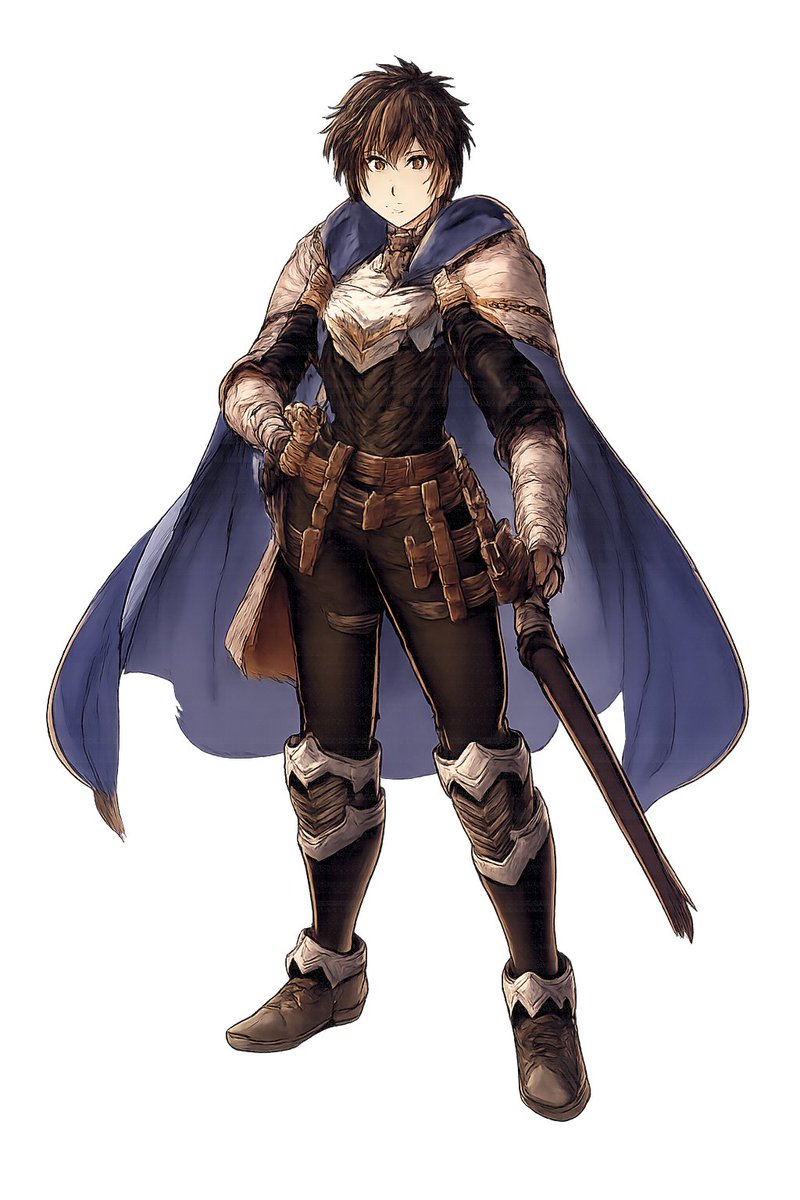
Fantasy Warrior Character Concept
This prompt generates a full-body JRPG-style fantasy warrior concept illustration on a plain background, suitable for character design sheets and game art ideation.
This is a GPT Image 2 prompt case for Portrait & Character. Use the copy-ready prompt below to generate similar visuals, and review Awesome GPT Image 2 Prompts attribution plus commercial-use rights before reuse.
Free 1K preview
Generate one preview image instantly, no sign-up required.
Prompt
Copy-ready prompt
A full-body fantasy character concept art illustration of a {argument name="character gender" default="young male"} warrior standing in a relaxed but ready pose on a plain light gray background, isolated with no environment. He has short, messy {argument name="hair color" default="dark brown"} hair and a rough heroic JRPG-style design. His face is largely obscured and de-emphasized, with the focus on costume and silhouette. He wears 8 clearly visible outfit elements: a dark fitted bodysuit, a white and cream layered chest mantle with angular feather-like folds, a large deep blue cape draped over both shoulders and flowing behind him, dark arm coverings with wrapped forearms, a brown utility belt, multiple tan leather pouches and straps hanging from the hips, silver knee and shin armor on both legs, and worn brown leather boots. He holds 2 weapons: a sheathed sword gripped at his left hip and a long dark staff or rod angled downward in his right hand. The art style is painterly high-detail fantasy concept art with fine ink-like outlines, muted earthy colors, realistic fabric folds, soft shading, and polished videogame character design presentation, centered composition, full figure visible from head to toe.Prompt variables
Editable argument placeholders found in the prompt, with their default values.
Best for
- - Portrait & Character visual exploration
- - Image generation and reference-image edits
- - Reusable briefs that keep source attribution visible
Change these parts
- - Subject, product, character, or scene
- - Aspect ratio, camera, lighting, and background
- - Brand, text, color, and output constraints
Recommended model and settings
- - Model: gpt-image-2
- - Input mode: Text to Image
- - Aspect ratio: source
- - Commercial status: review original source
How to use this prompt
- 1. Copy the prompt and preserve its structure for the first test.
- 2. Replace the subject, context, and publishing channel.
- 3. Change one camera, lighting, or style variable per iteration.
- 4. Inspect the output, source, text, and rights before reuse.
Limitations, source, and reuse cautions
- - Generated output is an editable draft, not factual, legal, or rights evidence.
- - Review the linked source, people, brands, logos, text, and third-party media before commercial use.
More cases in this category
Prioritized by category, input mode compatibility, quality, and lower risk.





Reuse and source notes
Use this prompt safely after previewing the case.
- 1.Copy the prompt or open it directly in Dovoo with the generation button.
- 2.Adjust variables, aspect ratio, and reference images for your own use case.
- 3.Before publishing or paid usage, verify source rights, attribution requirements, and brand or likeness risks.
Can I use this prompt commercially?
Commercial-use status is allowed. Review the original source, license, brand constraints, and legal requirements before paid usage.
Where does this case come from?
This case is imported from Awesome GPT Image 2 Prompts; keep attribution visible and check the source URL before reuse.