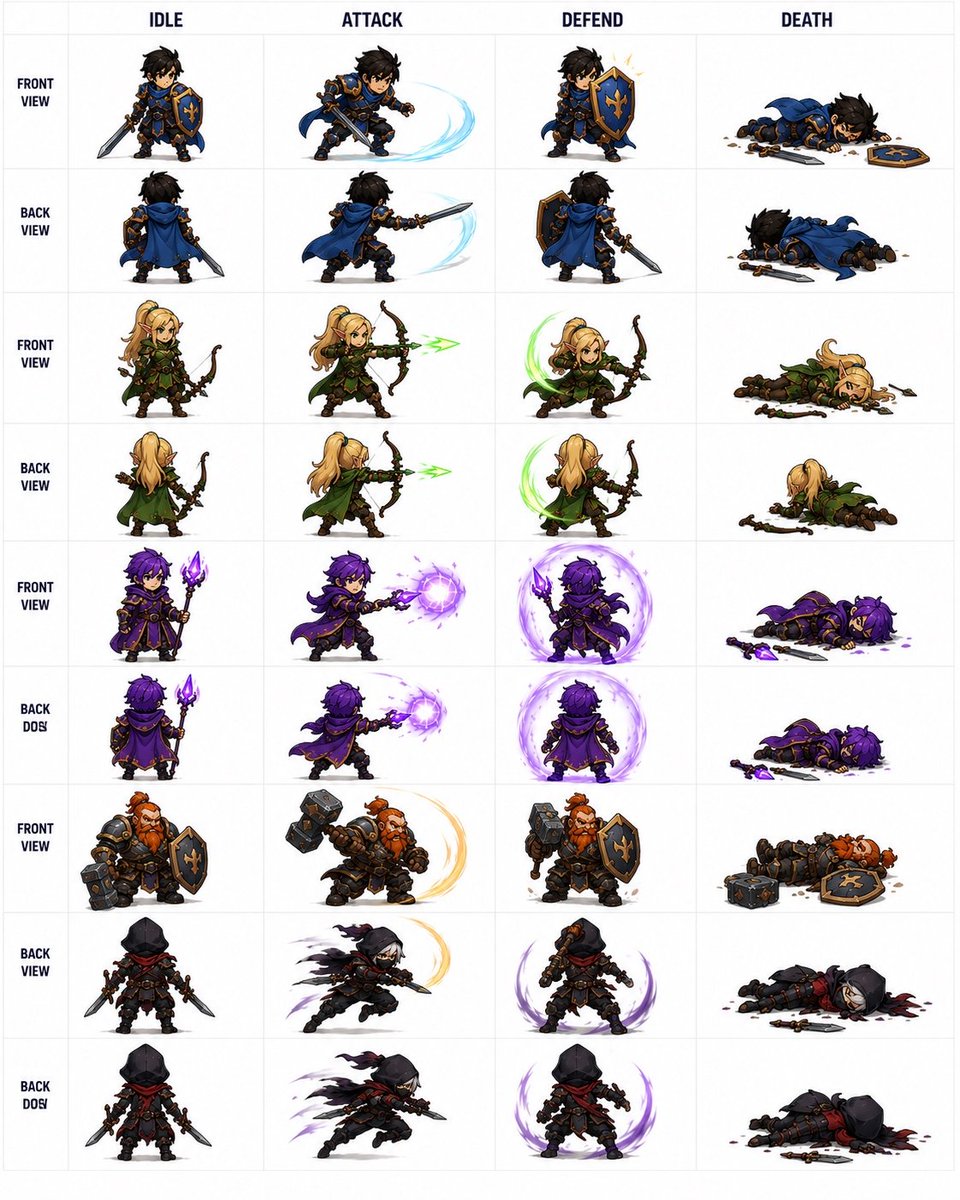
Fantasy Auto-Battler Spritesheet
Generates a structured 36-sprite fantasy RPG character sheet for prototyping 2D auto-battler idle, attack, defend, and death animations.
This is a GPT Image 2 prompt case for 动漫游戏. Use the copy-ready prompt below to generate similar visuals, and review Awesome GPT Image 2 Prompts attribution plus commercial-use rights before reuse.
Prompt
Copy-ready prompt
Objective: Create a clean atlas of sprites for a fantasy auto-battle game, showcasing battle animations of a small team, suitable for conversion into 2D game assets. Canvas: A square white canvas with a light gray grid, similar to a production-ready sprite atlas. Use a crisp, high-resolution chibi fantasy game art style with transparent white cells as the background, featuring strong outlines, dark strokes, painterly shadows, and dynamic slash/magic effects. Layout: Create a table containing 4 columns of animations and 9 rows of character/viewpoint views. The top 4 column headings must strictly follow: IDLE, ATTACK, DEFEND, DEATH. Place bold, small row labels on the left. Center a full-body chibi sprite in each cell, without cropping. Ensure all sprites are proportionally consistent. Number of Rows and Visible Count: Contains a total of 36 individual sprites, arranged in 9 rows × 4 columns. The content of each row is as follows: 1. FRONT VIEW:{argument name="blue knight character" default="A human knight with dark hair, wearing blue and gold armor, a blue cloak, and carrying a sword and a blue shield with a golden iris pattern."} 2. Back View: The same blue knight viewed from behind. 3. Front View:{argument name="elf archer character" default="A blonde female elven ranger, dressed in green leather armor and a cloak, carrying a wooden bow."} 4. BACK VIEW: The same Elven Ranger viewed from behind. 5. FRONT VIEW:{argument name="purple mage character" default="A purple-haired mage, dressed in a deep purple robe, holding a glowing purple crystal staff."} 6. BACK DOS: The same purple mage viewed from behind; retain this slightly incorrect line label text BACK DOS. 7. FRONT VIEW:{argument name="dwarf warrior character" default="A robust, red-bearded dwarf warrior, clad in heavy black-bronze armor, wielding a giant hammer and a blue shield."} 8. Back View:{argument name="hooded rogue character" default="A thief wearing a black hood, dark armor, a red scarf, carrying two daggers, and draped in a tattered cloak."} 9. BACK DOS: The same hooded thief is shown on another back/action line; retain the slightly incorrect line label text BACK DOS. Animation details for each column: In the IDLE column, each character is in a ready pose, with weapons visible. In the ATTACK column, characters are shown thrusting or attacking: the blue knight swings his sword with a pale blue arc, the elf shoots a green arrow, the mage casts a purple magic orb, the dwarf swings his hammer with a golden arc, and the thief charges with a purple trajectory. In the DEFEND column, defensive poses are shown: the knight raises his shield with small sparks, the elf raises a green circular energy arc, the mage is surrounded by a purple protective aura, the dwarf holds a hammer and shield in defense, and the thief crouches with a purple crescent-shaped defensive effect. In the DEATH column, each character lies on the ground, their weapon dropped, surrounded by debris; this includes a knight's shield and sword, an elf's bow, a mage's staff/crystal and purple remnants, a dwarf's hammer and shield, and a thief's dagger and a few dark red marks. Visual Style: Cute yet detailed chibi-style proportions, fantasy RPG/mobile auto-battle game style, three-quarter perspective, expressive poses, saturated colors, clear and legible outlines, consistent lighting, and no background scene outside the grid. Constraints: Must use 4 column labels, 9 row labels, and exactly 36 elf poses. Do not add extra characters, UI buttons, attributes, logos, watermarks, or scenes. Keep all text in English and ensure the table is easy to read.Prompt variables
Editable argument placeholders found in the prompt, with their default values.
More cases in this category
Prioritized by category, input mode compatibility, quality, and lower risk.
Reuse and source notes
Use this prompt safely after previewing the case.
- 1.Copy the prompt or open it directly in Dovoo with the generation button.
- 2.Adjust variables, aspect ratio, and reference images for your own use case.
- 3.Before publishing or paid usage, verify source rights, attribution requirements, and brand or likeness risks.
Can I use this prompt commercially?
Commercial-use status is allowed. Review the original source, license, brand constraints, and legal requirements before paid usage.
Where does this case come from?
This case is imported from Awesome GPT Image 2 Prompts; keep attribution visible and check the source URL before reuse.