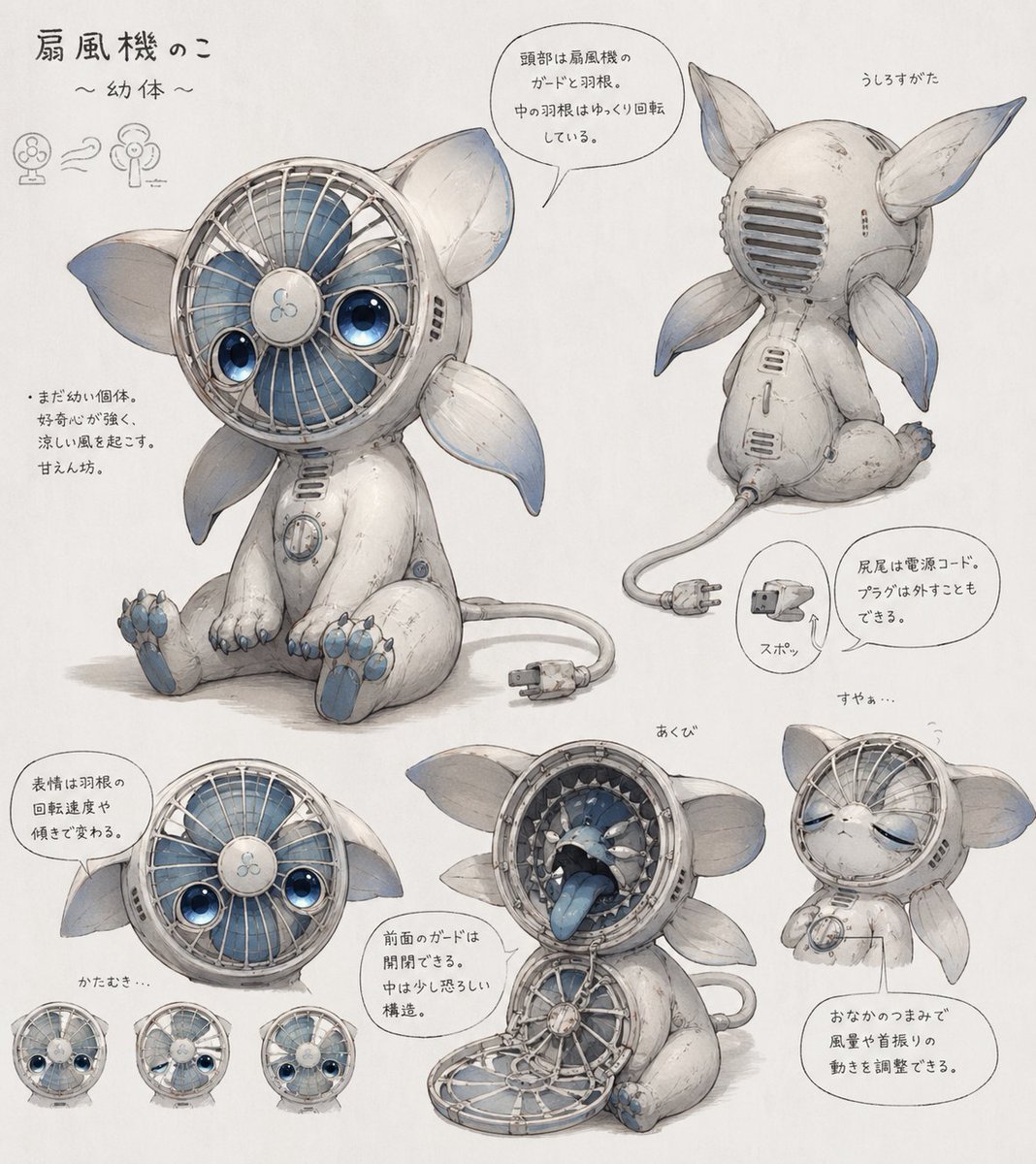
Fan Creature Concept Sheet
A Japanese-style concept art sheet showing a cute baby electric-fan creature from multiple views with mechanical callouts, ideal for creature design and character development prompts.
This is a GPT Image 2 prompt case for Portrait & Character. Use the copy-ready prompt below to generate similar visuals, and review Awesome GPT Image 2 Prompts attribution plus commercial-use rights before reuse.
Free 1K preview
Generate one preview image instantly, no sign-up required.
Prompt
Copy-ready prompt
{
  "type": "concept art character reference sheet",
  "subject": "cute inorganic creature based on an electric desk fan",
  "style": "soft watercolor and pencil sketch on white paper, delicate industrial design illustration, whimsical Japanese concept sheet",
  "character": {
    "species": "fan creature",
    "life stage": "{argument name=\"life stage\" default=\"infant\"}",
    "body": "small seated mascot-like animal body with worn white shell casing, rounded limbs, subtle scratches and seams, blue accent details",
    "head": "circular electric fan face with metal grille, visible blue fan blades behind the grille, central hub with a tiny fan icon, two large glossy blue eyes embedded inside the fan face, large leaf-like ears on both sides",
    "back": "rear head has a vent-like guard grille",
    "appendages": {
      "ear count": 2,
      "side fin count": 4,
      "paw count": 4,
      "tail": "power cord tail ending in a two-prong plug"
    },
    "color_palette": {
      "primary": "{argument name=\"body color\" default=\"off-white\"}",
      "secondary": "pale blue-gray",
      "accent": "{argument name=\"accent color\" default=\"soft blue\"}"
    },
    "mechanical_features": [
      "front fan guard can open like a hinged mouth cover",
      "interior mouth cavity reveals layered mechanical ring teeth and a blue tongue",
      "fan blades can rotate slowly inside the head",
      "plug tail can be unplugged from the body",
      "belly dial controls wind strength and head-shaking motion"
    ]
  },
  "layout": {
    "background": "plain white paper",
    "sheet_orientation": "landscape",
    "sections": [
      {
        "title": "扇風機のこ ~幼体~",
        "position": "upper left",
        "count": 1,
        "labels": [
          "title area with tiny fan evolution icons"
        ]
      },
      {
        "title": "front view",
        "position": "center-left",
        "count": 1,
        "labels": [
          "main full-body seated pose"
        ]
      },
      {
        "title": "うしろすがた",
        "position": "upper right",
        "count": 1,
        "labels": [
          "rear three-quarter seated view"
        ]
      },
      {
        "title": "expressions and face angle",
        "position": "lower left",
        "count": 4,
        "labels": [
          "main face close-up",
          "left tilted face",
          "sleepy face",
          "right tilted face"
        ]
      },
      {
        "title": "あくび",
        "position": "lower center",
        "count": 1,
        "labels": [
          "open guard mouth and yawning interior view"
        ]
      },
      {
        "title": "すやぁ…",
        "position": "bottom right",
        "count": 1,
        "labels": [
          "sleeping seated pose"
        ]
      },
      {
        "title": "feature callouts",
        "position": "throughout sheet",
        "count": 6,
        "labels": [
          "fan-blade head explanation",
          "young body and gentle wind note",
          "expression changes with blade rotation and tilt",
          "front guard opens",
          "plug tail removable",
          "belly dial adjusts wind and oscillation"
        ]
      }
    ]
  },
  "text_language": "Japanese handwritten annotations in speech bubbles and notes",
  "rendering": "high-detail hand-painted concept sketch, subtle shadows, slightly aged appliance texture, adorable but mechanical mood",
  "composition": "one large central character drawing with 7 smaller supporting views and callout bubbles",
  "customization": {
    "character concept": "{argument name=\"creature concept\" default=\"electric fan animal\"}",
    "paper style": "{argument name=\"paper style\" default=\"clean white concept sheet\"}"
  }
}
Prompt variables
Editable argument placeholders found in the prompt, with their default values.
Best for
- - Portrait & Character visual exploration
- - Image generation and reference-image edits
- - Reusable briefs that keep source attribution visible
Change these parts
- - Subject, product, character, or scene
- - Aspect ratio, camera, lighting, and background
- - Brand, text, color, and output constraints
Recommended model and settings
- - Model: gpt-image-2
- - Input mode: Text to Image
- - Aspect ratio: source
- - Commercial status: review original source
How to use this prompt
- 1. Copy the prompt and preserve its structure for the first test.
- 2. Replace the subject, context, and publishing channel.
- 3. Change one camera, lighting, or style variable per iteration.
- 4. Inspect the output, source, text, and rights before reuse.
Limitations, source, and reuse cautions
- - Generated output is an editable draft, not factual, legal, or rights evidence.
- - Review the linked source, people, brands, logos, text, and third-party media before commercial use.
More cases in this category
Prioritized by category, input mode compatibility, quality, and lower risk.






Reuse and source notes
Use this prompt safely after previewing the case.
- 1.Copy the prompt or open it directly in Dovoo with the generation button.
- 2.Adjust variables, aspect ratio, and reference images for your own use case.
- 3.Before publishing or paid usage, verify source rights, attribution requirements, and brand or likeness risks.
Can I use this prompt commercially?
Commercial-use status is allowed. Review the original source, license, brand constraints, and legal requirements before paid usage.
Where does this case come from?
This case is imported from Awesome GPT Image 2 Prompts; keep attribution visible and check the source URL before reuse.