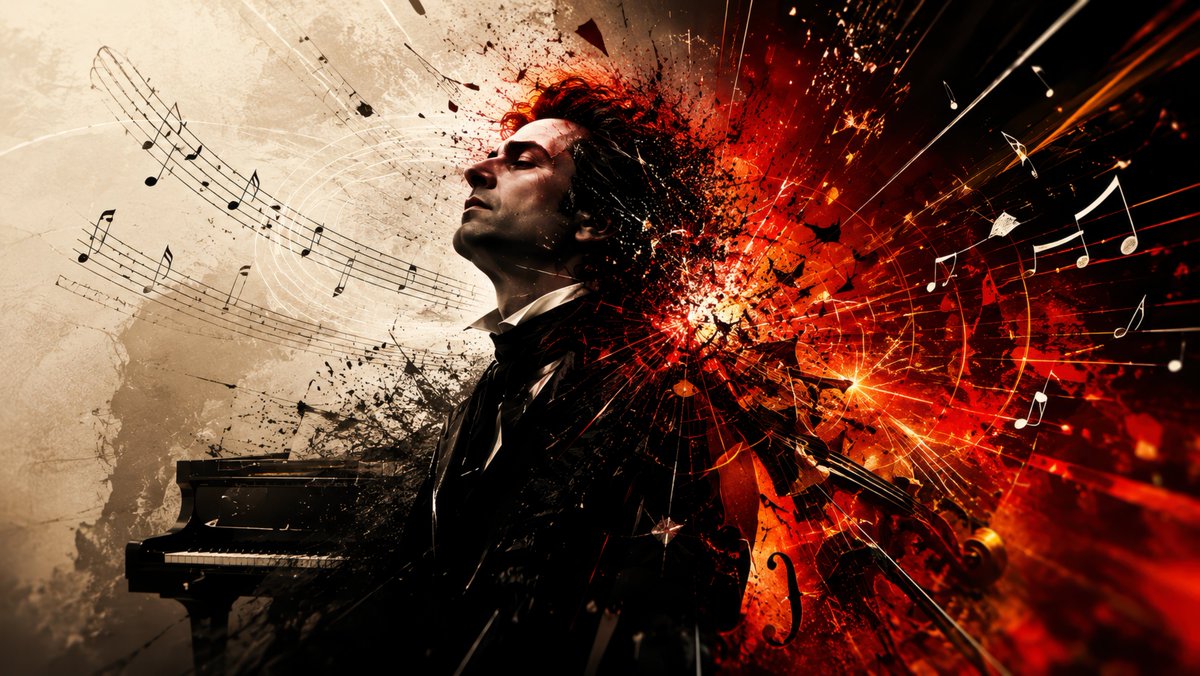
Explosive Classical Composer Artwork
A dramatic cinematic prompt for generating a classical composer consumed by fiery musical chaos and emotional intensity.
This is a GPT Image 2 prompt case for Illustration & Art. Use the copy-ready prompt below to generate similar visuals, and review Awesome GPT Image 2 Prompts attribution plus commercial-use rights before reuse.
Free 1K preview
Generate one preview image instantly, no sign-up required.
Prompt
Copy-ready prompt
Create a cinematic widescreen 16:9 digital artwork showing {argument name="character" default="a Romantic-era classical composer and pianist"} in dramatic side-profile at the center-left, wearing a black 19th-century formal suit, white shirt, and cravat, eyes closed and face lifted as if overwhelmed by music. Place a black grand piano in the lower left, partly swallowed by dark ink splatter. The background should be split emotionally: on the left, an aged parchment beige wall with faint stains, scratches, and flowing curved musical staff lines with black notes; on the right, an explosive abstract burst of {argument name="energy color" default="red, orange, and black"} like a violent emotional gunfight, with sparks, shards, ink, smoke, and radial speed lines shooting outward. Add floating sheet-music fragments, bright white and black musical notes, violin/cello silhouettes, strings, and glowing streaks flying through the composition. Make the composer’s hair and upper body dissolve into the explosion, with black splatter transitioning into fiery particles. Use high contrast chiaroscuro lighting, painterly photorealistic textures, intense motion, dramatic orchestral energy, no text, no watermark, no frame.Prompt variables
Editable argument placeholders found in the prompt, with their default values.
Best for
- - Illustration & Art visual exploration
- - Image generation and reference-image edits
- - Reusable briefs that keep source attribution visible
Change these parts
- - Subject, product, character, or scene
- - Aspect ratio, camera, lighting, and background
- - Brand, text, color, and output constraints
Recommended model and settings
- - Model: gpt-image-2
- - Input mode: Text to Image
- - Aspect ratio: source
- - Commercial status: review original source
How to use this prompt
- 1. Copy the prompt and preserve its structure for the first test.
- 2. Replace the subject, context, and publishing channel.
- 3. Change one camera, lighting, or style variable per iteration.
- 4. Inspect the output, source, text, and rights before reuse.
Limitations, source, and reuse cautions
- - Generated output is an editable draft, not factual, legal, or rights evidence.
- - Review the linked source, people, brands, logos, text, and third-party media before commercial use.
More cases in this category
Prioritized by category, input mode compatibility, quality, and lower risk.


Reuse and source notes
Use this prompt safely after previewing the case.
- 1.Copy the prompt or open it directly in Dovoo with the generation button.
- 2.Adjust variables, aspect ratio, and reference images for your own use case.
- 3.Before publishing or paid usage, verify source rights, attribution requirements, and brand or likeness risks.
Can I use this prompt commercially?
Commercial-use status is allowed. Review the original source, license, brand constraints, and legal requirements before paid usage.
Where does this case come from?
This case is imported from Awesome GPT Image 2 Prompts; keep attribution visible and check the source URL before reuse.