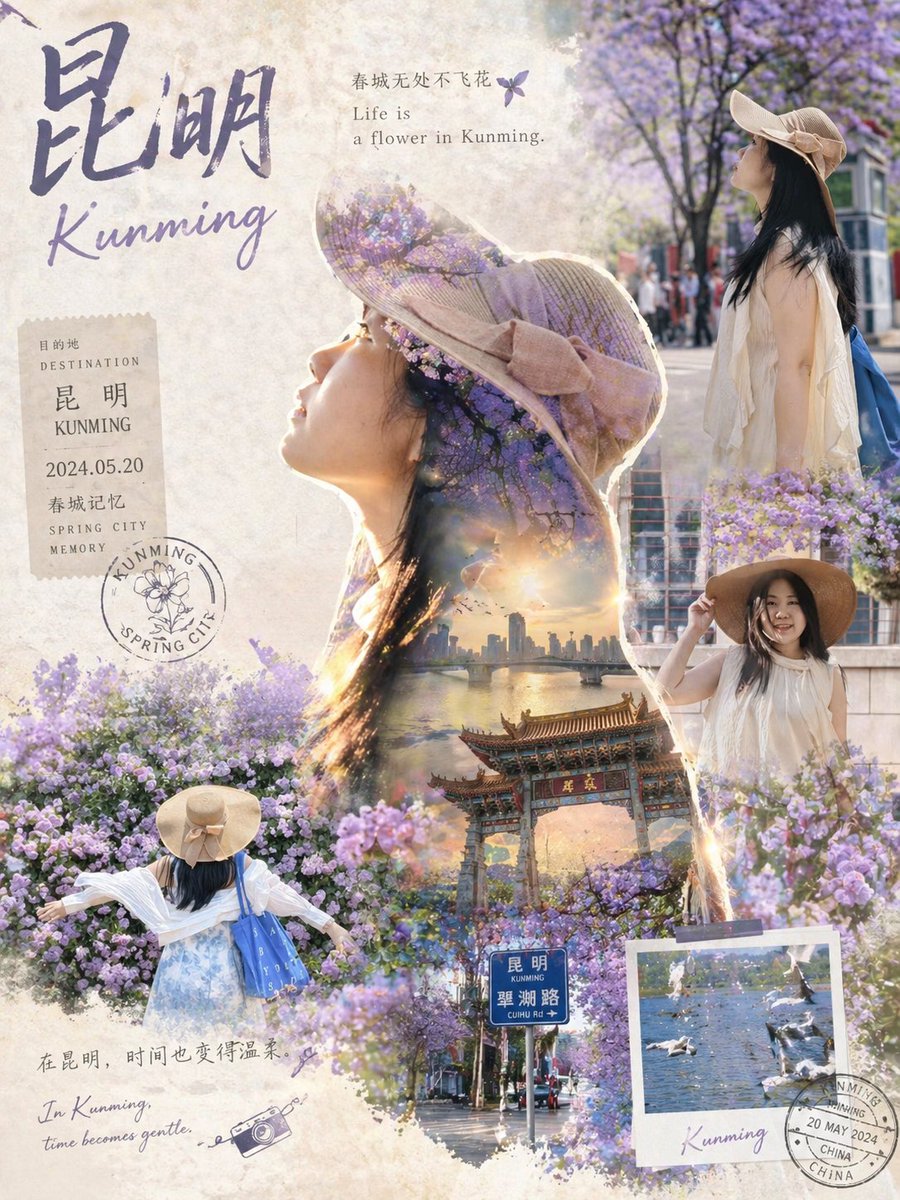
Epic Narrative Travel Poster
A comprehensive template prompt for creating structured travel posters using multiple reference images, double exposure, and collage techniques.
This is a GPT Image 2 prompt case for Graphic & Poster. Use the copy-ready prompt below to generate similar visuals, and review Awesome GPT Image 2 Prompts attribution plus commercial-use rights before reuse.
This prompt is designed for multiple reference images. We will open Dovoo with the prompt and the available preview image; add the remaining references in Dovoo before generating.
Free 1K preview
Generate one preview image instantly, no sign-up required.
Free text preview doesn’t preserve reference-image consistency.
Prompt
Copy-ready prompt
[Collection-Grade Travel Epic Poster · Universal Meta Prompt]

Based on the multiple character photos I uploaded, automatically generate a collection-grade epic narrative travel poster.

The silhouette of the first attached image is the default main outline reference. Extract the character's profile, body posture, hair outline, clothing silhouette, and overall temperament to form the main subject silhouette.

Other attached images are used as real photo collage materials. The character's image, posture, clothing, hairstyle, accessories, light, shadow, and action moments in the original photos must be preserved as much as possible. Do not generate strangers, and do not change gender, age, face shape, hairstyle, outfit, accessories, or physique.

Character consistency requirement: All characters appearing must come from the same person or group in the uploaded photos. The model needs to automatically extract character features. Do not beautify the person into a completely different face.

Travel Destination: {argument name="destination" default="Kunming"}

Automatically generate the corresponding travel visual world based on the filled city or attraction, including landmark landscapes, urban landmarks, street atmosphere, architectural styles, cultural symbols, etc.

The visual structure uses 'Main Silhouette Outline + Real Photo Collage + Double Exposure Narrative.'

The character outline from the first image serves as the large main visual, with the complete narrative world of the destination growing naturally inside the silhouette. Other images are embedded as photo collages inside or around the silhouette. Edges can be softly merged with watercolor, paper grain, mist, light spots, film scratches, or journal stickers.

Spatial layers must be clear: Foreground is the real moment of the person; Middle ground is the travel scene (streets, bridges, etc.); Background is the skyline or mountains.

Style: Cinematic travel collection poster, double exposure, real photo collage, light watercolor texture integration. The image should be sophisticated, restrained, poetic, and airy.

Text system combines Chinese and English: Main Title ({argument name="city name" default="Kunming"} + English name), subtitle, and short travel quotes.

Output Ratio: 3:4 or 4:5. Texture: High-definition, collection-grade, cinematic poster quality.
Prompt variables
Editable argument placeholders found in the prompt, with their default values.
Best for
- - Graphic & Poster visual exploration
- - Image generation and reference-image edits
- - Reusable briefs that keep source attribution visible
Change these parts
- - Subject, product, character, or scene
- - Aspect ratio, camera, lighting, and background
- - Brand, text, color, and output constraints
Recommended model and settings
- - Model: gpt-image-2
- - Input mode: Multi Image to Image
- - Aspect ratio: source
- - Commercial status: review original source
How to use this prompt
- 1. Copy the prompt and preserve its structure for the first test.
- 2. Replace the subject, context, and publishing channel.
- 3. Change one camera, lighting, or style variable per iteration.
- 4. Inspect the output, source, text, and rights before reuse.
Limitations, source, and reuse cautions
- - Generated output is an editable draft, not factual, legal, or rights evidence.
- - Review the linked source, people, brands, logos, text, and third-party media before commercial use.
More cases in this category
Prioritized by category, input mode compatibility, quality, and lower risk.



Reuse and source notes
Use this prompt safely after previewing the case.
- 1.Copy the prompt or open it directly in Dovoo with the generation button.
- 2.Adjust variables, aspect ratio, and reference images for your own use case.
- 3.Before publishing or paid usage, verify source rights, attribution requirements, and brand or likeness risks.
Can I use this prompt commercially?
Commercial-use status is allowed. Review the original source, license, brand constraints, and legal requirements before paid usage.
Where does this case come from?
This case is imported from Awesome GPT Image 2 Prompts; keep attribution visible and check the source URL before reuse.