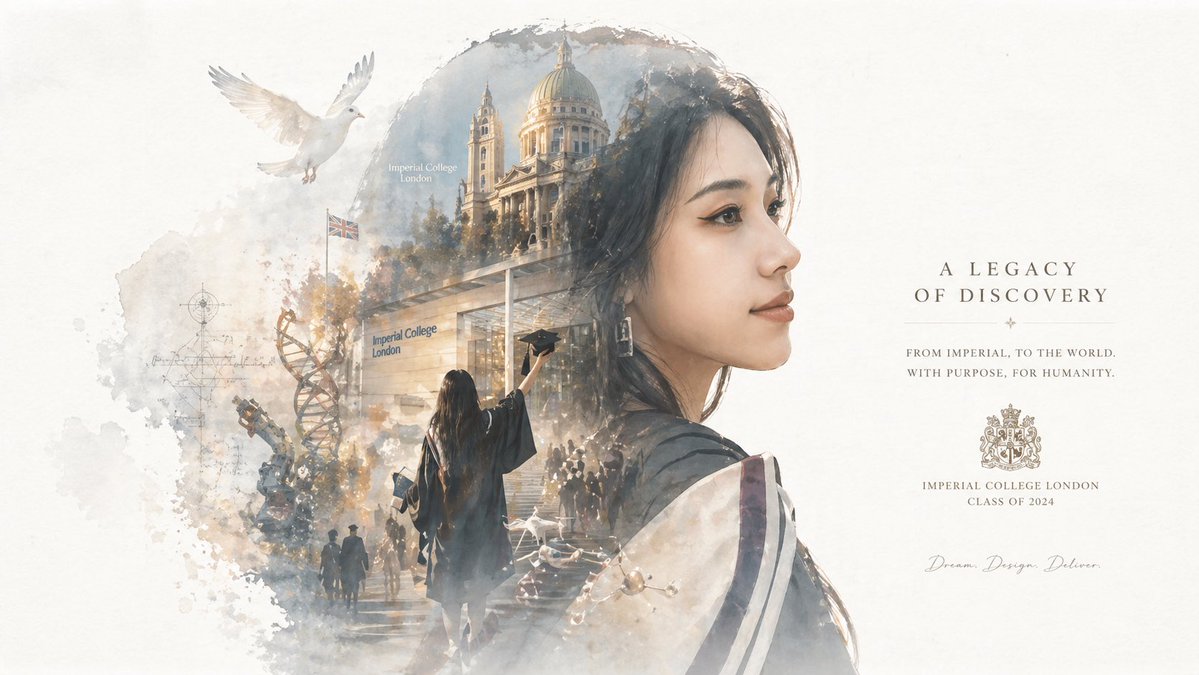
Epic Narrative Silhouette Poster
A complex prompt for creating a double-exposure style silhouette poster that integrates a complete narrative world within a character's profile
This is a GPT Image 2 prompt case for Graphic & Poster. Use the copy-ready prompt below to generate similar visuals, and review Awesome GPT Image 2 Prompts attribution plus commercial-use rights before reuse.
Free 1K preview
Generate one preview image instantly, no sign-up required.
Prompt
Copy-ready prompt
Automatically generate a collector's edition epic narrative poster based on my portrait ({argument name="theme" default="graduation photo"}): using a large silhouette of my side profile as the outer outline, inside the silhouette, a complete world-view, iconic scenes, character relationships, symbolic icons, key architecture, creatures, props, and atmosphere most relevant to the theme ({argument name="scene elements" default="campus + graduation"}) will grow automatically.

Overall, it's not a simple collage, but a high-end silhouette-fill narrative synthesis with double-exposure associations, leaning more towards a {argument name="art style" default="fusion of movie poster and dreamlike watercolor illustration style"}; soft aerial perspective, light misting, paper grain, white edges and brush marks, large areas of negative space, restrained and high-end layout, quiet, grand, sacred, nostalgic, poetic, and legendary feel.

Style, color, scene, and materials are all automatically adapted based on the theme. All elements must be strongly tied to the theme for instant recognition, avoiding clutter, hard collages, templated backgrounds, or cheap fantasy assets. Use English for any typography.
Prompt variables
Editable argument placeholders found in the prompt, with their default values.
Best for
- - Graphic & Poster visual exploration
- - Image generation and reference-image edits
- - Reusable briefs that keep source attribution visible
Change these parts
- - Subject, product, character, or scene
- - Aspect ratio, camera, lighting, and background
- - Brand, text, color, and output constraints
Recommended model and settings
- - Model: gpt-image-2
- - Input mode: Text to Image
- - Aspect ratio: source
- - Commercial status: review original source
How to use this prompt
- 1. Copy the prompt and preserve its structure for the first test.
- 2. Replace the subject, context, and publishing channel.
- 3. Change one camera, lighting, or style variable per iteration.
- 4. Inspect the output, source, text, and rights before reuse.
Limitations, source, and reuse cautions
- - Generated output is an editable draft, not factual, legal, or rights evidence.
- - Review the linked source, people, brands, logos, text, and third-party media before commercial use.
More cases in this category
Prioritized by category, input mode compatibility, quality, and lower risk.





Reuse and source notes
Use this prompt safely after previewing the case.
- 1.Copy the prompt or open it directly in Dovoo with the generation button.
- 2.Adjust variables, aspect ratio, and reference images for your own use case.
- 3.Before publishing or paid usage, verify source rights, attribution requirements, and brand or likeness risks.
Can I use this prompt commercially?
Commercial-use status is allowed. Review the original source, license, brand constraints, and legal requirements before paid usage.
Where does this case come from?
This case is imported from Awesome GPT Image 2 Prompts; keep attribution visible and check the source URL before reuse.