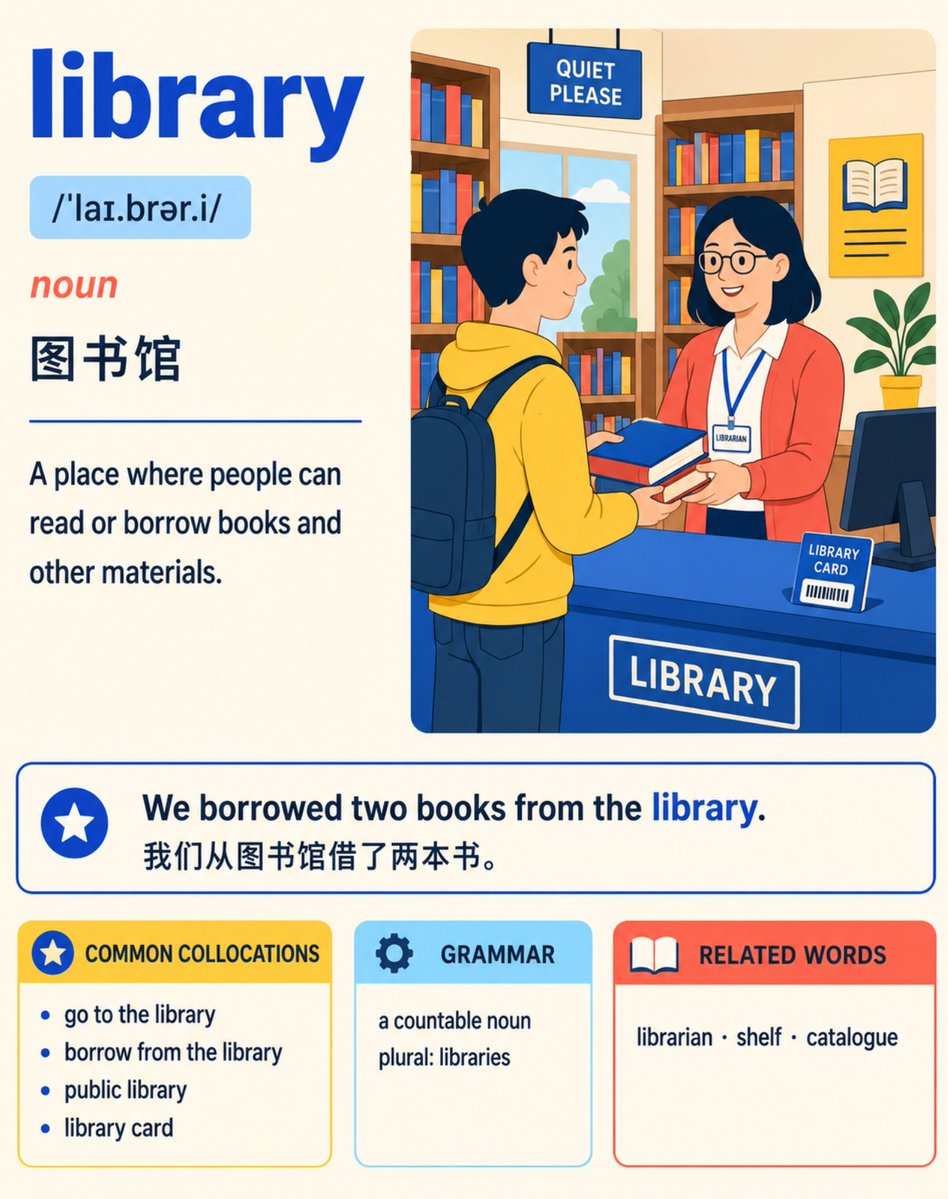
English Vocabulary Study Card Template
A detailed prompt for creating professional educational flashcards with a vibrant, editorial illustration style. It features organized layouts for definitions, pronunciations, examples, and collocations, set against a warm classroom-inspired color palette.
This is a GPT Image 2 prompt case for Graphic & Poster. Use the copy-ready prompt below to generate similar visuals, and review Awesome GPT Image 2 Prompts attribution plus commercial-use rights before reuse.
Free 1K preview
Generate one preview image instantly, no sign-up required.
Free text preview doesn’t preserve reference-image consistency.
Prompt
Copy-ready prompt
Create a refined 4:5 vertical English vocabulary learning card, suitable for A2–B1 level learners.

Card Type: Comprehensive Vocabulary Card
Theme: {argument name="card theme" default="vibrant editorial illustration"}
Palette: Sunny Classroom
Color: {argument name="color scheme" default="Primary Cobalt Blue #2563EB, Secondary Coral Red #FF6B5C, Secondary Lemon Yellow #FFD84D, Secondary Sky Blue #7DD3FC, Dark Text #17324D, Warm Cream Background #FFF9E8"}.

Accurately display the following text:

{argument name="word" default="library"}
/ˈlaɪ.brər.i/
noun

Library

Places where people can read or borrow books and other materials.

We borrowed two books from the library.
We borrowed two books from the library.

COMMON COLLOCATIONS
Go to the library (go to the library)
Borrow from the library (borrow from the library)
Public library (public library)
Library card (library card)

GRAMMAR
Countable noun (a countable noun)
Plural form: libraries (plural: libraries)

RELATED WORDS
Librarian (librarian) · Shelf (shelf) · Catalogue (catalogue)

Create a warm, modern, flat vector cross-section illustration of a library. Show a scene of a learner borrowing two books from a librarian, naturally integrating bookshelf and library card elements. The character image should be friendly and approachable, leaning towards editorial illustration rather than childish style.

Arrange the information like a professional publishing learner's dictionary page: prominent entry, compact pronunciation line, clear definition, highlighted example sentences, and neatly grouped learning modules. Use ample white space.

Use pure flat colors and simple line art. Prohibit gradients, shadows, 3D, gloss effects, photorealistic style, visual clutter, Logos, or watermarks. Ensure all body text is clear and readable. Accurately replicate the provided English, IPA, and Simplified Chinese content, do not add extra text.
Prompt variables
Editable argument placeholders found in the prompt, with their default values.
Best for
- - Graphic & Poster visual exploration
- - Image generation and reference-image edits
- - Reusable briefs that keep source attribution visible
Change these parts
- - Subject, product, character, or scene
- - Aspect ratio, camera, lighting, and background
- - Brand, text, color, and output constraints
Recommended model and settings
- - Model: gpt-image-2
- - Input mode: Image to Image
- - Aspect ratio: source
- - Commercial status: review original source
How to use this prompt
- 1. Copy the prompt and preserve its structure for the first test.
- 2. Replace the subject, context, and publishing channel.
- 3. Change one camera, lighting, or style variable per iteration.
- 4. Inspect the output, source, text, and rights before reuse.
Limitations, source, and reuse cautions
- - Generated output is an editable draft, not factual, legal, or rights evidence.
- - Review the linked source, people, brands, logos, text, and third-party media before commercial use.
More cases in this category
Prioritized by category, input mode compatibility, quality, and lower risk.




Reuse and source notes
Use this prompt safely after previewing the case.
- 1.Copy the prompt or open it directly in Dovoo with the generation button.
- 2.Adjust variables, aspect ratio, and reference images for your own use case.
- 3.Before publishing or paid usage, verify source rights, attribution requirements, and brand or likeness risks.
Can I use this prompt commercially?
Commercial-use status is allowed. Review the original source, license, brand constraints, and legal requirements before paid usage.
Where does this case come from?
This case is imported from Awesome GPT Image 2 Prompts; keep attribution visible and check the source URL before reuse.