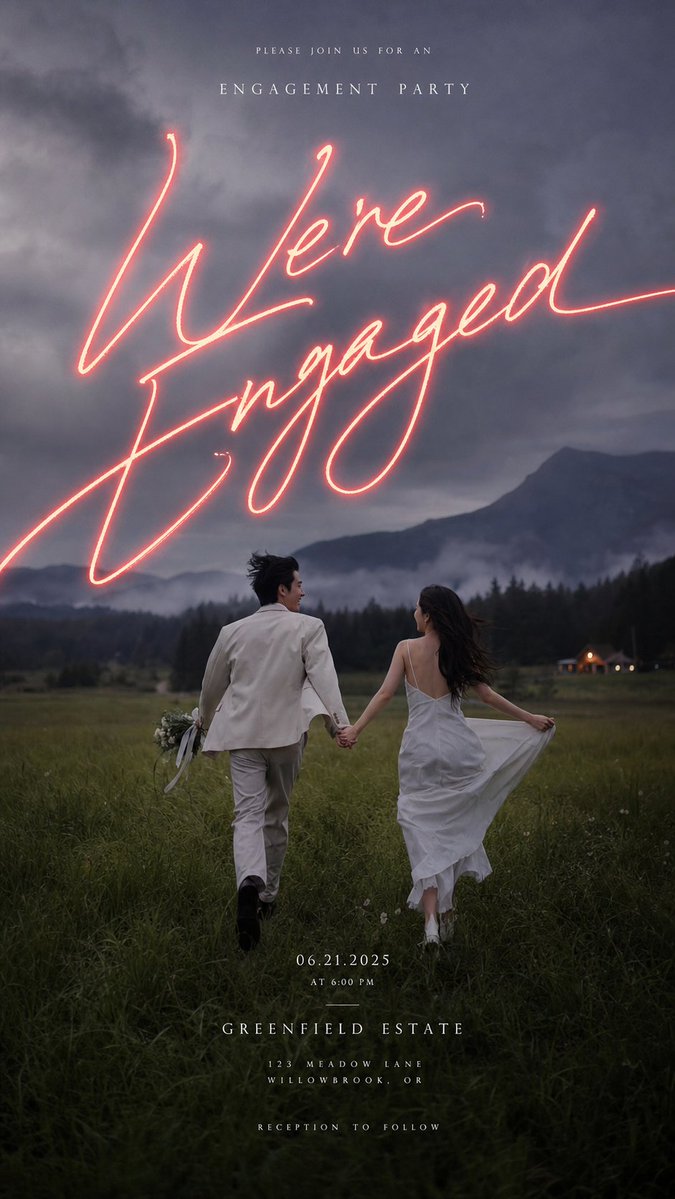
Moody Engagement Party Invitation
A cinematic wedding invitation design featuring a couple running through a dusk meadow beneath glowing handwritten engagement text.
This is a GPT Image 2 prompt case for Graphic & Poster. Use the copy-ready prompt below to generate similar visuals, and review Awesome GPT Image 2 Prompts attribution plus commercial-use rights before reuse.
Free 1K preview
Generate one preview image instantly, no sign-up required.
Prompt
Copy-ready prompt
Objective: Create a cinematic, vertical engagement party invitation poster using romantic wedding photography aesthetics, a melancholic atmosphere, and elegant typography.

Canvas: 9:16 vertical invitation design, full-bleed photo background, dark twilight tones, soft film grain, high-end luxury wedding stationery style.

Background Image: A vast meadow at dusk after the rain, with a misty evergreen forest, deep blue-gray mountains, low-hanging fog, and dramatic cloudy skies in the background. In the lower-center of the image, showcase an engaged couple holding hands and running through the field: the gentleman on the left wearing an ivory suit and holding a small bouquet with ribbons; the lady on the right wearing a flowing white slip dress, gently lifting her skirt, with long dark hair blowing in the wind. Add a tiny, warmly lit cottage or manor building in the distant right to enhance depth.

Main Visual Effect: Place a single line of large, glowing neon script in the upper-middle of the sky, reading {argument name="main script text" default="We're Engaged"}. The neon should be coral pink, oversized, with smooth lines, an imperfect cursive effect, bright internal glow, soft red halo, and long strokes extending towards the left and right edges.

Text Content: Include 6 separate text blocks, all centered except for the neon script, using a slender, wide-spaced uppercase serif or small caps font. 1) Top small text line: {argument name="top invitation text" default="PLEASE JOIN US FOR AN"}. 2) Below: "ENGAGEMENT PARTY". 3) Main neon script: {argument name="main script text" default="We're Engaged"}. 4) Bottom date/time: {argument name="date and time" default="06.21.2025\nAT 6:00 PM"}. 5) Venue information block: {argument name="venue name" default="GREENFIELD ESTATE"}, followed by address: {argument name="venue address" default="123 MEADOW LANE\nWILLOWBROOK, OR"}. 6) Bottom last line of small text: "RECEPTION TO FOLLOW".

Layout: Place the top invitation text above the sky, maintaining wide letter spacing; the neon script occupies the dominant position in the sky and overlaps with the mountain area; the couple is positioned in the lower third of the image; stack the date, venue, address, and reception text in the lower grassy area, ensuring moderate contrast and maintaining elegance.

Visual Style: Melancholic romantic editorial photography style, cinematic depth, natural dynamics, soft mist, understated greens and charcoal blues, glowing coral pink neon script, high-end engagement invitation design, minimalist and refined.

Constraints: Do not add borders, logos, QR codes, extra decorative icons, or additional text. The couple should be small in proportion to emphasize the landscape and typography. Ensure readability of all six text blocks.
Prompt variables
Editable argument placeholders found in the prompt, with their default values.
Best for
- - Graphic & Poster visual exploration
- - Image generation and reference-image edits
- - Reusable briefs that keep source attribution visible
Change these parts
- - Subject, product, character, or scene
- - Aspect ratio, camera, lighting, and background
- - Brand, text, color, and output constraints
Recommended model and settings
- - Model: gpt-image-2
- - Input mode: Text to Image
- - Aspect ratio: source
- - Commercial status: review original source
How to use this prompt
- 1. Copy the prompt and preserve its structure for the first test.
- 2. Replace the subject, context, and publishing channel.
- 3. Change one camera, lighting, or style variable per iteration.
- 4. Inspect the output, source, text, and rights before reuse.
Limitations, source, and reuse cautions
- - Generated output is an editable draft, not factual, legal, or rights evidence.
- - Review the linked source, people, brands, logos, text, and third-party media before commercial use.
More cases in this category
Prioritized by category, input mode compatibility, quality, and lower risk.





Reuse and source notes
Use this prompt safely after previewing the case.
- 1.Copy the prompt or open it directly in Dovoo with the generation button.
- 2.Adjust variables, aspect ratio, and reference images for your own use case.
- 3.Before publishing or paid usage, verify source rights, attribution requirements, and brand or likeness risks.
Can I use this prompt commercially?
Commercial-use status is allowed. Review the original source, license, brand constraints, and legal requirements before paid usage.
Where does this case come from?
This case is imported from Awesome GPT Image 2 Prompts; keep attribution visible and check the source URL before reuse.