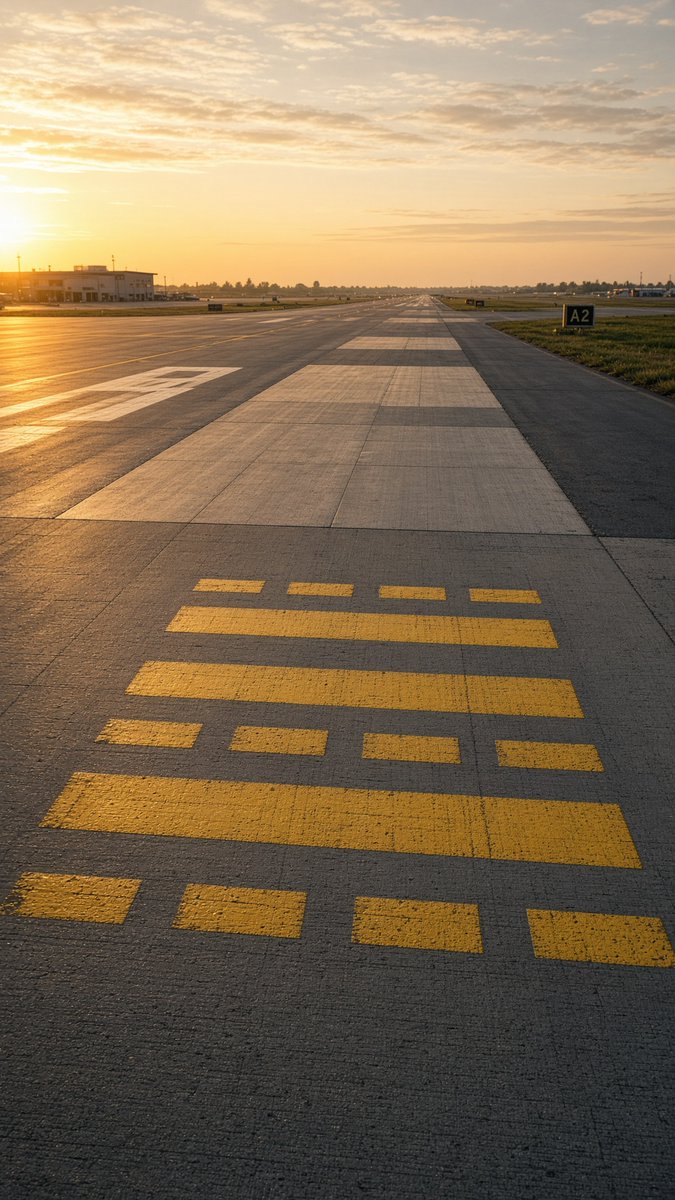
Golden Hour Empty Airport Runway
A photorealistic vertical aviation scene showing an empty runway or taxiway at sunset with detailed pavement markings and a distant airport horizon.
This is a GPT Image 2 prompt case for Landscape & Nature. Use the copy-ready prompt below to generate similar visuals, and review Awesome GPT Image 2 Prompts attribution plus commercial-use rights before reuse.
Free 1K preview
Generate one preview image instantly, no sign-up required.
Prompt
Copy-ready prompt
Create a photorealistic vertical aviation photograph of an empty airport runway/taxiway at golden hour, shot from a very low standing viewpoint centered on the concrete pavement and looking straight down the runway toward a distant vanishing point. The sun is low on the far left horizon, casting warm orange light, long shadows, and a glowing reflection across the tarmac. The sky is pale gold with scattered thin clouds. In the foreground, place exactly 15 yellow runway/taxiway paint rectangles on the concrete: 4 small separated rectangles along the bottom edge, 1 long horizontal bar above them, 4 small separated rectangles above that, 2 long horizontal bars in the middle, and 4 small separated rectangles near the top of the marking group. The runway surface should show realistic expansion joints, subtle cracks, rough texture, and alternating pale concrete slabs extending into the distance. Add a low airport building and utility poles on the left, flat grassy fields on both sides, distant tree line and airport lights near the horizon, and a black runway/taxiway sign on the right reading {argument name="taxiway sign text" default="A2"}. Use a calm, empty, realistic avgeek aesthetic with no aircraft, no people, no vehicles in the foreground, no watermark, and no extra text.Prompt variables
Editable argument placeholders found in the prompt, with their default values.
Best for
- - Landscape & Nature visual exploration
- - Image generation and reference-image edits
- - Reusable briefs that keep source attribution visible
Change these parts
- - Subject, product, character, or scene
- - Aspect ratio, camera, lighting, and background
- - Brand, text, color, and output constraints
Recommended model and settings
- - Model: gpt-image-2
- - Input mode: Text to Image
- - Aspect ratio: source
- - Commercial status: review original source
How to use this prompt
- 1. Copy the prompt and preserve its structure for the first test.
- 2. Replace the subject, context, and publishing channel.
- 3. Change one camera, lighting, or style variable per iteration.
- 4. Inspect the output, source, text, and rights before reuse.
Limitations, source, and reuse cautions
- - Generated output is an editable draft, not factual, legal, or rights evidence.
- - Review the linked source, people, brands, logos, text, and third-party media before commercial use.
More cases in this category
Prioritized by category, input mode compatibility, quality, and lower risk.
Reuse and source notes
Use this prompt safely after previewing the case.
- 1.Copy the prompt or open it directly in Dovoo with the generation button.
- 2.Adjust variables, aspect ratio, and reference images for your own use case.
- 3.Before publishing or paid usage, verify source rights, attribution requirements, and brand or likeness risks.
Can I use this prompt commercially?
Commercial-use status is allowed. Review the original source, license, brand constraints, and legal requirements before paid usage.
Where does this case come from?
This case is imported from Awesome GPT Image 2 Prompts; keep attribution visible and check the source URL before reuse.