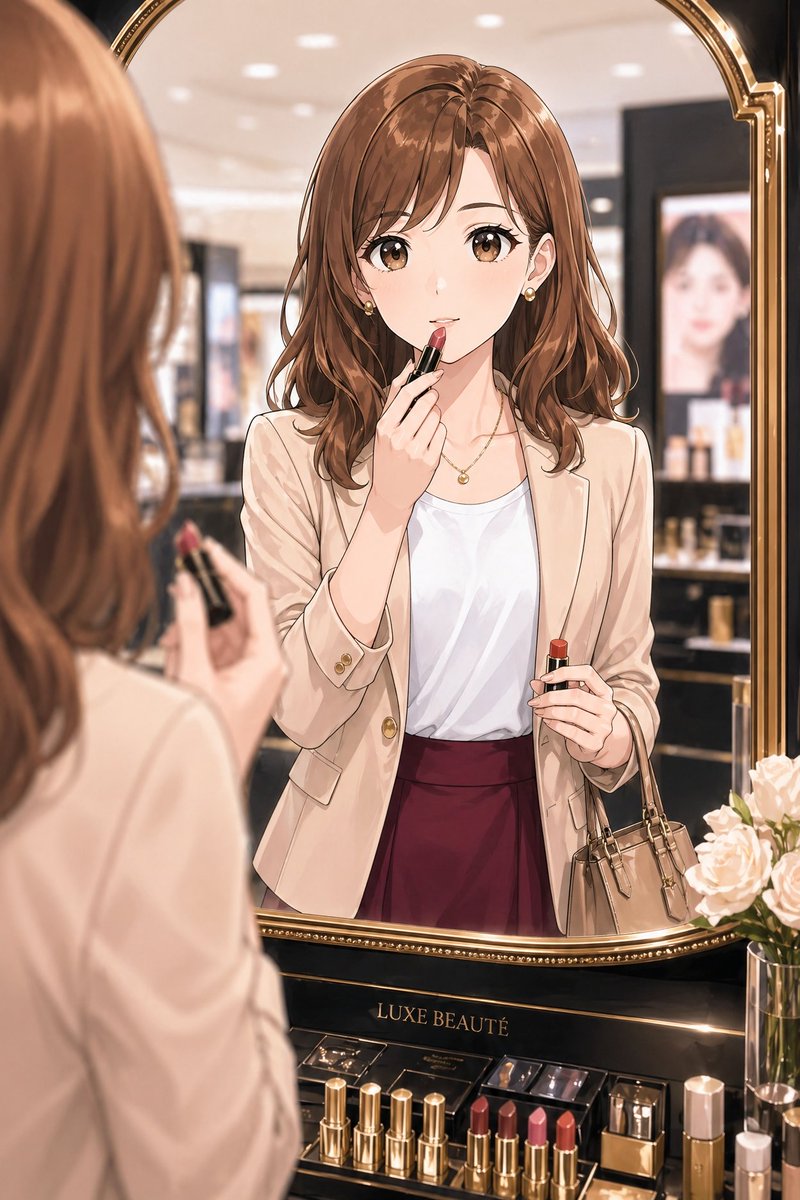
Elegant Office Lady at Beauty Counter
This prompt generates a polished anime-style portrait of a fashionable office lady applying lipstick at a luxury cosmetics counter, ideal for beauty, lifestyle, or mature character illustration.
This is a GPT Image 2 prompt case for Fashion & Beauty. Use the copy-ready prompt below to generate similar visuals, and review Awesome GPT Image 2 Prompts attribution plus commercial-use rights before reuse.
Free 1K preview
Generate one preview image instantly, no sign-up required.
Prompt
Copy-ready prompt
A refined anime-style illustration of a stylish Japanese office lady in her late 20s to early 30s trying on lipstick in front of a luxury cosmetics mirror inside an elegant department store beauty counter. Medium shot framed through the mirror, with her reflected figure centered and the back of her head and hand softly visible in the left foreground holding a lipstick tube. She has {argument name="hair color" default="warm chestnut brown"} shoulder-length softly wavy hair with a side part, small gold earrings, and a delicate gold necklace. Her outfit is polished and feminine: a light beige tailored blazer with gold buttons, a white satin-like blouse, and a deep burgundy high-waisted skirt. She carries a small taupe handbag on one arm. In the reflection, she is applying lipstick to her lips with one hand while holding the lipstick case in the other, giving the impression of checking her makeup before or after work. The setting is upscale and softly lit, with a large ornate gold-framed mirror, blurred cosmetic displays in the background, and a glamorous premium beauty-counter atmosphere. At the bottom of the mirror is a black and gold display stand labeled {argument name="brand text" default="LUXE BEAUTÉ"}. On the counter, show exactly 8 visible cosmetic items in a neat arrangement: 4 gold lipstick tubes standing on the left, 3 open lipsticks in shades of mauve, pink, and coral near the center-right, and 1 rectangular perfume or cosmetic bottle on the far right. Also include a glass vase with pale blush roses at the lower right. Use soft bokeh lighting, glossy luxury materials, delicate linework, smooth anime rendering, elegant mature OL fashion, warm neutral tones with burgundy accents, and a sophisticated feminine mood.Prompt variables
Editable argument placeholders found in the prompt, with their default values.
Best for
- - Fashion & Beauty visual exploration
- - Image generation and reference-image edits
- - Reusable briefs that keep source attribution visible
Change these parts
- - Subject, product, character, or scene
- - Aspect ratio, camera, lighting, and background
- - Brand, text, color, and output constraints
Recommended model and settings
- - Model: gpt-image-2
- - Input mode: Text to Image
- - Aspect ratio: source
- - Commercial status: review original source
How to use this prompt
- 1. Copy the prompt and preserve its structure for the first test.
- 2. Replace the subject, context, and publishing channel.
- 3. Change one camera, lighting, or style variable per iteration.
- 4. Inspect the output, source, text, and rights before reuse.
Limitations, source, and reuse cautions
- - Generated output is an editable draft, not factual, legal, or rights evidence.
- - Review the linked source, people, brands, logos, text, and third-party media before commercial use.
More cases in this category
Prioritized by category, input mode compatibility, quality, and lower risk.


Reuse and source notes
Use this prompt safely after previewing the case.
- 1.Copy the prompt or open it directly in Dovoo with the generation button.
- 2.Adjust variables, aspect ratio, and reference images for your own use case.
- 3.Before publishing or paid usage, verify source rights, attribution requirements, and brand or likeness risks.
Can I use this prompt commercially?
Commercial-use status is allowed. Review the original source, license, brand constraints, and legal requirements before paid usage.
Where does this case come from?
This case is imported from Awesome GPT Image 2 Prompts; keep attribution visible and check the source URL before reuse.