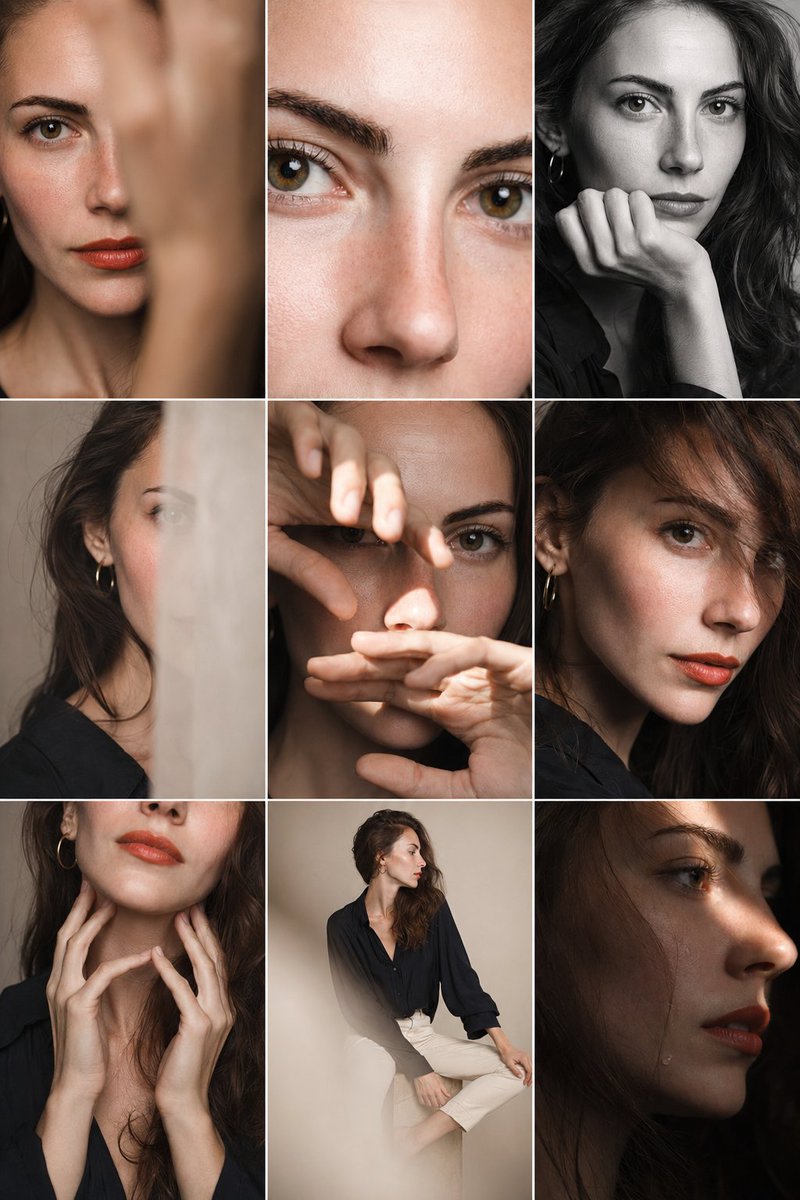
Editorial Portrait Photo Grid
A complex prompt for generating a professional 3x3 photo grid showing various angles and crops of a character in a minimalist studio setting.
This is a GPT Image 2 prompt case for Portrait & Character. Use the copy-ready prompt below to generate similar visuals, and review Awesome GPT Image 2 Prompts attribution plus commercial-use rights before reuse.
Free 1K preview
Generate one preview image instantly, no sign-up required.
Prompt
Copy-ready prompt
Editorial 3x3 photo grid in a clean {argument name="studio style" default="soft beige studio"}. Character (matches reference 100%) wearing {argument name="outfit" default="lightweight dark navy shirt, ivory trousers"}, barefoot for raw simplicity. Lighting: large diffused key light directly front-right, silver reflector left, subtle rim from top. Shots to include: 1. extreme close-up of lips + cheekbone with blurred hand partially covering (85mm, f/1.8, razor-thin DOF); 2. tight crop on eyes looking into lens with reflection of light strip visible (85mm, f/2.0); 3. black & white close portrait resting chin on fist, face filling frame (50mm, f/2.2); 4. over-shoulder shot, blurred foreground fabric curtain framing half face (85mm, f/2.0); 5. very close frontal with hands overlapping face, light streak across eyes (50mm, f/2.5); 6. tight angled portrait showing hair falling into eyes, soft-focus background (85mm, f/2.2); 7. crop of hands touching jawline, eyes cropped out (50mm, f/3.2, detail-focused); 8. half-body seated sideways on low cube, head turned sharply away, blurred foreground (35mm, f/ 4.5); 9. intense close-up of profile with single tear-like water droplet, cinematic light slice across (85mm, f/ 1.9). Angles: mostly tight headshots with slight high/low tilts, maintaining variation. Capture RAW, professional muted grade, smooth tonal contrast, subtle cinematic grain. Mood: intimate, introspective, character-led editorial minimalism with delicate use of fabric as prop.Prompt variables
Editable argument placeholders found in the prompt, with their default values.
Best for
- - Portrait & Character visual exploration
- - Image generation and reference-image edits
- - Reusable briefs that keep source attribution visible
Change these parts
- - Subject, product, character, or scene
- - Aspect ratio, camera, lighting, and background
- - Brand, text, color, and output constraints
Recommended model and settings
- - Model: gpt-image-2
- - Input mode: Text to Image
- - Aspect ratio: source
- - Commercial status: review original source
How to use this prompt
- 1. Copy the prompt and preserve its structure for the first test.
- 2. Replace the subject, context, and publishing channel.
- 3. Change one camera, lighting, or style variable per iteration.
- 4. Inspect the output, source, text, and rights before reuse.
Limitations, source, and reuse cautions
- - Generated output is an editable draft, not factual, legal, or rights evidence.
- - Review the linked source, people, brands, logos, text, and third-party media before commercial use.
More cases in this category
Prioritized by category, input mode compatibility, quality, and lower risk.




Reuse and source notes
Use this prompt safely after previewing the case.
- 1.Copy the prompt or open it directly in Dovoo with the generation button.
- 2.Adjust variables, aspect ratio, and reference images for your own use case.
- 3.Before publishing or paid usage, verify source rights, attribution requirements, and brand or likeness risks.
Can I use this prompt commercially?
Commercial-use status is allowed. Review the original source, license, brand constraints, and legal requirements before paid usage.
Where does this case come from?
This case is imported from Awesome GPT Image 2 Prompts; keep attribution visible and check the source URL before reuse.