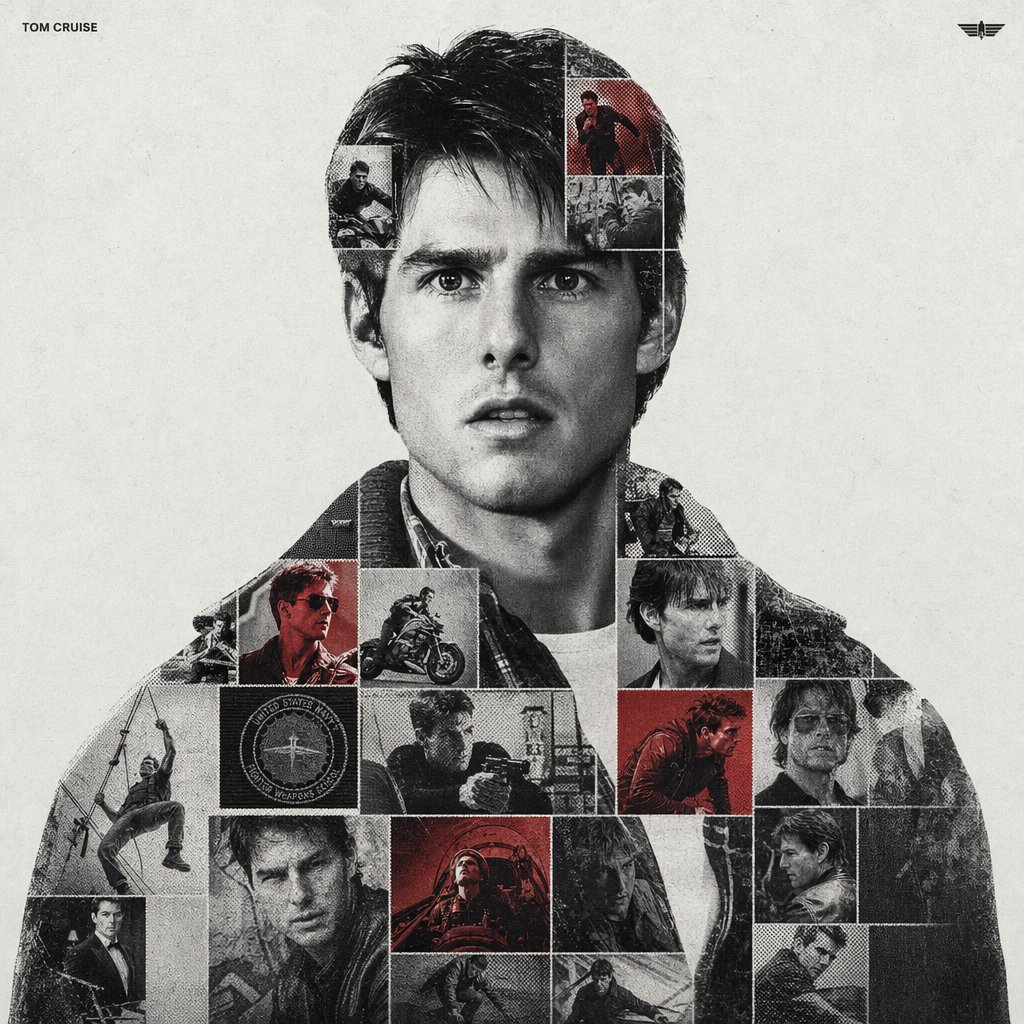
Dual Exposure Sports Graphic
A sophisticated prompt for creating a mixed-media sports tribute poster using silhouette containers, photo-mosaic grids, and tactile textures like halftone dots and film grain.
This is a GPT Image 2 prompt case for Graphic & Poster. Use the copy-ready prompt below to generate similar visuals, and review Awesome GPT Image 2 Prompts attribution plus commercial-use rights before reuse.
Free 1K preview
Generate one preview image instantly, no sign-up required.
Prompt
Copy-ready prompt
{argument name="subject name" default="[PERSON NAME]"}.
Act as a high-end sports graphic designer creating a conceptual tribute poster. The style is a complex "dual exposure photo-grid composite" with mixed-media textures.
CENTRAL STRUCTURE (THE VESSEL):
The central focus is a large-scale, high-contrast black and white portrait silhouette of {argument name="subject name" default="[PERSON NAME]"}. This main portrait acts as the container.
THE GRID FILL & TEXTURES (MIXED MEDIA):
The interior of the silhouette is populated by a dense "photo mosaic grid" of action shots from the person's career.
CRITICAL TEXTURE INSTRUCTION: Do not just paste flat photos. Apply artistic textures to various grid cells to create a tactile, collage feel. Use effects like:
Halftone Dots: Comic-book style raster patterns on some cells.
Fabric/Embroidery: Subtle thread or canvas textures suggesting a jersey or patch.
Film Grain: Heavy noise on specific high-contrast action shots.
COLOR STRATEGY:
The base is Monochrome B&W. Use selective color overlays (relevant to the team/flag) ONLY on specific grid cells to create a rhythm.
TYPOGRAPHY & BRANDING (STRICT MICRO-SCALING):
Top Left (The Name): Write "{argument name="subject name" default="[PERSON NAME]"}" strictly using the font {argument name="font family" default="Inter Semibold"}.
Kerning: Tight negative kerning (-4%).
Size: SMALL and discreet. It must occupy MAXIMUM 20% of the canvas width. Do NOT make it large or loud.
Top Right (The Symbol): Place the primary logo (Team/Brand/Flag).
Size: VERY SMALL. It must occupy MAXIMUM 10% of the canvas width.
COMPOSITION & BACKGROUND:
Background: Off-white or light grey with a visible high-quality paper or concrete texture. It should not be flat digital white.
Alignment: Center the figure perfectly. Maintain wide negative space around the object.
Prompt variables
Editable argument placeholders found in the prompt, with their default values.
Best for
- - Graphic & Poster visual exploration
- - Image generation and reference-image edits
- - Reusable briefs that keep source attribution visible
Change these parts
- - Subject, product, character, or scene
- - Aspect ratio, camera, lighting, and background
- - Brand, text, color, and output constraints
Recommended model and settings
- - Model: gpt-image-2
- - Input mode: Text to Image
- - Aspect ratio: source
- - Commercial status: review original source
How to use this prompt
- 1. Copy the prompt and preserve its structure for the first test.
- 2. Replace the subject, context, and publishing channel.
- 3. Change one camera, lighting, or style variable per iteration.
- 4. Inspect the output, source, text, and rights before reuse.
Limitations, source, and reuse cautions
- - Generated output is an editable draft, not factual, legal, or rights evidence.
- - Review the linked source, people, brands, logos, text, and third-party media before commercial use.
More cases in this category
Prioritized by category, input mode compatibility, quality, and lower risk.






Reuse and source notes
Use this prompt safely after previewing the case.
- 1.Copy the prompt or open it directly in Dovoo with the generation button.
- 2.Adjust variables, aspect ratio, and reference images for your own use case.
- 3.Before publishing or paid usage, verify source rights, attribution requirements, and brand or likeness risks.
Can I use this prompt commercially?
Commercial-use status is allowed. Review the original source, license, brand constraints, and legal requirements before paid usage.
Where does this case come from?
This case is imported from Awesome GPT Image 2 Prompts; keep attribution visible and check the source URL before reuse.