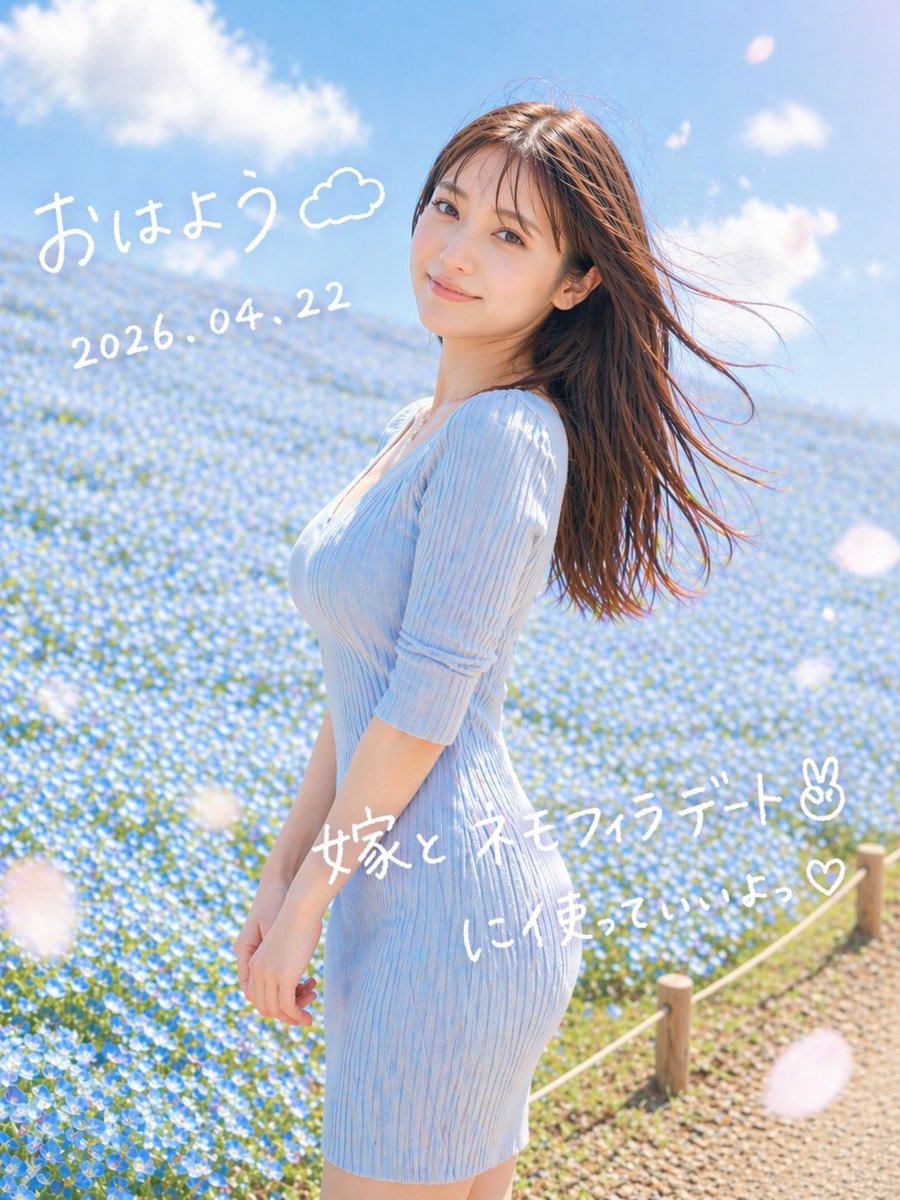
Dreamy Nemophila Date Portrait
This generates a soft, romantic vertical portrait of a woman in a blue flower field with handwritten Japanese morning-post text, ideal for social media visuals.
This is a GPT Image 2 prompt case for Portrait & Character. Use the copy-ready prompt below to generate similar visuals, and review Awesome GPT Image 2 Prompts attribution plus commercial-use rights before reuse.
Free 1K preview
Generate one preview image instantly, no sign-up required.
Prompt
Copy-ready prompt
A dreamy vertical spring portrait photo of a young woman standing in profile in a vast field of tiny blue nemophila flowers under a bright blue sky with soft white clouds. She wears a fitted ribbed knit dress in {argument name="dress color" default="pale sky blue"} with elbow-length sleeves, and her long straight brown hair is blowing dramatically to the right in the wind. Frame her from about mid-thigh upward, slightly off-center to the right, with the flower field filling the background and a small rope fence with wooden posts visible along the lower right edge beside a gravel path. Use soft natural morning sunlight, airy high-key exposure, gentle pastel tones, shallow depth of field, subtle lens bloom, and a romantic social-media snapshot aesthetic. Add a few large out-of-focus white flower petals drifting across the foreground. Overlay handwritten white Japanese text directly on the image: at the upper left, "{argument name="greeting text" default="おはよう"}" with a small doodled cloud beside it; below that, the date "{argument name="date text" default="2026.04.22"}"; across the lower middle-right, "{argument name="main note text" default="嫁と ネモフィラデート✌︎"}"; and beneath it, "{argument name="sub note text" default="に使っていいよっ♡"}". Keep the handwriting casual, playful, and slightly uneven like a marker pen on a photo.Prompt variables
Editable argument placeholders found in the prompt, with their default values.
Best for
- - Portrait & Character visual exploration
- - Image generation and reference-image edits
- - Reusable briefs that keep source attribution visible
Change these parts
- - Subject, product, character, or scene
- - Aspect ratio, camera, lighting, and background
- - Brand, text, color, and output constraints
Recommended model and settings
- - Model: gpt-image-2
- - Input mode: Text to Image
- - Aspect ratio: source
- - Commercial status: review original source
How to use this prompt
- 1. Copy the prompt and preserve its structure for the first test.
- 2. Replace the subject, context, and publishing channel.
- 3. Change one camera, lighting, or style variable per iteration.
- 4. Inspect the output, source, text, and rights before reuse.
Limitations, source, and reuse cautions
- - Generated output is an editable draft, not factual, legal, or rights evidence.
- - Review the linked source, people, brands, logos, text, and third-party media before commercial use.
More cases in this category
Prioritized by category, input mode compatibility, quality, and lower risk.




Reuse and source notes
Use this prompt safely after previewing the case.
- 1.Copy the prompt or open it directly in Dovoo with the generation button.
- 2.Adjust variables, aspect ratio, and reference images for your own use case.
- 3.Before publishing or paid usage, verify source rights, attribution requirements, and brand or likeness risks.
Can I use this prompt commercially?
Commercial-use status is allowed. Review the original source, license, brand constraints, and legal requirements before paid usage.
Where does this case come from?
This case is imported from Awesome GPT Image 2 Prompts; keep attribution visible and check the source URL before reuse.