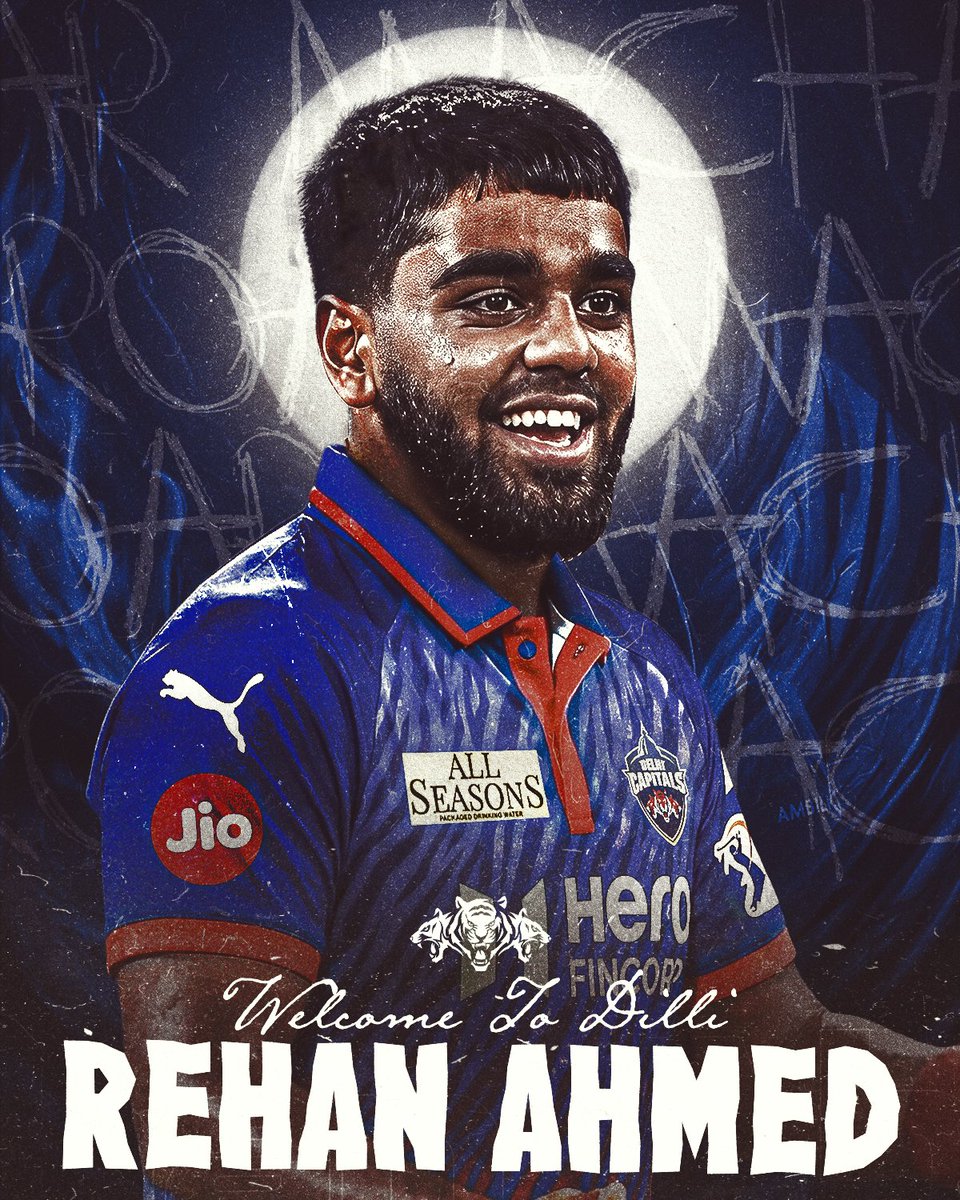
Dramatic Cricket Signing Poster
A gritty, high-contrast cricket announcement poster used for player reveal or welcome graphics in a professional team branding style.
This is a GPT Image 2 prompt case for Graphic & Poster. Use the copy-ready prompt below to generate similar visuals, and review Awesome GPT Image 2 Prompts attribution plus commercial-use rights before reuse.
Free 1K preview
Generate one preview image instantly, no sign-up required.
Prompt
Copy-ready prompt
A dramatic sports poster featuring a waist-up portrait of a male cricket player in a royal blue Delhi Capitals jersey, facing slightly left in a strong three-quarter pose. Show every face clearly with natural, detailed facial features, creating an anonymized reveal effect. Behind his head is a bright glowing white circular halo, centered like a spotlight or moon. The background is dark navy and black with electric blue flame-like textures rising on both sides, overlaid with rough chalk-style scribbles, arrows, circles, and large hand-drawn letters for a gritty urban sports aesthetic. The jersey has red-orange collar and placket accents, a white Puma logo on the right chest and sleeve, a Delhi Capitals crest on the left chest, a red circular Jio patch on the sleeve, a rectangular ALL SEASONS sponsor patch on the chest, and large Hero branding across the torso. Add realistic fabric texture, sweat sheen, grain, dust, scratches, and distressed poster wear. At the bottom, place elegant white handwritten script reading Welcome to Dilli above very large bold cracked white block letters reading {argument name="player name" default="REHAN AHMED"}. Use high contrast lighting, moody shadows, centered composition, and a premium IPL team announcement poster style.Prompt variables
Editable argument placeholders found in the prompt, with their default values.
Best for
- - Graphic & Poster visual exploration
- - Image generation and reference-image edits
- - Reusable briefs that keep source attribution visible
Change these parts
- - Subject, product, character, or scene
- - Aspect ratio, camera, lighting, and background
- - Brand, text, color, and output constraints
Recommended model and settings
- - Model: gpt-image-2
- - Input mode: Text to Image
- - Aspect ratio: source
- - Commercial status: review original source
How to use this prompt
- 1. Copy the prompt and preserve its structure for the first test.
- 2. Replace the subject, context, and publishing channel.
- 3. Change one camera, lighting, or style variable per iteration.
- 4. Inspect the output, source, text, and rights before reuse.
Limitations, source, and reuse cautions
- - Generated output is an editable draft, not factual, legal, or rights evidence.
- - Review the linked source, people, brands, logos, text, and third-party media before commercial use.
More cases in this category
Prioritized by category, input mode compatibility, quality, and lower risk.





Reuse and source notes
Use this prompt safely after previewing the case.
- 1.Copy the prompt or open it directly in Dovoo with the generation button.
- 2.Adjust variables, aspect ratio, and reference images for your own use case.
- 3.Before publishing or paid usage, verify source rights, attribution requirements, and brand or likeness risks.
Can I use this prompt commercially?
Commercial-use status is allowed. Review the original source, license, brand constraints, and legal requirements before paid usage.
Where does this case come from?
This case is imported from Awesome GPT Image 2 Prompts; keep attribution visible and check the source URL before reuse.