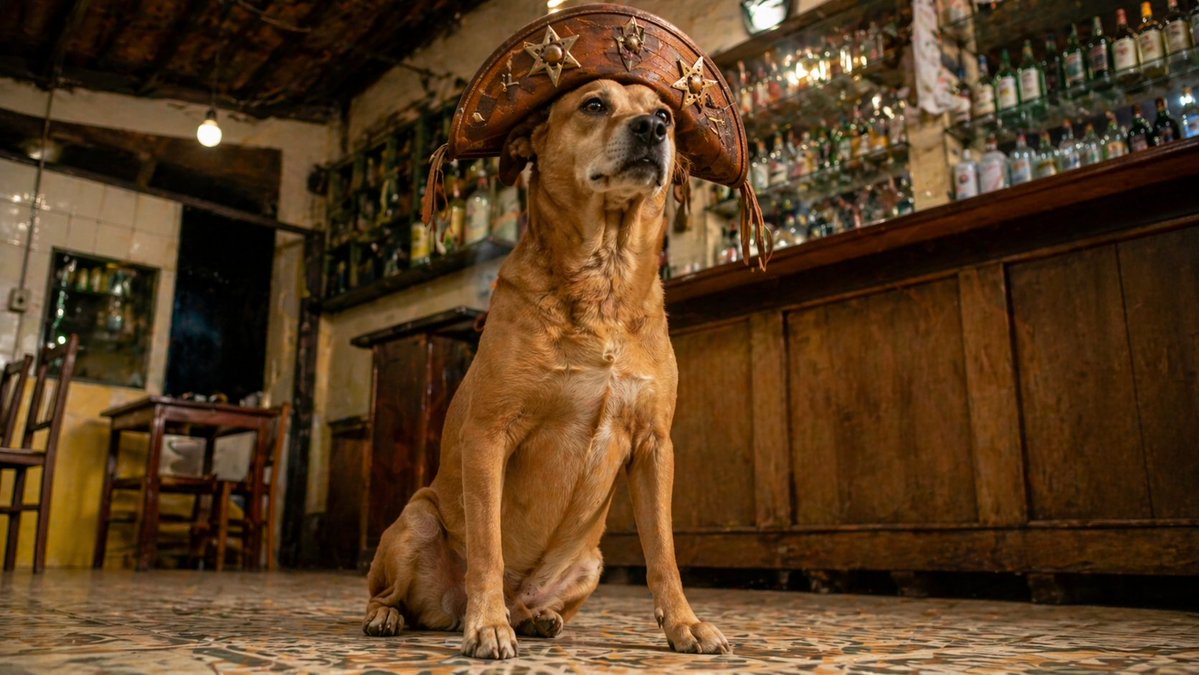
Dog in Leather Cangaceiro Hat at a Bar
This prompt generates a warm, cinematic photorealistic portrait of a dignified dog wearing a traditional leather hat in a rustic bar interior, ideal for humorous editorial or social media imagery.
This is a GPT Image 2 prompt case for Portrait & Character. Use the copy-ready prompt below to generate similar visuals, and review Awesome GPT Image 2 Prompts attribution plus commercial-use rights before reuse.
Free 1K preview
Generate one preview image instantly, no sign-up required.
Prompt
Copy-ready prompt
A cinematic low-angle photo of a medium-sized tan dog sitting proudly on a patterned tile floor inside a rustic old bar, wearing an oversized brown leather cangaceiro-style hat decorated with multiple metal star emblems and stitched details. The dog is centered in the frame, looking slightly upward with a calm, noble, almost heroic expression. Behind the dog is a long dark wooden bar counter on the right and a wall densely lined with many glass liquor bottles and hanging glasses, creating a cluttered authentic tavern atmosphere. On the left side, show a small wooden table, 2 wooden chairs, a dark doorway, worn walls, exposed beams, and 2 visible bare hanging light bulbs. Use warm amber indoor lighting, rich brown and golden tones, realistic textures, shallow depth of field, documentary-style realism, sharp focus on the dog, softly blurred background, wide cinematic composition, and a humorous but dignified mood. The image should feel like a Brazilian countryside bar portrait of a dog dressed like a regional folk hero.
Best for
- - Portrait & Character visual exploration
- - Image generation and reference-image edits
- - Reusable briefs that keep source attribution visible
Change these parts
- - Subject, product, character, or scene
- - Aspect ratio, camera, lighting, and background
- - Brand, text, color, and output constraints
Recommended model and settings
- - Model: gpt-image-2
- - Input mode: Text to Image
- - Aspect ratio: source
- - Commercial status: review original source
How to use this prompt
- 1. Copy the prompt and preserve its structure for the first test.
- 2. Replace the subject, context, and publishing channel.
- 3. Change one camera, lighting, or style variable per iteration.
- 4. Inspect the output, source, text, and rights before reuse.
Limitations, source, and reuse cautions
- - Generated output is an editable draft, not factual, legal, or rights evidence.
- - Review the linked source, people, brands, logos, text, and third-party media before commercial use.
More cases in this category
Prioritized by category, input mode compatibility, quality, and lower risk.



Reuse and source notes
Use this prompt safely after previewing the case.
- 1.Copy the prompt or open it directly in Dovoo with the generation button.
- 2.Adjust variables, aspect ratio, and reference images for your own use case.
- 3.Before publishing or paid usage, verify source rights, attribution requirements, and brand or likeness risks.
Can I use this prompt commercially?
Commercial-use status is allowed. Review the original source, license, brand constraints, and legal requirements before paid usage.
Where does this case come from?
This case is imported from Awesome GPT Image 2 Prompts; keep attribution visible and check the source URL before reuse.