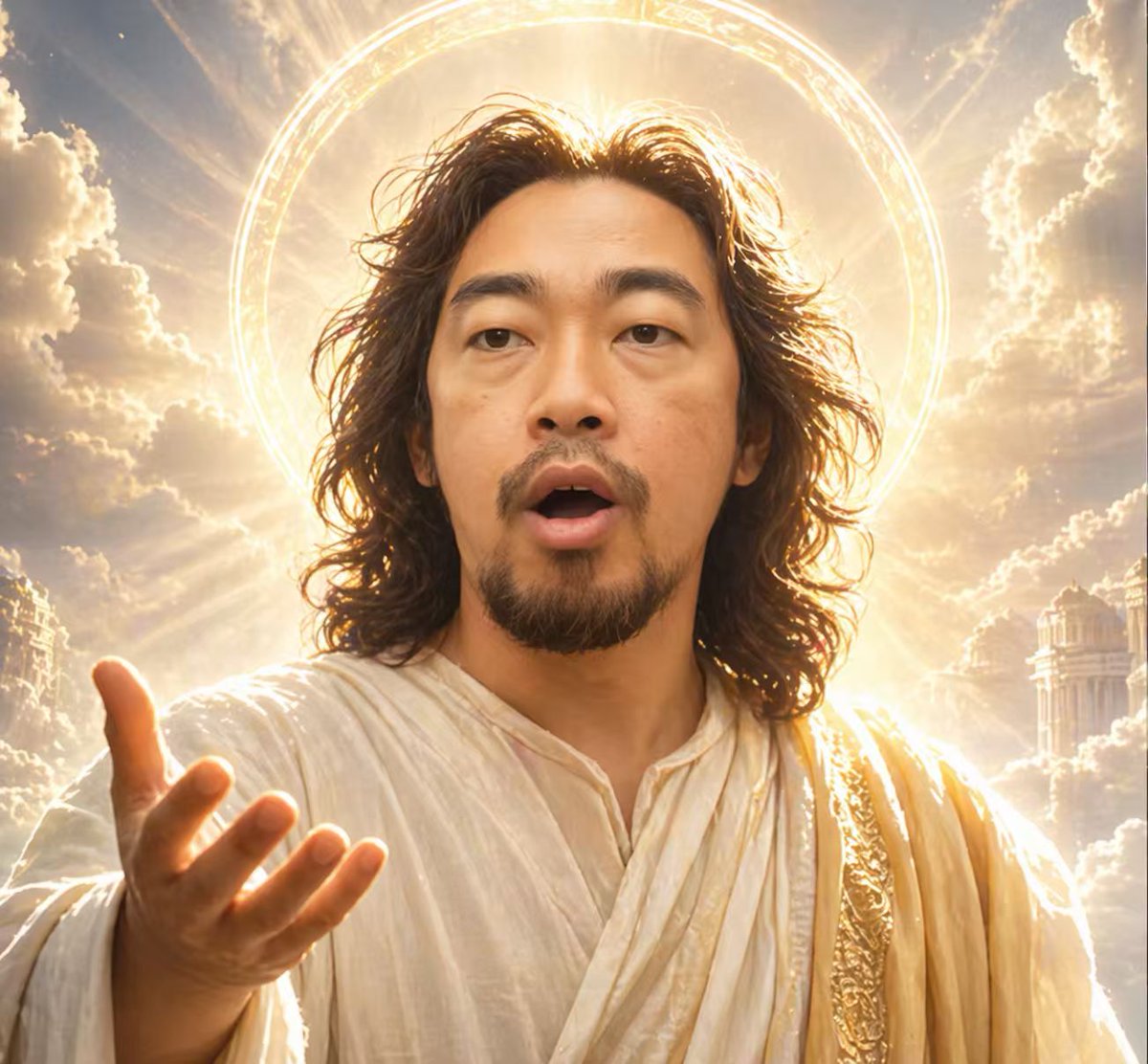
Divine Halo Portrait With Obscured Face
This prompt generates a dramatic heavenly portrait of a Christ-like figure with an extended hand, radiant halo, and intentionally blocked face, suitable for spiritual, symbolic, or meme-style editorial imagery.
This is a GPT Image 2 prompt case for Portrait & Character. Use the copy-ready prompt below to generate similar visuals, and review Awesome GPT Image 2 Prompts attribution plus commercial-use rights before reuse.
Free 1K preview
Generate one preview image instantly, no sign-up required.
Prompt
Copy-ready prompt
A cinematic divine portrait of a Jesus-like holy figure from the chest up, centered and facing forward, Show every face clearly with natural, detailed facial features. He has shoulder-length wavy dark brown hair, a short beard visible below the block, and wears flowing layered white robes with a gold embroidered sash over one shoulder. One hand is extended toward the viewer in the lower left foreground, palm open in a welcoming, blessing gesture. Behind his head is 1 large glowing circular halo with intricate luminous ring details, surrounded by intense golden backlight and radiant sunbeams bursting through dramatic heavenly clouds. Faint classical temple architecture appears on both sides in the distance, creating a celestial kingdom atmosphere. Warm gold-and-cream color grading, volumetric light, ultra-detailed fabric folds, spiritual epic fantasy realism, symmetrical centered composition, soft glowing highlights, inspirational religious iconography, vertical portrait framing.
Best for
- - Portrait & Character visual exploration
- - Image generation and reference-image edits
- - Reusable briefs that keep source attribution visible
Change these parts
- - Subject, product, character, or scene
- - Aspect ratio, camera, lighting, and background
- - Brand, text, color, and output constraints
Recommended model and settings
- - Model: gpt-image-2
- - Input mode: Text to Image
- - Aspect ratio: source
- - Commercial status: review original source
How to use this prompt
- 1. Copy the prompt and preserve its structure for the first test.
- 2. Replace the subject, context, and publishing channel.
- 3. Change one camera, lighting, or style variable per iteration.
- 4. Inspect the output, source, text, and rights before reuse.
Limitations, source, and reuse cautions
- - Generated output is an editable draft, not factual, legal, or rights evidence.
- - Review the linked source, people, brands, logos, text, and third-party media before commercial use.
More cases in this category
Prioritized by category, input mode compatibility, quality, and lower risk.





Reuse and source notes
Use this prompt safely after previewing the case.
- 1.Copy the prompt or open it directly in Dovoo with the generation button.
- 2.Adjust variables, aspect ratio, and reference images for your own use case.
- 3.Before publishing or paid usage, verify source rights, attribution requirements, and brand or likeness risks.
Can I use this prompt commercially?
Commercial-use status is allowed. Review the original source, license, brand constraints, and legal requirements before paid usage.
Where does this case come from?
This case is imported from Awesome GPT Image 2 Prompts; keep attribution visible and check the source URL before reuse.