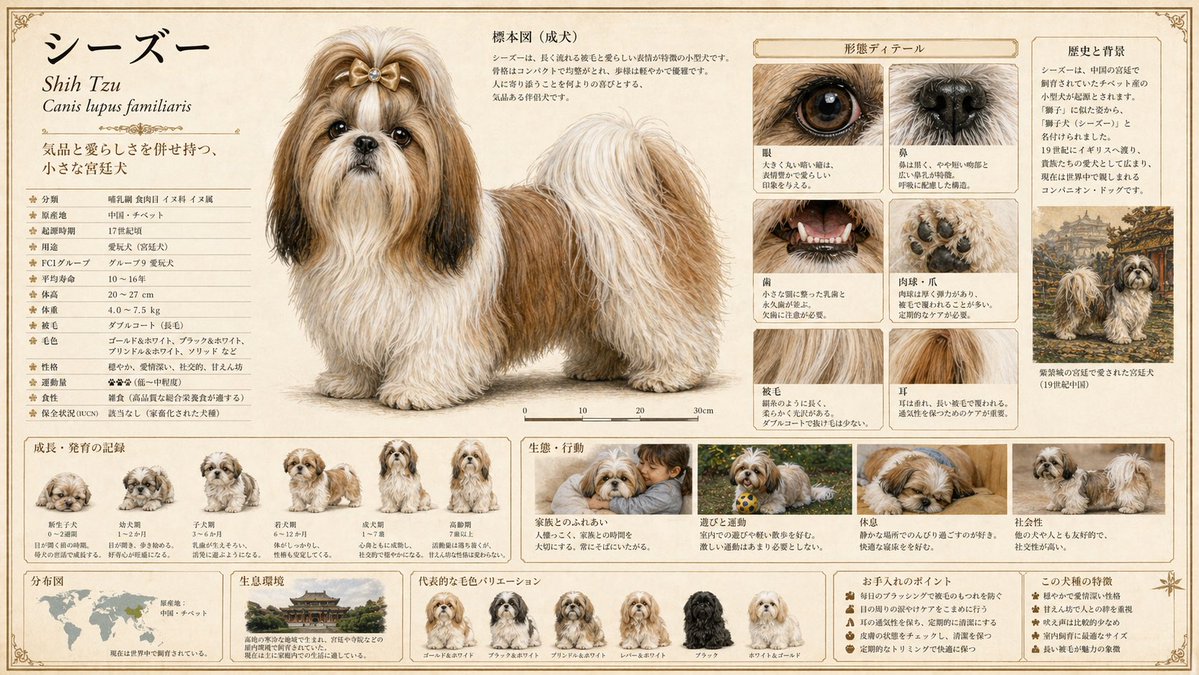
Detailed Animal Encyclopedia Generation
A sophisticated prompt for creating high-quality animal encyclopedia pages with anatomical details, habitat information, and evolutionary stages.
This is a GPT Image 2 prompt case for Illustration & Art. Use the copy-ready prompt below to generate similar visuals, and review Awesome GPT Image 2 Prompts attribution plus commercial-use rights before reuse.
Free 1K preview
Generate one preview image instantly, no sign-up required.
Prompt
Copy-ready prompt
[Animal Name]
{argument name="animal name" default="insert animal name here"}

[Objective]
Complete a large-format animal encyclopedia plate at a sellable quality level as a single illustration. Generate a publishing-quality plate that balances scientific accuracy with visual appeal.

[Output Format]
- Include all information in one image
- Aspect Ratio: 16:9
- Quality: High (essential for ensuring precision of small text, fine lines, and labels)

[Screen Design Principles]
Layout, zoning, information priority, margin design, typography, decorative elements, and color palette should all be determined autonomously by GPT based on the animal's characteristics, habitat, and classification. Design a layout best suited for this specific animal without being bound by templates.

[Essential Elements to Include]
Integrate the following elements naturally into one frame:

1. Main Specimen Drawing
- Full body of adult depicted with maximum precision
- Scientifically accurate colors, patterns, and proportions
- Scientific name (italicized), common name, and classification info (Order, Family, Genus)
- Scale bar or size comparison

2. Growth/Development Record
- Step-by-step illustration of changes from juvenile to adult
- Concise labels for each stage

3. Ecological/Behavioral Depiction
- Action scenes in natural environments (foraging, predation, breeding, territoriality, etc.)
- Include habitat vegetation and terrain in the background

4. Morphological Details
- Close-ups of characteristic parts (claws, fangs, feathers, scales, eyes, etc.)
- Magnified depictions of surface textures

5. Distribution/Habitat Range
- World or regional distribution map
- Description of habitat types

6. Data Notations
- Length, weight, lifespan, diet, conservation status (IUCN, etc.)
- Easy-to-read table or icon format

[Style Specification]
- Publisher-quality natural history encyclopedia
- Realistic botanical/naturalist painting touch (19th-century naturalist precision + modern color expression)
- Paper texture: Cream-colored hot-press watercolor paper or parchment style
- Font: Unified serif. Scientific names in italics; data can use mixed small sans-serif fonts
- Border: Thin ink border + classical plate decoration
- Overall color scheme, layout tone, and page design optimized by GPT based on habitat, classification, and ecology

[Most Important Instruction]
Deeply understand the unique ecology, cultural significance, and taxonomic features of this animal to design a page that feels like it was "made just for this animal." Visualize the essence of the animal rather than using a generic template. Ensure all text is actually rendered within the frame, leaving no empty labels.
Prompt variables
Editable argument placeholders found in the prompt, with their default values.
Best for
- - Illustration & Art visual exploration
- - Image generation and reference-image edits
- - Reusable briefs that keep source attribution visible
Change these parts
- - Subject, product, character, or scene
- - Aspect ratio, camera, lighting, and background
- - Brand, text, color, and output constraints
Recommended model and settings
- - Model: gpt-image-2
- - Input mode: Text to Image
- - Aspect ratio: source
- - Commercial status: review original source
How to use this prompt
- 1. Copy the prompt and preserve its structure for the first test.
- 2. Replace the subject, context, and publishing channel.
- 3. Change one camera, lighting, or style variable per iteration.
- 4. Inspect the output, source, text, and rights before reuse.
Limitations, source, and reuse cautions
- - Generated output is an editable draft, not factual, legal, or rights evidence.
- - Review the linked source, people, brands, logos, text, and third-party media before commercial use.
More cases in this category
Prioritized by category, input mode compatibility, quality, and lower risk.




Reuse and source notes
Use this prompt safely after previewing the case.
- 1.Copy the prompt or open it directly in Dovoo with the generation button.
- 2.Adjust variables, aspect ratio, and reference images for your own use case.
- 3.Before publishing or paid usage, verify source rights, attribution requirements, and brand or likeness risks.
Can I use this prompt commercially?
Commercial-use status is allowed. Review the original source, license, brand constraints, and legal requirements before paid usage.
Where does this case come from?
This case is imported from Awesome GPT Image 2 Prompts; keep attribution visible and check the source URL before reuse.