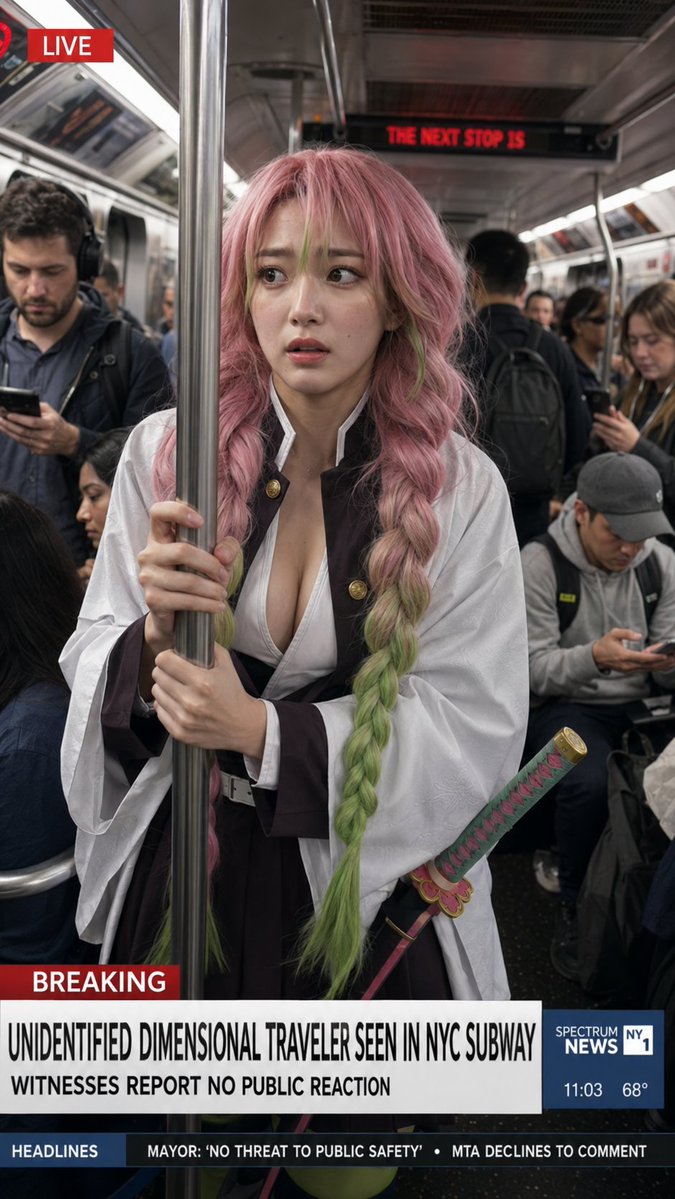
Dimensional Traveler in NYC Subway News Shot
Generates a photorealistic live-news subway scene featuring a Demon Slayer-inspired girl crossing into the real world.
This is a GPT Image 2 prompt case for Anime & Game. Use the copy-ready prompt below to generate similar visuals, and review Awesome GPT Image 2 Prompts attribution plus commercial-use rights before reuse.
Free 1K preview
Generate one preview image instantly, no sign-up required.
Prompt
Copy-ready prompt
Create a vertical photorealistic live TV news screenshot set inside a crowded New York City subway car, as if captured by a news camera. Center frame: {argument name="character name" default="Mitsuri Kanroji"}, a young anime-inspired woman rendered as a realistic human, standing in the aisle and gripping a shiny stainless-steel subway pole with both hands. She has very long thick twin braids, {argument name="hair color" default="pastel pink hair fading into lime green at the ends"}, soft anxious eyes, and a slightly worried expression as she looks off to the side. She wears a Demon Slayer-style uniform with a white haori over a dark brown/black outfit, open white chest wrap, wide sleeves, belt, and a decorative katana at her hip with a pink-and-green wrapped handle and ornate guard. Surround her with ordinary commuters who appear completely indifferent: exactly 6 clearly visible passengers include one man on the left looking at his phone with headphones, one seated woman partly visible lower left, one standing man in the background with a backpack facing away, one woman on the right looking down at her phone, one seated man in a gray cap looking at his phone, and one partially visible passenger behind the main subject. The subway interior should have metal poles, fluorescent strip lights, ad panels, dark speckled floor, and a red LED sign in the rear reading “THE NEXT STOP IS”. Add realistic broadcast graphics: top-left red label with a small red circular live icon and the word “LIVE”; lower-third red tag “BREAKING”; main headline in bold condensed black uppercase on white: {argument name="headline text" default="UNIDENTIFIED DIMENSIONAL TRAVELER SEEN IN NYC SUBWAY"}; subheadline beneath it: {argument name="subheadline text" default="WITNESSES REPORT NO PUBLIC REACTION"}; right blue news box reading “SPECTRUM NEWS NY1” with “11:03” and “68°”; bottom ticker bar with exactly 2 headline items: “MAYOR: ‘NO THREAT TO PUBLIC SAFETY’” and “MTA DECLINES TO COMMENT”. Use gritty documentary realism, natural subway lighting, shallow depth of field, subtle motion blur in background commuters, accurate skin texture and fabric detail, a believable viral news still composition, no watermark, no extra text.Prompt variables
Editable argument placeholders found in the prompt, with their default values.
Best for
- - Anime & Game visual exploration
- - Image generation and reference-image edits
- - Reusable briefs that keep source attribution visible
Change these parts
- - Subject, product, character, or scene
- - Aspect ratio, camera, lighting, and background
- - Brand, text, color, and output constraints
Recommended model and settings
- - Model: gpt-image-2
- - Input mode: Text to Image
- - Aspect ratio: source
- - Commercial status: review original source
How to use this prompt
- 1. Copy the prompt and preserve its structure for the first test.
- 2. Replace the subject, context, and publishing channel.
- 3. Change one camera, lighting, or style variable per iteration.
- 4. Inspect the output, source, text, and rights before reuse.
Limitations, source, and reuse cautions
- - Generated output is an editable draft, not factual, legal, or rights evidence.
- - Review the linked source, people, brands, logos, text, and third-party media before commercial use.
More cases in this category
Prioritized by category, input mode compatibility, quality, and lower risk.

Reuse and source notes
Use this prompt safely after previewing the case.
- 1.Copy the prompt or open it directly in Dovoo with the generation button.
- 2.Adjust variables, aspect ratio, and reference images for your own use case.
- 3.Before publishing or paid usage, verify source rights, attribution requirements, and brand or likeness risks.
Can I use this prompt commercially?
Commercial-use status is allowed. Review the original source, license, brand constraints, and legal requirements before paid usage.
Where does this case come from?
This case is imported from Awesome GPT Image 2 Prompts; keep attribution visible and check the source URL before reuse.